One-Person-One-Code Personnel Management System Selection Guide: How Enterprises Choose the Right Solution
Original: https://cli.im/article/detail/2327
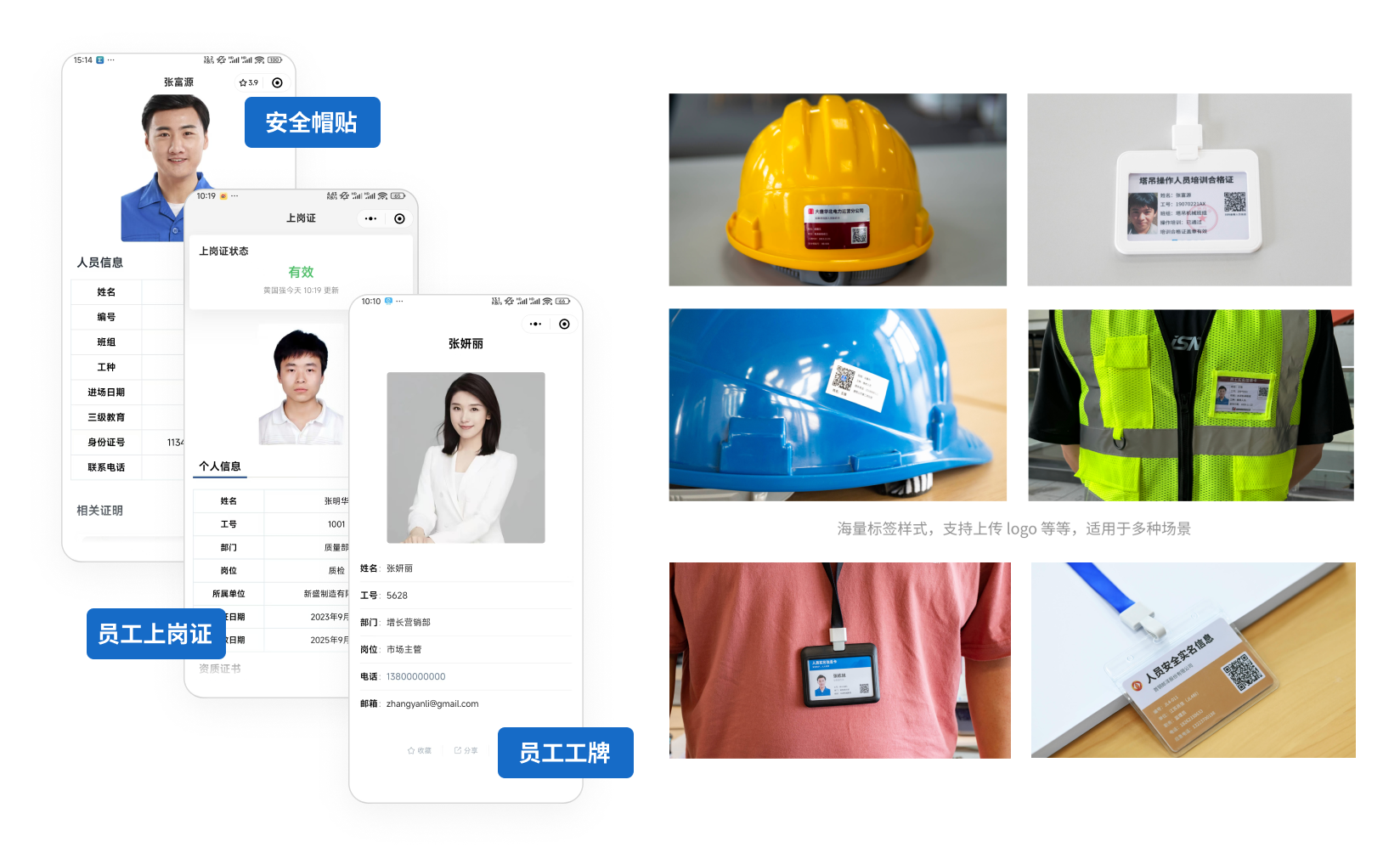
As enterprises accelerate their digital transformation, personnel management systems are no longer optional tools but essential software for enhancing human resource efficiency and optimizing management processes. Driven by the "one-person-one-code" digital management approach—assigning a unique QR code to each employee—enterprises can easily achieve rapid information entry, real-time updates, and efficient management. This not only simplifies daily tasks like employee information management and attendance tracking but also extends to complex scenarios such as recruitment, training, and performance evaluations, truly empowering enterprise management with digital capabilities.
However, with a plethora of products on the market, how can enterprises select the right personnel management system for one-person-one-code management? What key points should be considered during selection? Which mainstream products are more user-friendly? This article will gradually address these questions, offering a practical selection guide to help you avoid pitfalls when choosing a one-person-one-code personnel management system.
1. Why Do You Need a "One-Person-One-Code" Personnel Management System?
Imagine if your enterprise still relies on paper files to record employee information or Excel spreadsheets to track attendance. As the number of employees grows and business complexity increases, wouldn't these methods become increasingly cumbersome? Data errors, untimely updates, and inefficient management are common issues in traditional personnel management. A personnel management system digitizes these basic tasks, making them effortless and efficient. More importantly, it can support more complex tasks like recruitment processes, employee training, and performance management, transforming human resource management from a manual chore into an intelligent operation.
By generating a unique QR code for each employee, managers can simply scan with a mobile phone to verify identities, view information, and even update data. This approach is not only easy to operate but also ensures data accuracy and real-time updates. Whether for a small startup or a large enterprise with employees spread across locations, a suitable personnel management system can save you both money and effort.
2. Key Considerations When Selecting a System
Choosing a system isn't about picking the cheapest or the one with the most features; it requires tailoring to the enterprise's actual situation. The following key factors are worth careful consideration for every manager:
2.1. Enterprise Scale and Suitability
Enterprises of different sizes have significantly different system requirements. Small and micro-enterprises (under 50 employees) typically focus on cost and ease of use, preferring lightweight solutions with comprehensive basic functions. Medium-sized enterprises (50-500 employees) need to balance functionality and scalability. Large enterprises (over 500 employees) often prioritize system stability, security, and deep customization capabilities. For example, a 20-person startup team might only need basic employee information management and attendance functions, while a multinational corporation may require a complex system supporting multiple languages and regions.
2.2. Functionality Match
Identifying the enterprise's core pain points is the first step in selecting a system. Basic needs like employee record management and attendance tracking may suit most enterprises, while advanced functions such as recruitment management, performance evaluations, and payroll calculations are better for enterprises with complex management needs. Additionally, certain industries have specific requirements, such as real-name personnel management in construction or personnel assessment in the service industry.
2.3. Technical Deployment Method
The deployment mode of a personnel management system directly impacts the user experience and cost:
- SaaS Cloud Service: The preferred choice for enterprises with limited budgets and weak IT teams. Features include rapid deployment, pay-as-you-go pricing, automatic updates, and mobile management from anywhere, e.g., CaoLiao QR Code.
- On-Premises Deployment: Suitable for enterprises sensitive about data or requiring deep customization. Higher initial investment but offers stronger control and flexibility in the long run, e.g., Kingdee KIS.
2.4. Budget and Long-Term Return
Don't just focus on the upfront price; the system's "Total Cost of Ownership" (TCO) is crucial. Consider software fees, hardware investments, implementation services, and ongoing maintenance. Choosing a system that delivers value over the next several years is truly cost-effective.
3. Comparative Analysis of Mainstream Products
The market offers a variety of one-person-one-code personnel management systems. Here, we compare several representative ones, highlighting their pros, cons, and suitable scenarios:
3.1. DingTalk Smart Personnel
- Features: Provides basic functions like employee information management, attendance clock-in, and payroll calculation, supports QR code identity verification, and offers an excellent mobile experience.
- Price: Advanced version subscription based on the number of users, annual fee approximately 10,000-20,000 RMB (for 50 users).
- Pros: Low cost, quick to learn, suitable for rapid deployment in small and micro-enterprises.
- Cons: Limited advanced features, weak customization capabilities.
- Suitable Scenarios: Enterprises already using DingTalk.
3.2. CaoLiao QR Code Personnel Management System
- Features: Implements "one-person-one-code" digital management by generating a unique QR code for each individual. Easy to set up, supports bulk QR codes generation, and allows viewing records and updating data via scanning.
- Price: Free to use with no limit on the number of personnel. The free version suffices for simple use; the advanced version, costing about 1,280 RMB annually, is for higher collaboration needs.
- Pros: Practical features that can be flexibly combined as needed. Supports bulk generation—import an employee Excel sheet to generate personnel QR codes in bulk. No need to install other apps, suitable for rapid deployment in small and medium-sized enterprises.
- Suitable Scenarios: Suitable for real-name management of labor personnel, team personnel management, work ID production, and employee profile display.
3.3. Kingdee KIS HR (On-Premises Deployment)
- Features: Comprehensive coverage of employee records, attendance, and payroll management, supports deep customization and QR code identity management.
- Price: Initial investment about 100,000-200,000 RMB, annual maintenance fee about 20,000-30,000 RMB.
- Pros: Data security and control, lower long-term cost.
- Cons: Long implementation cycle, requires IT team support.
- Suitable Scenarios: Large manufacturing enterprises with high data security requirements.
3.4. Odoo HR (Open-Source Solution)
- Features: Free and open-source, comprehensive basic personnel management functions, can use QR codes for information management, but requires self-development or purchasing services.
- Price: Software is free, deployment and customization costs about 50,000-100,000 RMB.
- Pros: High degree of customization freedom.
- Cons: Although the software is free, deployment costs are high, technical barriers are significant, and requires a professional team for maintenance.
- Suitable Scenarios: Medium-sized enterprises with technical capabilities.
4. Advantages of QR Codes in Personnel Management
When it comes to QR code tools, CaoLiao QR Code is the choice for 90% of enterprises. It has several highlights in one-person-one-code personnel management, especially suitable for teams with limited budgets seeking quick implementation:
4.1. Low Cost
CaoLiao QR Code's basic functions are completely free, such as generating, editing, and downloading QR codes, with no limit on the number of personnel QR codes generated. The free version is fully sufficient for simple applications. For small and medium-sized enterprises, generating exclusive QR codes for employees on the platform can set up a simple digital management system with an extremely low entry barrier.
4.2. Simple Operation, Easy for Anyone to Use
As a no-code platform, CaoLiao QR Code has a clean, intuitive interface and simple operational procedures. Managers can generate thousands of personnel QR codes in just 3 minutes by importing an employee Excel sheet. Using WeChat to scan, view, and manage requires no complex training, enabling quick adoption. For example, administrators can scan with WeChat to view employee records and fill in assessment details.
4.3. Rapid Deployment
It offers label layout and printing functions. After simple layout of the generated QR codes, they can be printed using an office printer. The printed QR codes are ready to use immediately without further involvement from the IT department.
4.4. High Flexibility
CaoLiao QR Code supports customizable content and styles, allowing enterprises to design the information within the QR codes according to their needs. For instance, assessment records can be added to personnel information management, recording assessment time, content, and results. It can be adjusted anytime business changes occur, enabling dynamic management effortlessly.
5. Practical Recommendations
Choosing the right one-person-one-code personnel management system can significantly enhance an enterprise's management efficiency and data accuracy. During selection, be sure to comprehensively consider functionality match, cost-effectiveness, ease of use, data security, integration capabilities, and supplier strength. Compare various products and combine them with your own situation to find the most suitable one.
For small and micro-enterprises with limited budgets, CaoLiao QR Code is a good starting point. Medium-sized enterprises already within the DingTalk ecosystem can use a combination of DingTalk and CaoLiao QR Code. Large enterprises can opt for Kingdee KIS HR or Odoo HR, supplemented by CaoLiao QR Code for added value.
Finally, here is a practical step-by-step guide for selection:
- Identify Needs: List current pain points and goals for the next few years, and prioritize functions.
- Trial Experience: Select 2-3 products for trial and gather real feedback from the team.
- Calculate Costs: Calculate the total cost over 5 years, including initial investment and ongoing maintenance.
- Evaluate Suppliers: Assess their service capabilities, customer cases, and reputation.
- Implement in Phases: For complex systems, start with core functions and gradually expand.