Company Business Introduction
Consolidate company profile, business scope, customer cases, corporate qualifications, and other content to build a homepage, facilitating systematic understanding of the company's business for scanners.
Basic Information
- Monthly Installs: 7891
- Monthly Visits: 17522
- Original: https://cli.im/template/detail/121463227
Case Label Image

Instructions
Application Scenarios
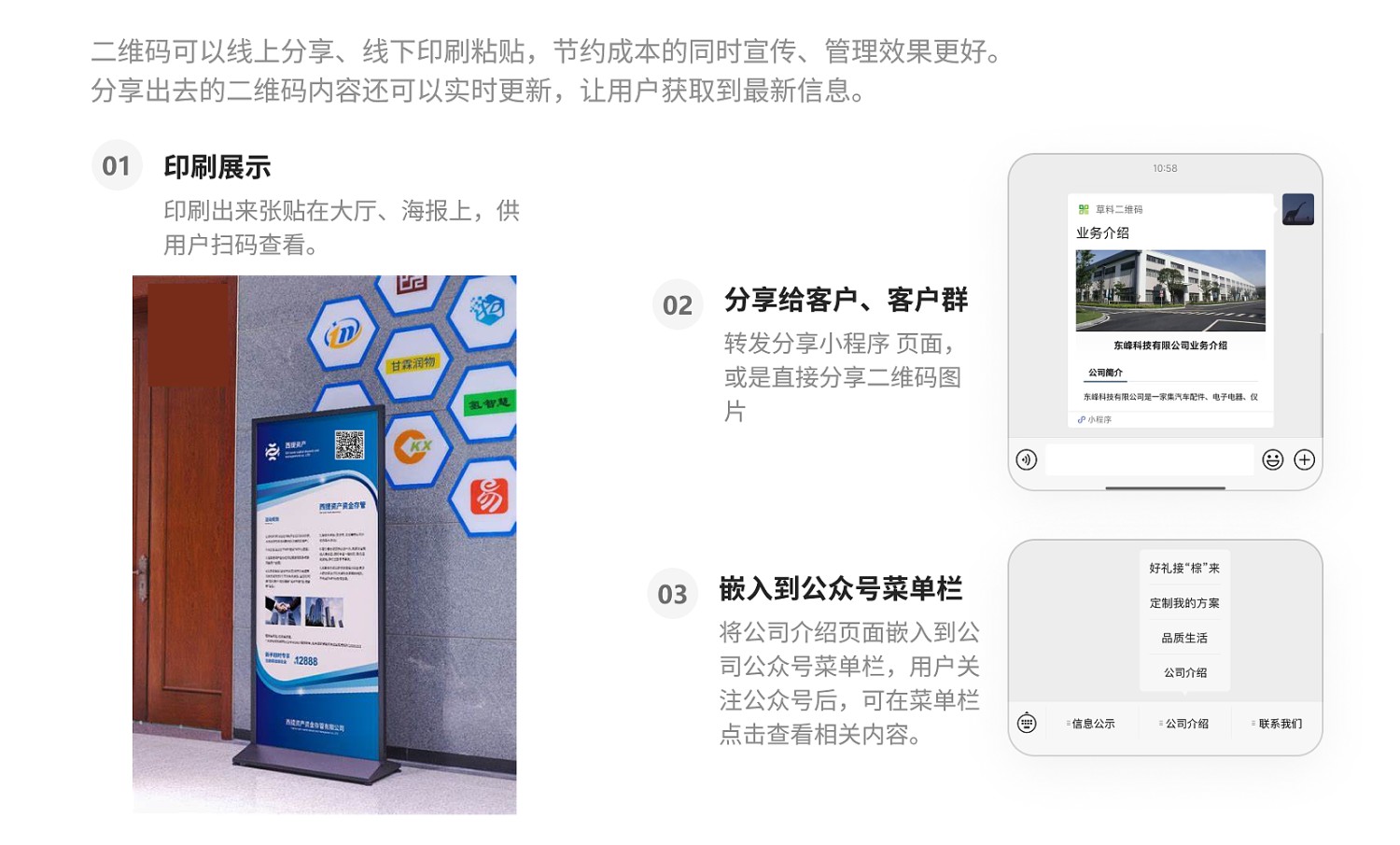
1. Print Promotion: The QR code can be attached to the company's offline promotional materials, such as stand-up posters, corporate culture brochures, and business cards, to showcase the company's modern image at exhibitions, company reception areas, and other occasions.
2. Forwarding and Sharing: Company employees can directly forward the company introduction page via WeChat to clients or client groups, allowing clients to open and browse directly within WeChat.
3. WeChat Public Platform Section: If the company has a WeChat Public Platform account, the company introduction page can also be embedded into a Public Platform section to enrich the promotional content of the Public Platform.
Core Features
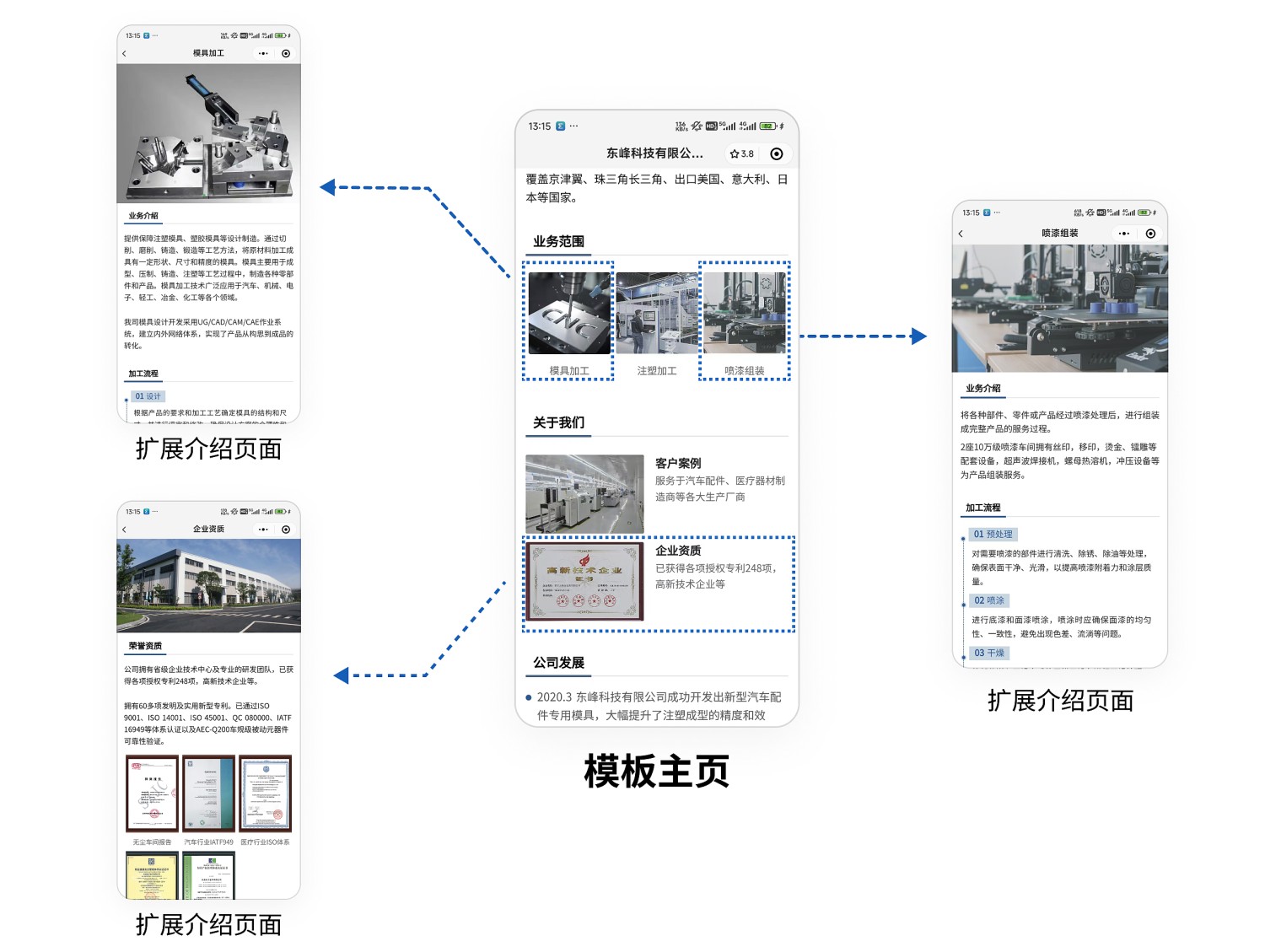
1. Extended Introduction: This template uses the Link Jump feature to link detailed introduction pages for the company's business scope, customer cases, and corporate qualifications to the main template page. The main page serves as the company's homepage. Clients can click on images to view extended introductions and detailed information. After reading, they can return to the main page to continue viewing other content.
2. Updates Anytime: In case of changes such as expansion of main business operations or personnel changes, the content of the introduction page can be modified or replaced at any time, while the QR code pattern remains unchanged. This ensures clients always access the latest information, which is particularly important for rapidly growing enterprises.
3. Easy Creation: No professional technical staff required. Simply modify it like using a PPT template to create a visually appealing QR code page.
Setup Process
- Step 1: Create extended introduction pages for company business scope, customer cases, and corporate qualifications:
The template already links to content from the materials library for extended introductions, which can be modified and used directly. Click 【Modify Content】 to enter the materials library editing page.
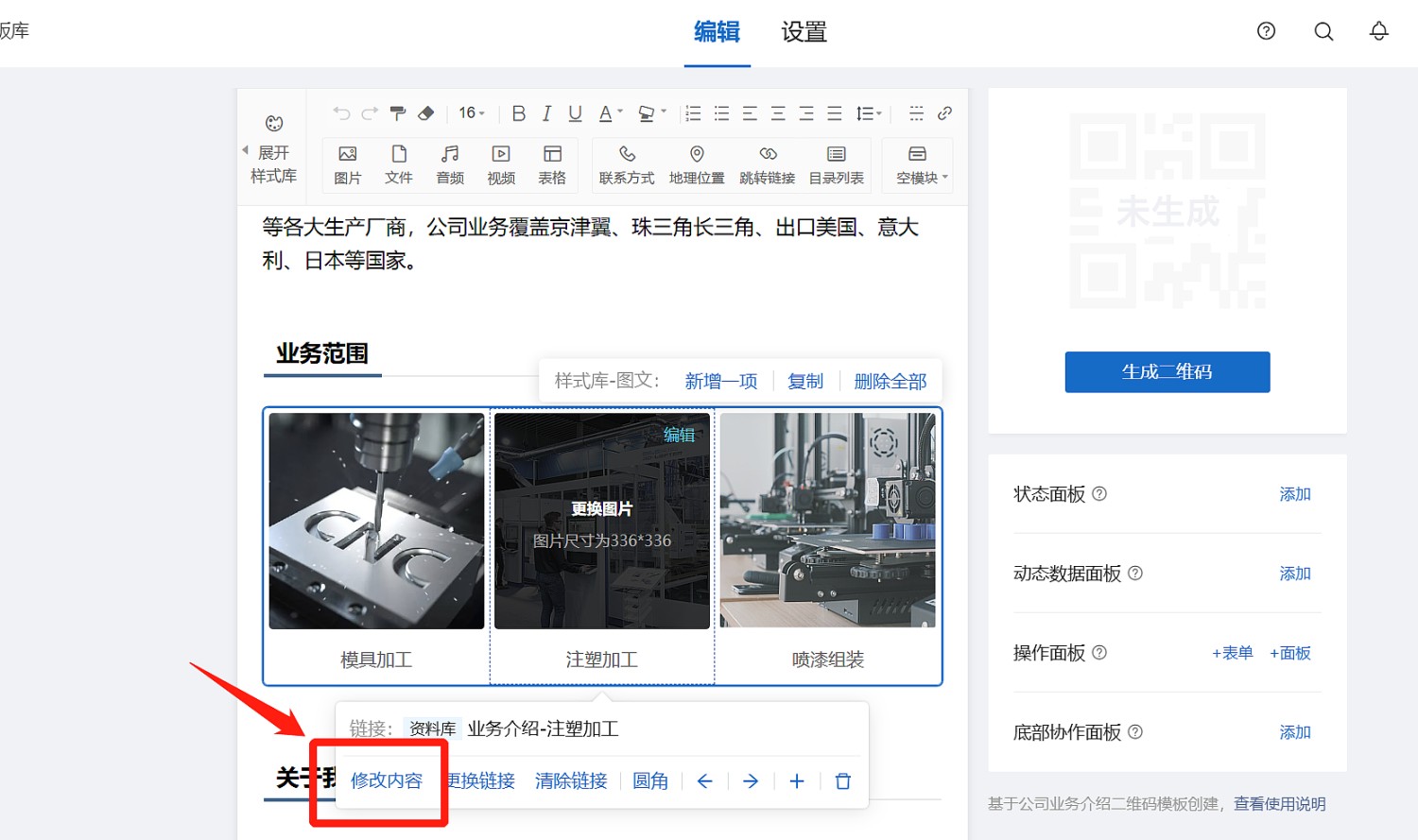
Modify the content of the materials library pages according to the company's actual situation. After completion, click 【Save】 to generate the QR code page for the extended introduction. Then click 【Confirm and Exit Editing】 to return to the main template page.
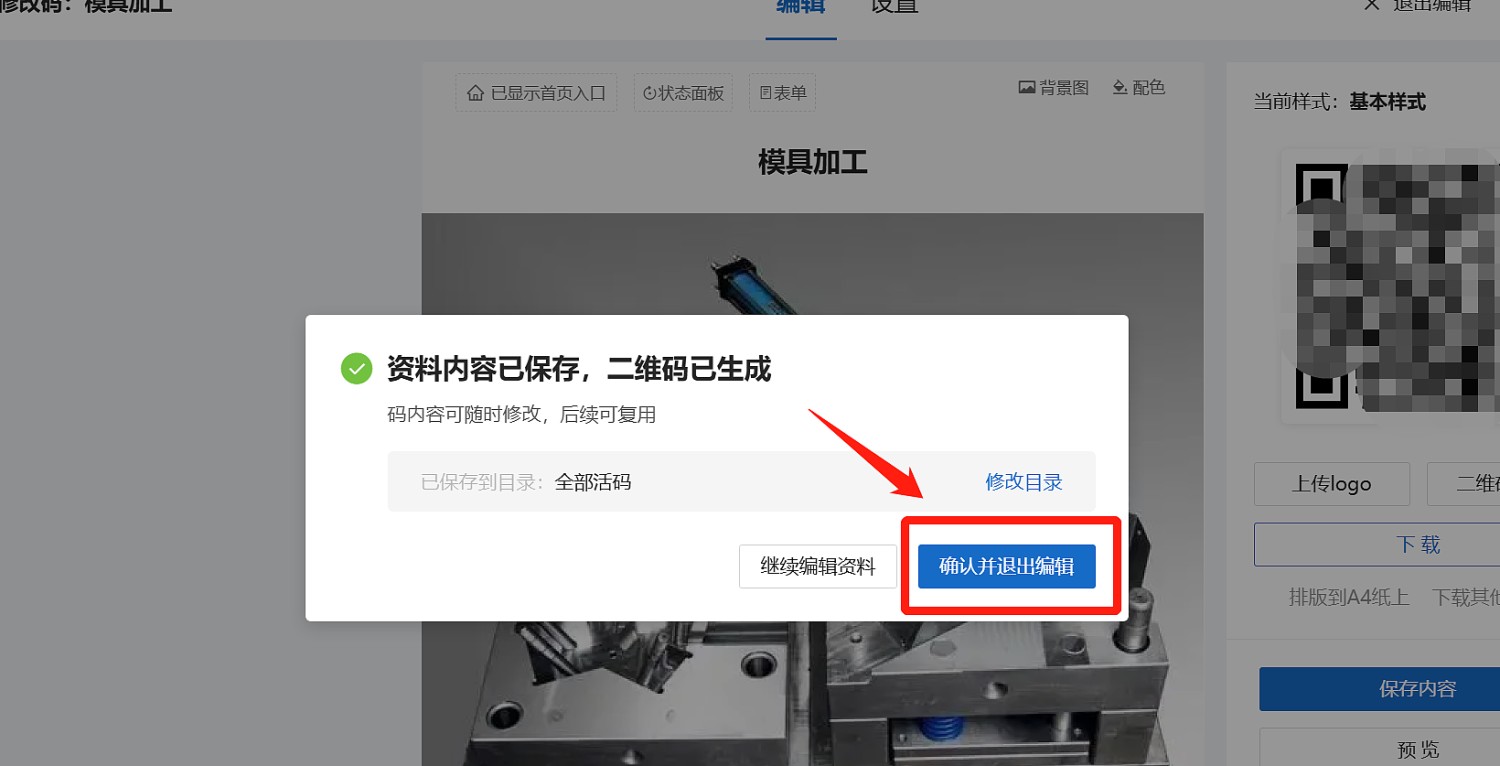
Use the same method to create other extended introduction pages as needed.
*If extended introductions are not needed, you can simply clear the links.
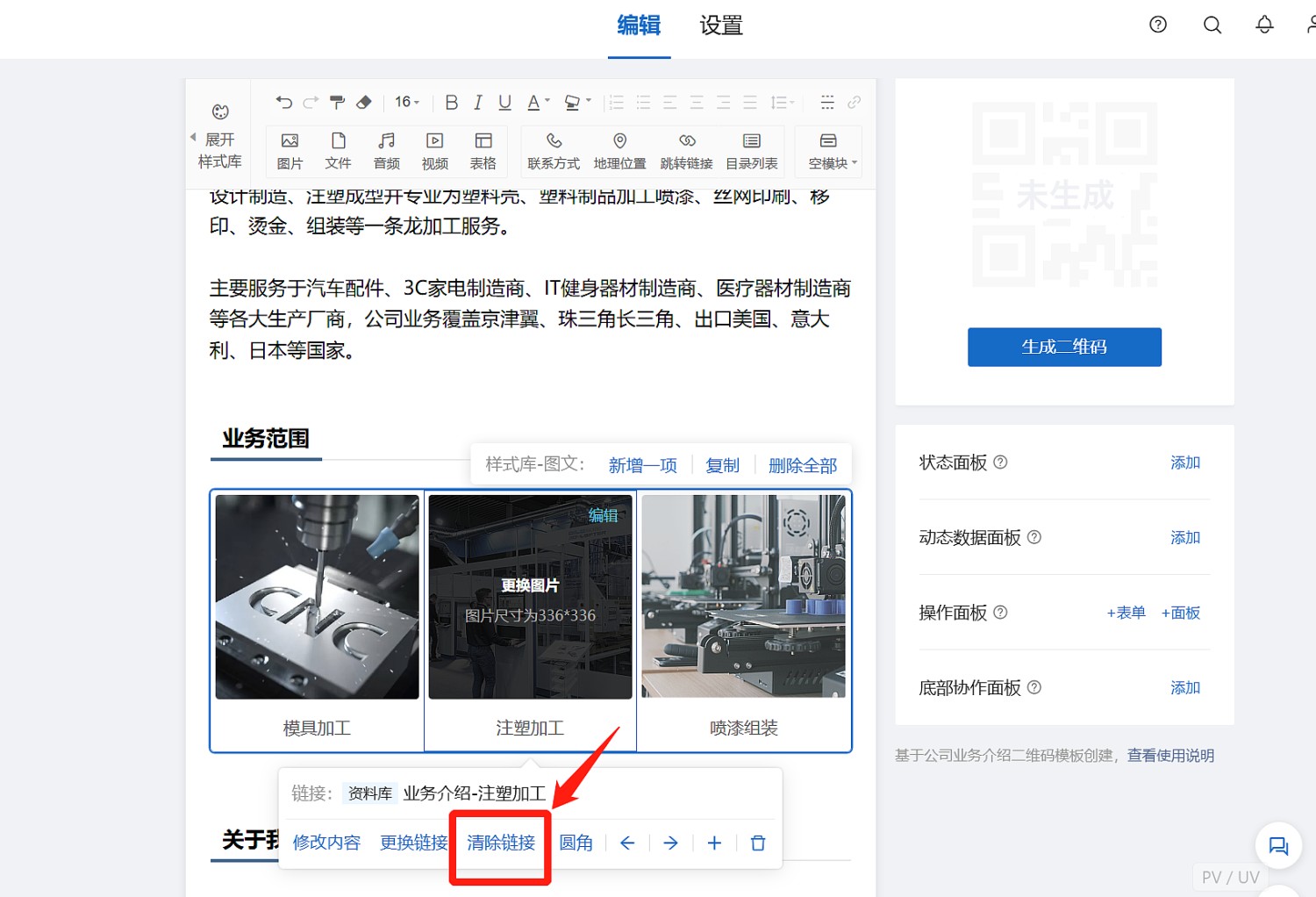
- Step 2: Modify and create the main company introduction page.
Modify the introduction content, contact information, etc., in the template to reflect your company's own information. You are not required to strictly follow the sections provided by the template; you can modify it to display any information you wish to showcase, such as core company advantages, staff composition, etc.
After modifications are complete, click 【Generate QR Code】.
Usage Suggestions
If it needs to be printed on promotional materials like posters, you can download the QR code label and provide it to the poster manufacturer.
If sending via WeChat, you can scan the completed QR code to open it, click the "..." in the upper right corner, and select to forward it to clients or client groups.

- If it needs to be embedded into a WeChat Public Platform section, refer to the tutorial: Embed into WeChat Public Platform - CaoLiao QR Code
Advanced Applications
This template can be used for free long-term.
If you purchase the CaoLiao QR Code Basic Edition, you can further remove the CaoLiao logo from the page and also add corporate promotional videos to the introduction page without playback restrictions.
Frequently Asked Questions
1. How long can the generated QR code be used?
A: QR codes generated by CaoLiao are valid long-term, with unlimited scans and users. You can use them with confidence.
2. How to edit the QR code label style?
A: After generating the QR code, you can edit and create label styles in the design library to meet actual display needs.
3. If no suitable style is found in the design library, can it be customized?
A: Custom modification of label styles is not currently supported. The CaoLiao design library offers 100+ styles to choose from. If no suitable style is found, you can export the data and use third-party software for your own layout design.
Related Templates
Employee Onboarding Guide: New employees scan the code to quickly understand the onboarding process and fill out the onboarding registration form. HR can export registration form data and onboarding materials from the backend to improve onboarding efficiency.
Recruitment Information Posting and Registration: Print on corporate recruitment and hiring promotional materials. Interested individuals scan the code to quickly register their information. After offline promotion ends, HR can centrally filter resumes from the backend and schedule interviews, improving mass recruitment efficiency.
Meeting Check-in: Attendees check in by scanning the WeChat QR code. The backend can view and export the check-in list in real-time. Meeting schedules and document materials can also be uploaded to the QR code, making it convenient for attendees to access meeting information.