AI Insights: How to Create an Intelligent Process Guide
Original: https://cli.im/article/detail/2404
From content design and information organization to tool selection, we need to consider far more than just "writing a document."
"How do I complete the onboarding process?" "How do I apply for a temporary business trip?" "How far in advance should I report a factory visit?"
Almost every organization, campus, institution, or internal team needs to communicate similar process information to employees, visitors, clients, or partners.
Ultimately, the goal of such content is to solve one problem:
Enable individuals who need to complete a process to quickly access correct information, understand requirements, and execute correctly when needed.
The problem is, this goal is often not met. Instruction documents go unread, access points are scattered and hard to find, steps are misunderstood, and updated information is not synchronized... These issues stem not just from "whether it's written clearly," but from a combination of factors including information structure, distribution channels, tool selection, and interaction mechanisms.
Especially in today's digital context, where mobile phones are the primary access point and user attention spans are shrinking, process guides that remain as traditional static documents or group files are unlikely to yield satisfactory results.
This article will address common challenges in practical work, exploring three aspects—content design, information organization, and tool selection—to explain how to design a more efficient, usable, and maintainable "intelligent process guide." It will also evaluate several mainstream tools to help you find the solution best suited to your scenario.
1. Why Process Guides Often "Might as Well Not Be Written"
Our research shows that while most organizations have "instruction documents," they lack effective instructional mechanisms. Common issues include:
Scattered Access Points: Process-related information is dispersed across cloud drives, group files, OA systems, bulletin boards, and emails, leaving users unsure where to look;
Inconsistent Versions: Different people maintain different versions, outdated versions still circulate, while the actual content has long been updated;
Unclear Language: Lack of clear structure and formatting, relying on users to decipher the process logic themselves;
Reliance on Manual Q&A: Instructions are "written there," but executors repeatedly ask questions like "Does my situation count as an exception?" or "Do I need to bring the original document for this material?";
Inability to Respond Dynamically: Once a process changes, it requires redistribution or individual notifications, incurring high management costs.
In summary, traditional process guides often suffer from three types of shortcomings:
- Unreasonable structural design
- Unclear information distribution paths
- Lack of interaction and feedback mechanisms
2. What Makes a Guide "Intelligent"?
Intelligence is not about complexity or flashy techniques, but about solving users' real problems and reducing repeated explanations and errors. A qualified intelligent process guide should have the following characteristics:
Clear Structure: Well-segmented, highlighted key points, and easy to scan;
Unified Access Point: Users know where to check, and what they find is the latest version;
Interactive Support: Users can ask questions about unclear points and receive answers;
Easy Maintenance: Content can be flexibly updated without repeatedly sending group messages or modifying multiple documents;
Trackable Data: Visibility into which content has been viewed and which questions are frequently asked;
Ultimately, it's about making information findable, understandable, usable, and error-resistant.
3. Three Key Steps to Designing a Process Guide
1. Map the Process First, Don't Rush to Write the Document
Creating a process guide isn't just about "good writing." Mapping out the entire process is the most critical first step. Flowcharts or step tables can help clarify:
Who is responsible?
When should it be done?
Where should it be done?
What materials are needed?
What exceptions might be encountered?
We recommend using flowchart tools (e.g., ProcessOn, Feishu Whiteboard) or structured tables to organize information. With clear content logic, any subsequent presentation method will be more effective.
2. Structure the Content, Avoid Long-Winded Explanations
For example, consider this text:
"Employees must apply in advance for business trips, fill out a business trip application form, obtain department head approval, and submit it to finance. Only after approval can transportation and accommodation be booked."
Rewriting it in a structured way improves understanding:
Applicable To: Current employees
Application Deadline: 3 working days before departure
Application Process:
- Fill out the business trip application form (template available via link)
- Obtain department head approval
- Submit to finance for review
- Book transportation and accommodation after approval
Notes: For high-speed rail/flights/accommodation outside the local area, a budget explanation must be attached
Structured expression not only facilitates reading but also lays the foundation for integrating digital tools.
3. Tool Selection Determines Effectiveness
Whether the written content reaches the "right person at the right time" depends on the distribution tool. Below is a comparison of common methods:
4. Comparison of Common Process Guide Tools
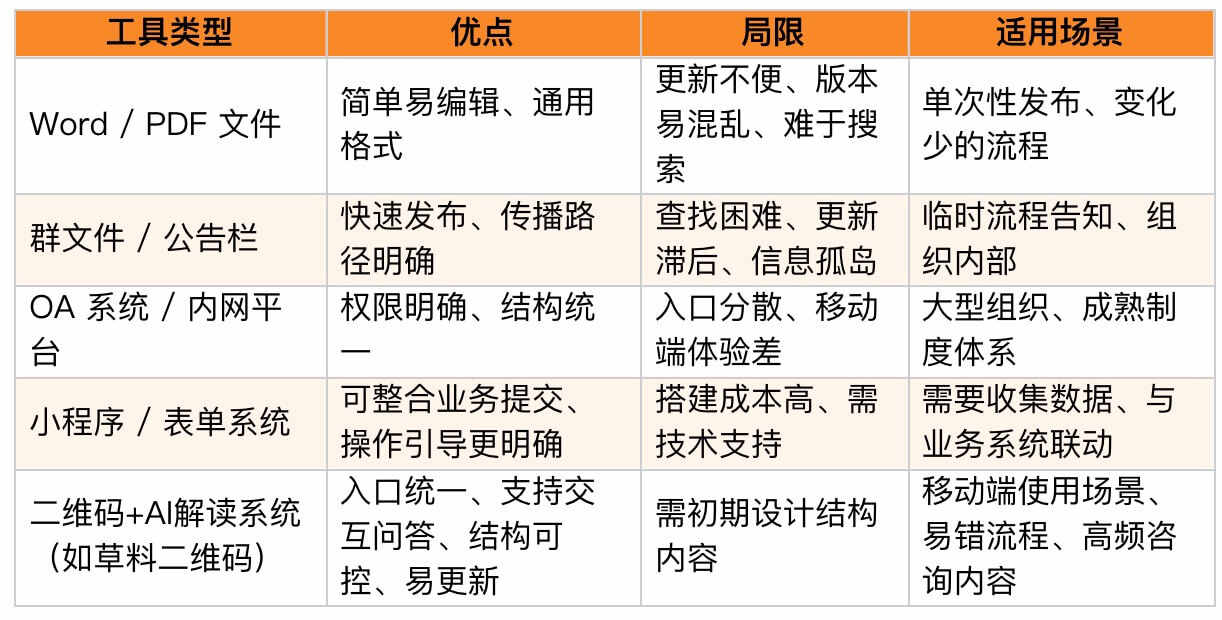
5. AI Insights: Structured Guides + Conversational Interaction
CaoLiao QR Code's "AI Insights" component offers a low-threshold, lightweight combination of structured information distribution and intelligent Q&A access.
Its basic mechanism is:
- You write the process content as a clearly structured graphic page, which can include various forms of content such as documents, audio, video, and images;
- After users scan the code and enter the page, they can directly ask questions if anything is unclear;
- The configured AI assistant automatically responds based on the content.
The benefits of this design are:
Access content immediately by scanning, no app download required;
Set different interpretation roles based on identity or scenario (e.g., visitor guidance, reimbursement process assistant, etc.);
Synchronized content updates, avoiding multiple people maintaining multiple document versions;
View access data and question records in the backend to continuously optimize content structure.
CaoLiao is suitable for scenarios with simple processes but frequent inquiries, typically including:
- Visitor appointments / vehicle entry rules
- Internal business trip, procurement, and reimbursement process instructions
- Project application and activity participation rules
- Onboarding document submission and supplementary processes
Its limitations: It does not directly handle business process operations and is only suitable for information dissemination and guidance; complex business scenarios still require integration with other systems. 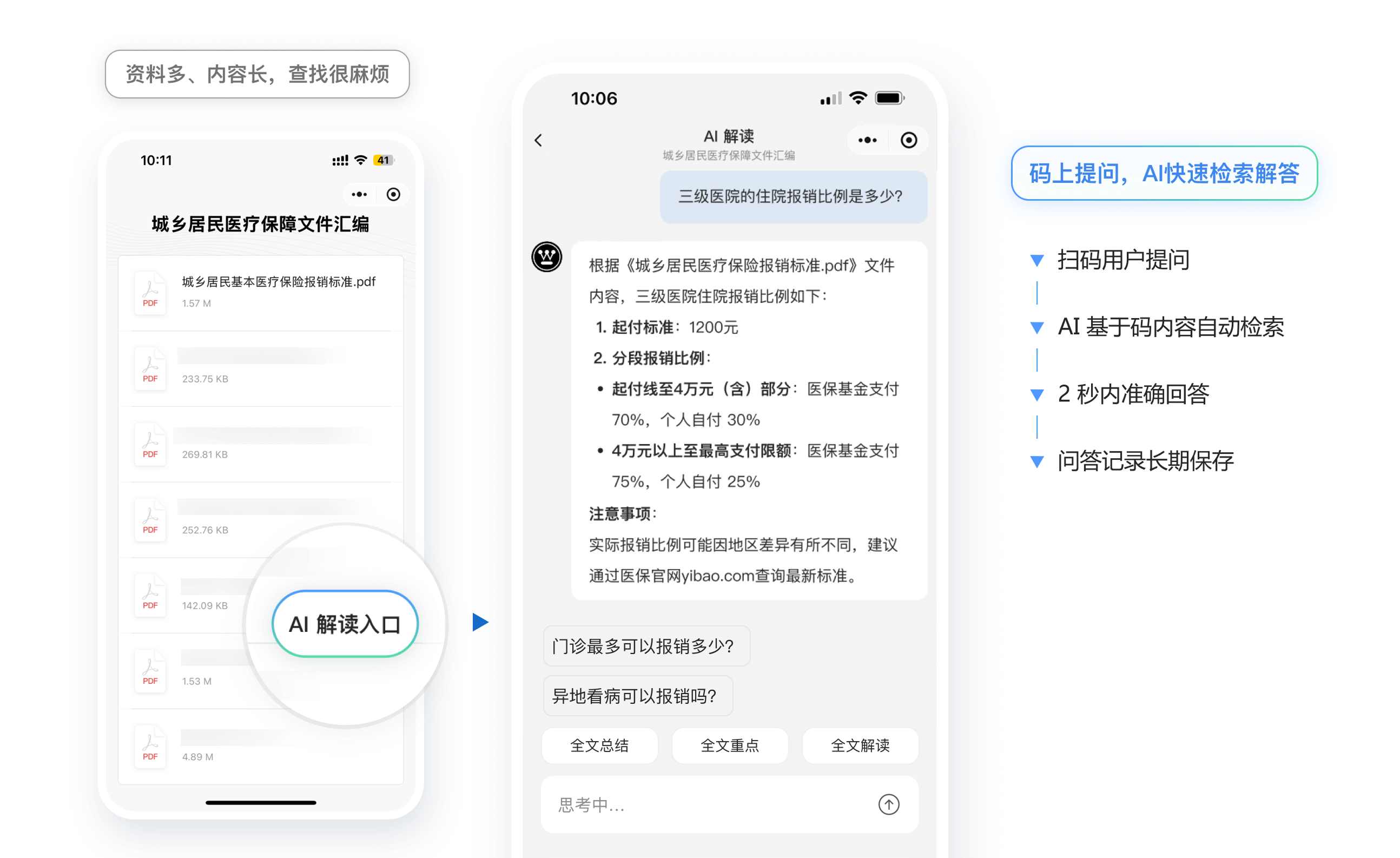
6. Beyond Tool Selection: Additional Key Considerations
Tools can only solve the problem of information access. To make a process guide truly effective, the following strategies are also essential:
- Unified Distribution Channel: Regardless of the tool used, ensure all versions and paths ultimately point to one page/entry point;
- Content Ownership: Clearly define who is responsible for updates and who reviews content effectiveness;
- Closed-Loop Q&A Mechanism: Combine AI Q&A, FAQs, and contact persons for inquiries to reduce the need for "asking after reading";
- Version Update Mechanism: When processes change, are relevant personnel notified? Do old access points automatically redirect? Is the update time marked?
Process guides are not about "document management" but about "information service design." Only when information design aligns with execution paths can users truly "avoid detours."
Behind every process lies a series of "repeatedly asked questions." This isn't because users don't read carefully, but because the instructional mechanism is unclear, the path is not smooth, and the information is not structured.
Designing an intelligent process guide isn't about pursuing technological sophistication but about maximizing the efficiency of process information delivery. Clarity, findability, understandability, and interactivity are the four key metrics of a good guide.
CaoLiao QR Code is just one tool among many; you can also choose other platforms, Mini Programs, or internal systems to achieve your goals. The key isn't the tool itself, but whether you approach it from the perspective of "how users understand the process," turning a seemingly simple task into something truly actionable.
The true value of an intelligent guide lies in smooth process execution and the elimination of repeated explanations.