Shipping and Loading Records
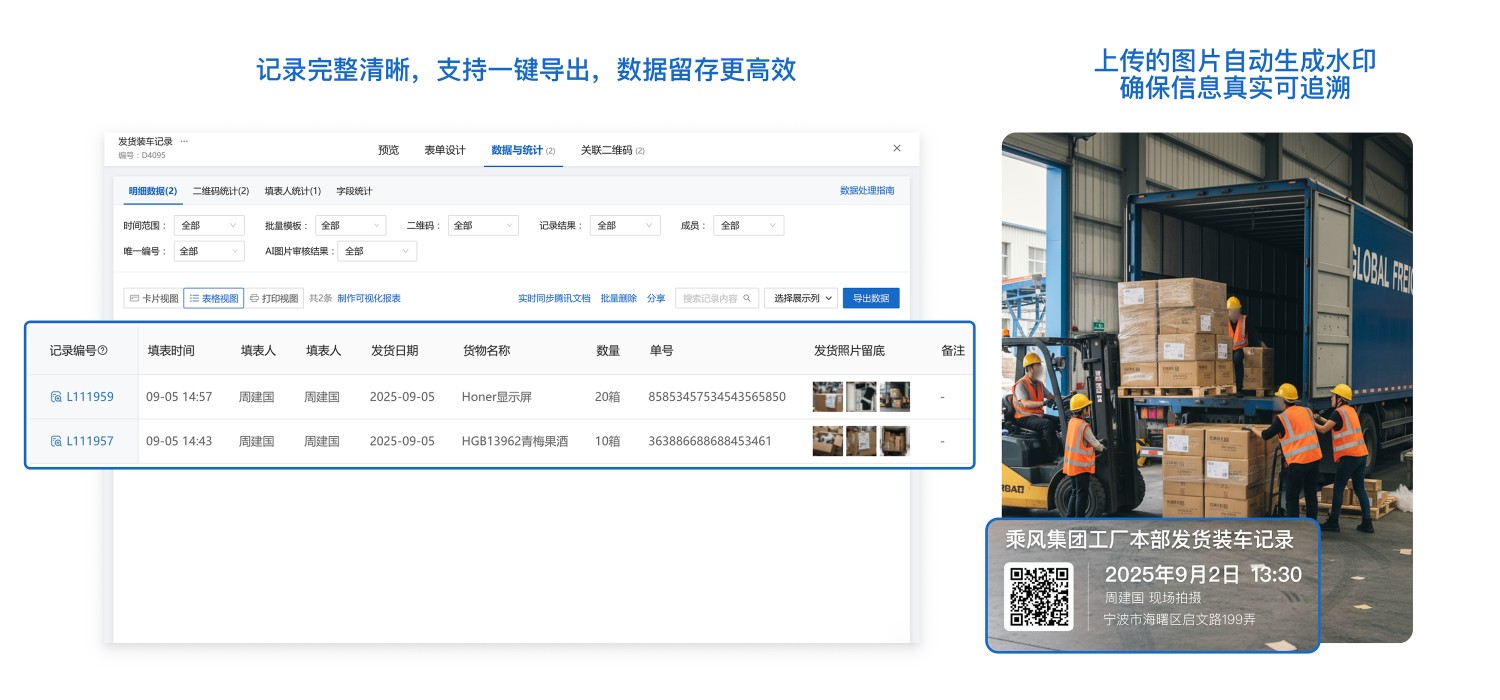
By scanning QR codes to fill out loading records and upload on-site photos, all shipping information is completely preserved. In case of issues such as missing goods, quantity discrepancies, or customer complaints, the loading situation and photo evidence from that day can be quickly traced back to clarify responsibilities and reduce disputes. Additionally, the system supports querying and exporting reports, facilitating subsequent reconciliation, statistics, and management.
Basic Information
- Monthly Installations: 69
- Monthly Visits: 43
- Original Text: https://cli.im/template/detail/121463688
Case Label Image

Usage Instructions
1. Core Value
Daily Work Documentation
By scanning QR codes to fill out loading records and upload on-site photos, all shipping information is completely preserved.
Clear Responsibility and Traceability
Loading information and on-site photos are documented simultaneously. In case of cargo abnormalities or customer complaints, the responsible link can be quickly identified, reducing disputes.
2. Usage Process
1. Generate Shipping and Loading Record QR Code
Click [Use Now] to create a QR code and modify the form content according to your actual needs.
2. Post the QR Code in the Workplace
Download the QR code label, choose an appropriate printing method, and post it in the workplace.
3. Employees Scan the Code to Fill Out Loading Records
Loading personnel scan the QR code via WeChat on their mobile phones during work, fill in details such as cargo name, quantity, shipping order number, and upload on-site photos as evidence.
4. Administrators View and Export Data
Managers can view loading data in real-time through the backend and export it to Excel with one click for easy reconciliation, statistics, and archiving. Data Summary and Statistics Feature
5. Trusted Data Notarization (Optional)
Form records can be integrated with Ant Blockchain Notarization. Submitted data is automatically uploaded to the blockchain, generating a unique notarization hash and timestamp to ensure the authenticity of the records, which can serve as electronic evidence and enhance data reliability. This feature is currently not enabled for this form. If needed, refer to the tutorial
3. Frequently Asked Questions
1. Is it free to use? What are the differences between the paid and free versions?
Answer: The free version has no usage restrictions, data is stored long-term, and the latest 5,000 collected images are stored for free, meeting basic usage needs.
For features such as multi-user collaboration management, data review, viewing more than 5,000 images, and using advanced data export functions, it is recommended to purchase the paid version.
For detailed selection advice, see: Version Selection Recommendations