Summer Study Programs Causing Enrollment Headaches? QR Codes Offer a Solution
Original: https://cli.im/article/detail/2436
Every summer, study programs kick off in full swing. From short day camps to cross-city residential camps, from urban exploration to career experiences, activities with different themes and batches operate intensively within two months. For organizers, information collection is the first step to launch and also the most prone to issues.
On the surface, "enrollment" might seem like just parents filling out a few forms. In reality, it involves multiple follow-up steps like course confirmation, participant information, health declarations, document uploads, and transportation arrangements. This is especially true when managing multiple camps and groups simultaneously. Poorly designed information collection during enrollment can directly lead to inefficiency and frequent errors during execution.
Many organizations still rely on sharing forms in WeChat groups and using Excel for enrollment statistics. While functional, this method is inefficient, error-prone, and difficult to manage uniformly. Without a stable entry point, everyone spends time "searching for information, asking for status updates, and supplementing details." The closer the deadline, the more apparent the chaos becomes.
The solution offered by CaoLiao QR Code is to consolidate the enrollment information process into a single, structured entry point. It doesn't require development or changes to existing workflows. Instead, it uses a lightweight chain of "scan to fill -> backend management -> data export" to help organizers complete information collection more reliably.
Why is Summer Study Program Enrollment Prone to Problems?
Enrollment information is prone to errors primarily due to the large volume of data and a lack of structural design. Many organizers treat information merely as "content for a table" rather than designing it as the "data structure required for subsequent work."
- For instance, asking parents to manually write course names, clothing sizes, or pickup arrangements often leads to "inconsistent entries," "filling in the wrong field," or "missing a field."
- Similarly, uploading documents like ID card photos or health commitment forms without standardized format instructions results in parents submitting screenshots, scans, or photos taken with their phones, making backend organization very difficult.
- A more common issue is dispersed enrollment entry points. Some forms are embedded in articles, some are shared via group chats, and others are collected manually by homeroom teachers. Parents don't know which is the official channel, leading to duplicate submissions, while organizers spend time manually cross-referencing and tallying.
- Without a unified view of form completion progress, organizers might only realize "a few students haven't submitted their documents" a few days before departure, making remediation extremely costly.
How Does CaoLiao QR Code Solve These Problems?
CaoLiao QR Code isn't a specialized study program management system, but it provides a lightweight solution featuring a unified information entry point, clear content structure, and highly flexible processes. It's suitable for summer project scenarios with tight deadlines, multiple batches, and data that isn't overly complex but is voluminous.
On the CaoLiao platform, organizers can set up the enrollment process in the following ways:
Consolidate Multiple Form Entry Points If different departments need to collect different information (e.g., administration collects basic info, group leaders collect health declarations, camp managers collect transportation preferences), you can create separate forms and aggregate them into one QR code using CaoLiao. Parents scan once and fill out sections sequentially, enabling role-based division of labor while maintaining a single external entry point.
Configure Fields Suited for Study Program Needs CaoLiao forms support common field types like ID numbers, dates, dropdowns, single/multiple selection, and image uploads, allowing you to collect various information. For example, you can configure image components for health info or document proofs, and even enable AI recognition to extract key information from IDs.
Display Program Routes and Materials Beyond enrollment, you can add program itineraries, materials, and contact details for the training institution to the QR code content. All content can be modified in real-time via the CaoLiao backend, facilitating synchronized information dissemination.
Real-time Backend Viewing, Filtering, and Exporting All submitted data syncs to the backend in real-time, eliminating manual merging. You can filter data by field for quick lookup. Data can be exported in Excel format for subsequent tasks like grouping, accommodation arrangements, or printing lists.
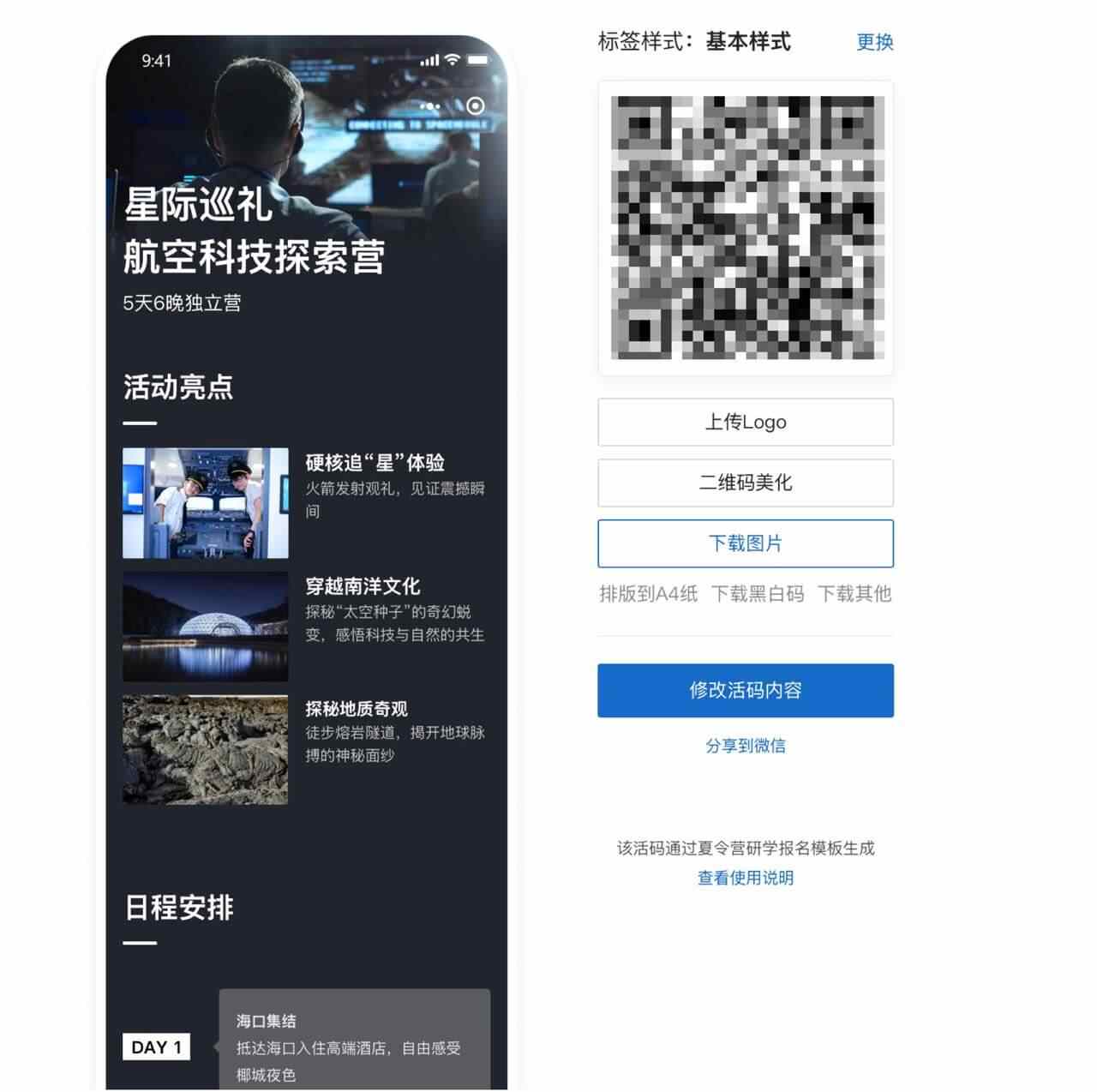
Practical Application: From Enrollment Interest to Project Execution
Take a city-based training institution as an example. It organized summer camps with three themes across five batches, involving over 500 student participants. Previously, they published form links in official account articles and had teaching assistants create group chats to receive materials, leading to scattered information and severe duplicate record-keeping.
This year, using CaoLiao QR Code, the project team divided the enrollment process into three stages:
- Stage 1: Expression of Interest
- Stage 2: Formal Enrollment
- Stage 3: Document Submission
A separate form was configured for each stage, all published through a single directory QR code.
Throughout the process, CaoLiao QR Code served two main purposes:
- First, as an information entry point, reducing barriers for parents and minimizing omissions and errors.
- Second, as a data consolidation tool, enabling team members to process data based on stage, field, or batch.
After the project concluded, when the team compiled form data for the final report, they found it saved nearly half the time compared to last year's manual consolidation method.
Form Design Suggestions: Make Data Directly Serve Execution
When using a QR code tool, the key isn't just "creating a fillable form" but "creating a data structure that's immediately usable." The following points are often overlooked in practice:
- Sequence fields according to the on-site process flow: For example, select batch first, then camp, then fill personal information, and finally submit documents. This creates a clearer logic.
- Provide clear instructions for image upload fields: Specify requirements like file size, clarity, and whether scans are mandatory.
- Avoid open-ended fields for critical items like course names or clothing sizes; use predefined options instead.
- For families unsure about participation, set up separate stages for expression of interest and formal enrollment to prevent information mix-ups.
- Open the form early and state a clear deadline explicitly, allowing sufficient buffer time for document collection and review.
Final Thoughts
The complexity of study programs often lies not in the activities themselves, but in the organization of information beforehand. If every enrollment cycle relies on manual confirmation, repeated communication, and data cleaning, organizers will expend significant time on inefficient tasks.
The approach offered by CaoLiao QR Code isn't about replacing systems or adding complexity. It's about using a low-threshold method to unify information entry points, structure content, and enable collaborative work. This lightweight approach is a more pragmatic option for summer projects that require rapid deployment, frequent iteration, and flexible adjustments.
If you are preparing for summer camps, day programs, or thematic study activities and are grappling with parent communication, information collection, and document management, consider starting by organizing a clear scan-to-enter process. The tool doesn't need to be complex; the key is whether it can make your workflow smooth.