Product QR Codes: Tell Your Product Story with Rich Media
Original: https://cli.im/article/detail/2390
In this era of information overload, how can you help consumers quickly and comprehensively understand your products? Traditional printed brochures are difficult to update, while digital catalogs struggle to reach offline scenarios. Today, I'd like to share a simple and practical solution – product introduction QR codes.
1. Why Do You Need Product Introduction QR Codes?
I've worked with many business owners and frontline sales personnel who frequently encounter these challenges:
- Products are updated frequently, but promotional materials can't keep pace.
- Customers want detailed information but have to search through various documents.
- At exhibitions or physical stores, it's impossible to showcase all product content individually.
Actually, placing a QR code on your product can solve these problems effortlessly. CaoLiao QR Code's product introduction feature allows you to update product information promptly while making it more accessible for customers.
2. Advantages of Product Introduction QR Codes
Real-time Content Updates - Scan to See the Latest Information
When consulting for a machinery equipment company, their biggest headache was frequent product parameter changes that couldn't be reflected in printed brochures. Multiple revisions couldn't keep up with the pace. Later, they placed QR codes on each piece of equipment - whenever they updated content in the backend, customers would see the latest version when scanning, eliminating the need to reprint any materials.
Integrated Text, Images, and Videos for More Intuitive Presentation
Previously, product introductions meant having photos on phones, specifications in documents, and videos on USB drives - scattered materials that made it difficult for customers to follow. Now, a single QR code can handle everything: product images, parameter tables, usage videos, and PDF manuals can all be integrated into one QR code page, as clear as a Taobao product detail page.
Notably, CaoLiao has launched a video background feature. This means you can set a video to autoplay on the QR code page, such as factory workshop operations, product running processes, or usage demonstrations. This approach is more engaging than static posters and enhances product understanding.
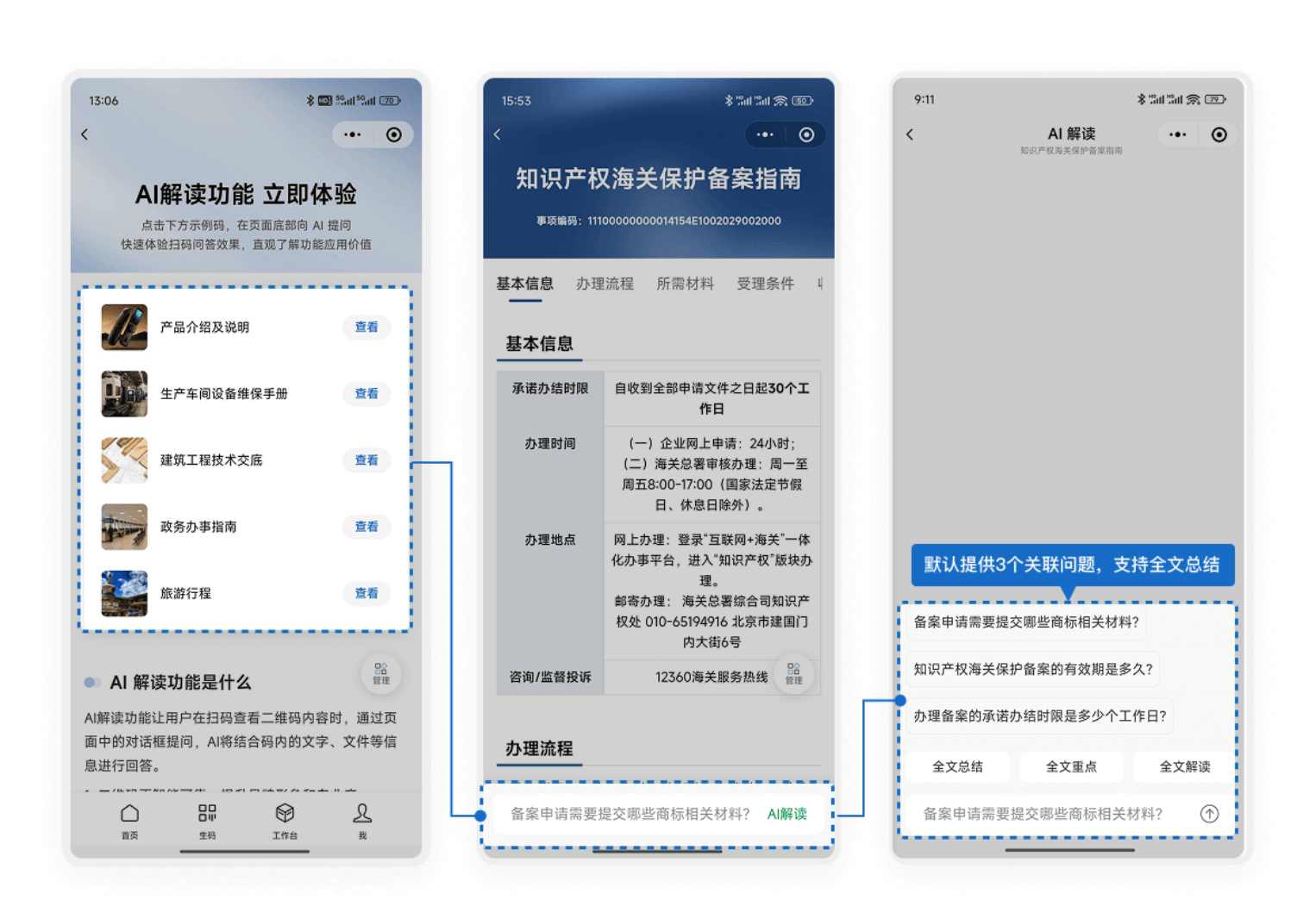
AI Interpretation Feature: "Ask" the Product by Scanning
If text, images, and videos represent presentation, then AI interpretation represents interaction.
After scanning the code, users can directly converse with AI on the page, asking questions like:
- "What environments is this product suitable for?"
- "What's its typical lifespan?"
- "How do I contact for maintenance?"
The AI automatically extracts page information to generate responses.
This feature is particularly suitable for exhibition venues, retail stores, and self-service displays, reducing the need for manual explanations while allowing customers to obtain information according to their specific interests. It also supports customization - you can name the AI, change its avatar, or adjust its tone to align with your brand identity, creating a more unified experience.
Low Technical Barrier with Clear Operational Process
Many people assume such QR code pages require professional design, but they don't. CaoLiao's template library offers numerous relevant templates based on real-world experience that can be easily modified as needed. Moreover, you can scan directly without downloading additional apps, making it convenient to use.
3. How to Create Product Introduction QR Codes?
Let's take industrial products as an example with the following workflow:
Step 1: Prepare Materials
- Basic information: product name, model, parameters
- Clear product photos (recommended from different angles)
- User manuals or inspection reports
- Demonstration videos (optional)
Step 2: Select a Template Log into CaoLiao QR Code's official website and choose "Product Detail Introduction (Simple Version)" from the template library. This template has a clear structure and requires minimal modification.
Step 3: Fill in Content Enter product information as prompted. You can upload materials in batches for efficiency. Customize template content as needed, replacing original template materials with your prepared assets.
Step 4: Beautify the QR Code Choose from various QR code style options, add your logo and brand colors to match your packaging design or exhibition visuals.
Step 5: Generate and Use Generate the QR code after confirming everything is correct, then print and place it on product packaging, instruction cards, exhibition materials, etc.
The above tutorial covers creating individual product QR codes. For multiple similar products, you can use bulk generation to create multiple QR codes with different content at once.
Product introduction QR codes aren't just a "conceptual" tool - they're practical solutions that genuinely address daily presentation and communication challenges. They require no technical background nor significant investment, yet can qualitatively enhance how you present your products.
In today's high-information-density environment, clear, timely, and interactive information delivery has become part of product competitiveness. Give it a try and add a "talking" window to your products.