Zhongyifeng Xingmei Road Project QR Code Implementation Experience Sharing
Original: https://cli.im/article/detail/2427
Client Introduction
- Company: Zhongyifeng Construction Group Co., Ltd.
- Project Department: Xingmei Road Section 2
- Responsible Person: Director Ma
- Department: Safety and Quality Department
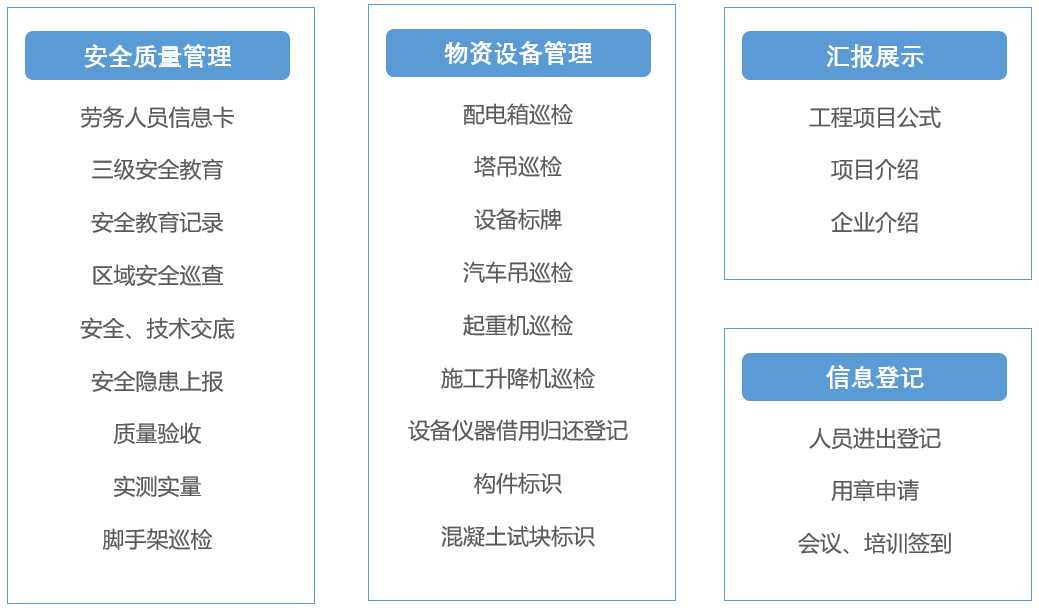
Usage Scenarios
Implementation Steps
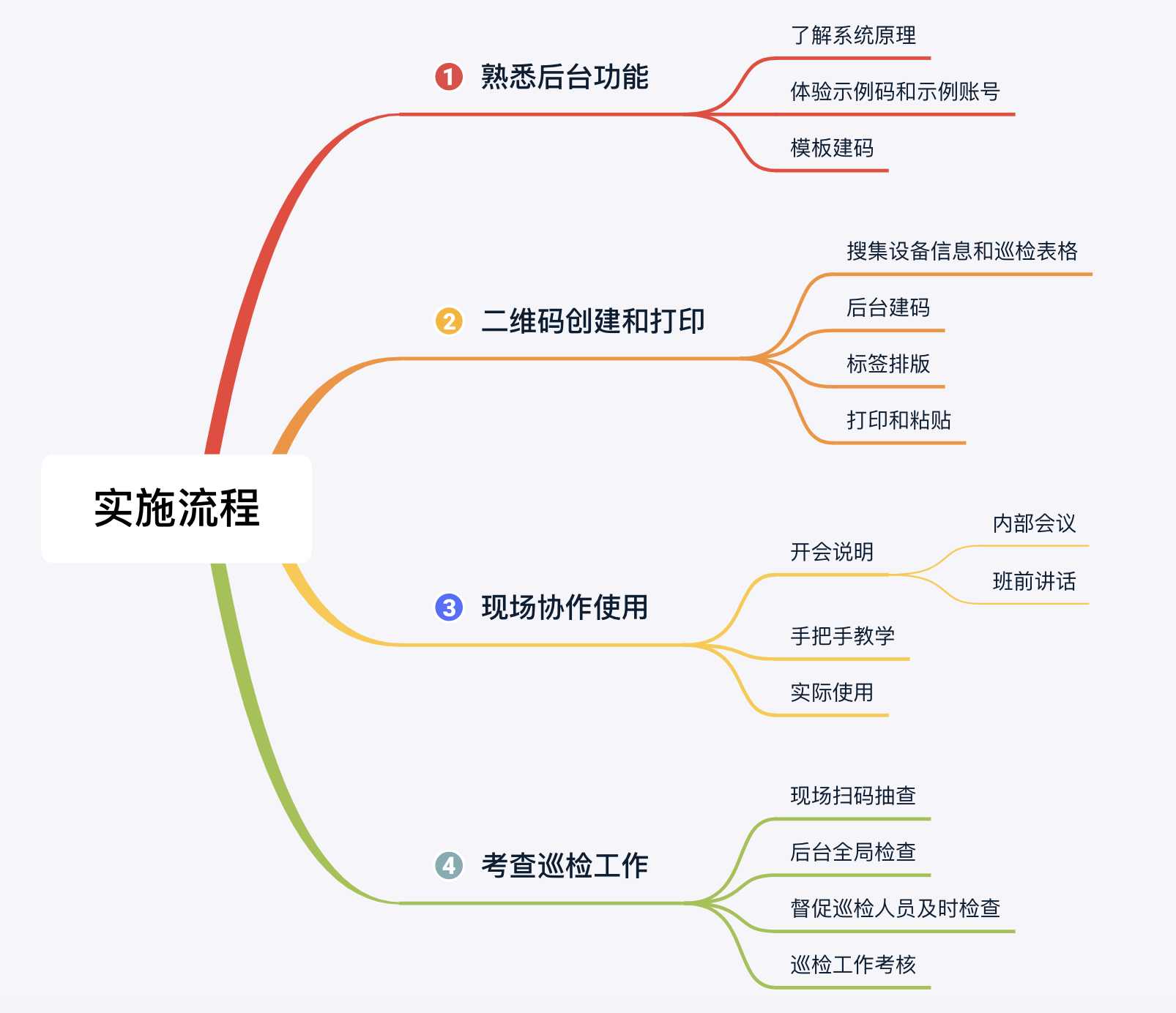
1. Familiarize with Platform Features
Understand the basic functions of CaoLiao, enter the workbench to use system templates, and learn how to create a QR code with inspection functionality.
2. QR Code Creation
Mechanical Equipment QR Code: Taking a crawler crane as an example, the content includes basic equipment information and an equipment inspection form. Other scenarios follow a similar approach. (For more tutorials, refer to the Construction Implementation Guide)
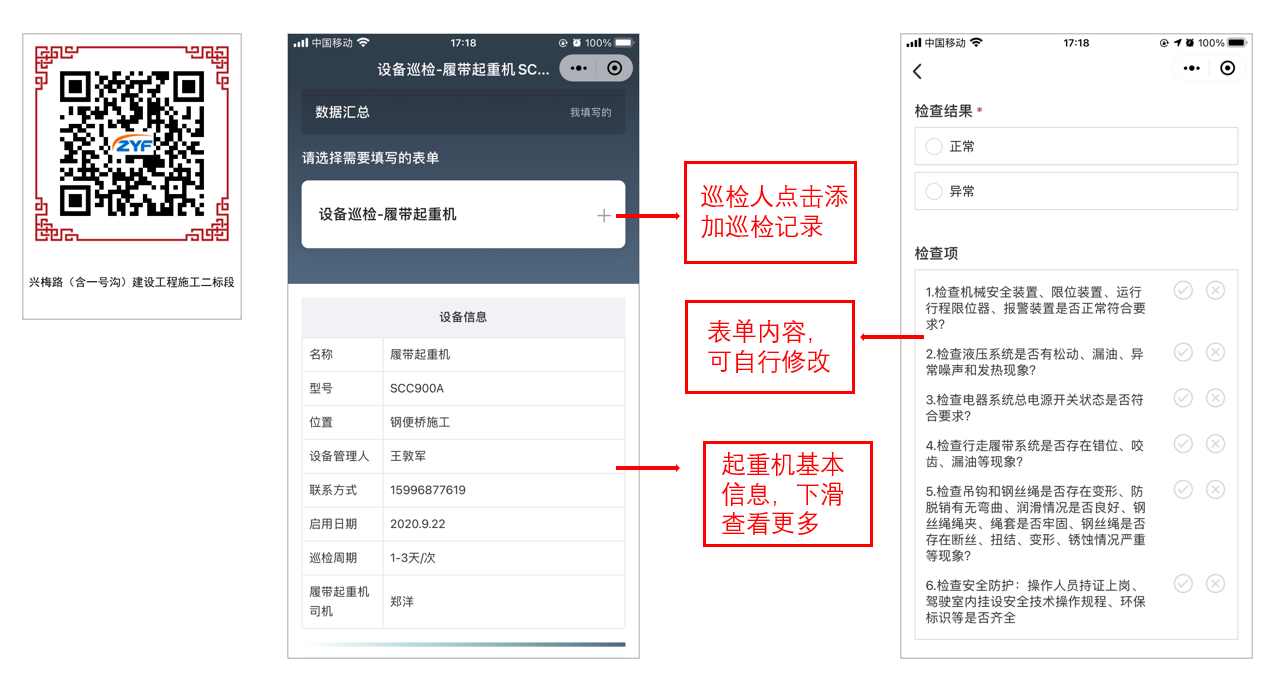
2.1 Create Directories in the Workbench
To facilitate later management, directories were created according to scenarios. A mechanical equipment inspection directory was created, and equipment such as cranes, tower cranes, and truck cranes were placed under this directory.
2.2 Collect Crane Information
- Basic Information/Qualification Documents: Found in the "One Machine, One File" records in the project office.
- Operator Information: Requested certificates and photos from the operators.
- Inspection Content Form: Requested from the crane equipment manager for creating the crane inspection form.
2.3 Create the QR Code
- Edit Equipment Information: Fill in equipment name, model, usage location, operator, etc. Upload collected basic information (document files, operator license photos, etc.).
- Create Form: Based on the crane inspection checklist items, edit the inspection items in the form, and add fields for photos, location, inspector, etc.
- Set Form Permissions: Designate inspectors and other management personnel for this equipment; set up notification functions to alert responsible persons in case of abnormalities. (The designated collaboration member function is only available in the Enterprise edition).
- Set QR Code Label: Save the content. When downloading, select the label and modify the label style.
2.4 Print and On-site Pasting
- Material: A4 adhesive labels
- Printing Method: Standard laser printer
- Purchase Method: CaoLiao designated Taobao store
Crane and Distribution Box Identification Plate
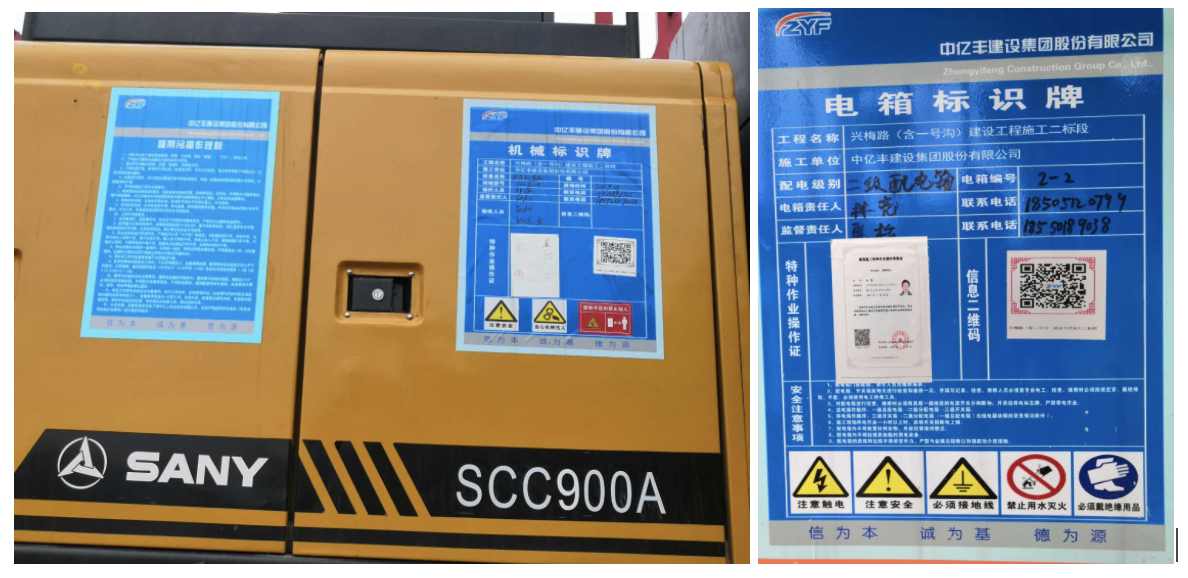
2.5 Time Required for Creation
Creating a QR code for one piece of equipment, from information collection to printing, takes about half an hour. After using bulk templates, creating QR codes for similar equipment only requires inputting a few basic details and can be done in bulk, generating multiple codes at once.
Attached: Bulk Templates Operation Tutorial
3. On-site Guidance on Usage
3.1 Meeting Briefing
Organize a meeting, gather all inspection personnel and relevant responsible persons, briefly explain that QR codes will replace the previous paper-based inspection records. Inspection information can be added by scanning the QR code with WeChat, and historical inspection records can also be viewed by scanning. Help everyone understand the convenience brought by the new method and familiarize them with the overall QR code system.
3.2 Live Demonstration and Teaching
- Operational Staff: Demonstrate the entire process of scanning the QR code and adding an inspection record on-site. Have the staff practice the operation themselves and answer any questions.
- Management Personnel: Demonstrate scanning to view historical records and perform routine spot checks.
Attached Internal Meeting PPT Download: On-site Implementation Report.pptx
4. Inspection Work Assessment
4.1 Daily Inspections
Visit the site daily to check machinery usage, scan QR codes to review inspection records, and check for missed inspections or faults. Communicate directly with staff about any issues for timely correction.
4.2 Regular Summarization
For the first half-month, check inspection data daily in the workbench. Export data every few days, tally the number of missed inspections, review fault handling status, and establish assessment measures, including penalties for missed inspections or unaddressed faults.
Assessment Methods:
- Adaptation Period: In the first half-month, as people adjust to the new method, missed inspections are more likely. Daily reminders are needed, notifying personnel promptly if equipment hasn't been inspected that day. Later, strictly implement the management measures, applying point deductions or fines as appropriate.
- Point Deduction System (Internal Employees): Use a simple point deduction system. Personnel with high deductions receive public criticism, affecting monthly and annual bonuses.
- Fines (Outsourced Units): Issue fines for failure to inspect timely or inadequate inspections, requiring signed confirmation. Fine amounts vary from hundreds to thousands based on severity.
Implementation Summary
1. Dedicated Personnel and Division of Labor
Designate a dedicated person responsible for overall implementation and coordinating various tasks. This person handles coordination and progress when encountering obstacles. Clearly define responsibilities for each role in the work distribution.
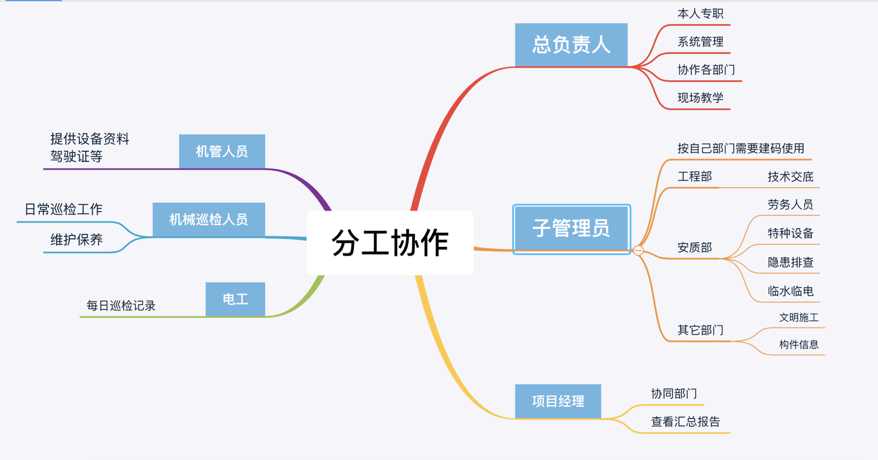
2. Gaining Acceptance from Inspection Personnel for the New Method
2.1 Meeting Explanations
Hold special meetings or use pre-shift briefings to announce the official switch from traditional paper-based methods to electronic inspections using QR codes.
Advantages Explained:
QR code information management replaces paper-based office work, eliminating the cumbersome process of compiling mechanical ledger资料. It enables more standardized, visual, and timely updated management of various on-site machinery, allowing dynamic monitoring of construction equipment status.
2.2 Hands-on Teaching
On-site staff may not readily accept new things, fearing extra workload. On-site, demonstrate scanning the code, filling in information, and uploading photos. Ensure everyone tries it at least once, showing them it's genuinely simple and easy to use.
2.3 Supervision and Assessment
- Adaptation Period: Initially, as people adjust, missed inspections are common. Provide daily reminders; promptly notify personnel if equipment hasn't been inspected. Later, strictly enforce management measures with point deductions or fines.
- Point Deduction System (Internal Employees): Implement a simple point deduction system. Personnel with high deductions face public criticism, impacting monthly and annual bonuses.
- Fines (Outsourced Units): Issue fines for failure to inspect timely or inadequate inspections, requiring signed confirmation. Fine amounts range from hundreds to thousands based on severity.
3. Securing Support from Project Leadership
3.1 Project Initiation Phase (Clarification)
Since the project department mandated the informatization upgrade, support was strong. Having the project manager communicate with all departments was sufficient. During implementation, when collaborating with other departments, clearly define their tasks and deadlines to ensure rapid progress.
3.2 Regular Reporting (Demonstrating Results)
Conduct regular work summaries, highlighting improvements in inspection status compared to before (e.g., reduction in missed inspections, thoroughness of checks, issues identified during use). Showing tangible results to leadership ensures continued support and usage.
3.3 Sharing Summary Codes and Mobile Management (Engagement)
Facilitate leadership's real-time understanding of site conditions by creating summary QR codes for inspection equipment. Leaders can view inspection records anytime. They can also open the Mini Program to view inspection records for all QR codes and filter data.

Special Thanks to Director Ma from Zhongyifeng Xingmei Road Section 2 Project
For providing the above QR code usage experience