Hazard Reporting
Employees scan QR codes to report hazards or defect clues, and managers receive real-time notifications to assign corresponding personnel for rectification. The entire rectification process can be documented with photos, and records can be exported as PDFs for archiving.
Basic Information
- Monthly Installations: 43060
- Monthly Visits: 115626
- Original Text: https://cli.im/template/detail/4111148
Case Label Image

Usage Instructions
1. Problems Solved
Traditional paper inspection forms present the following issues during hazard and defect reporting:
- Delayed Response: Abnormal situations reported as hazards are difficult to respond to promptly, and real-time tracking of hazard rectification is unavailable.
- Open-loop Process: Processes like hazard reporting, maintenance rectification, and acceptance are fragmented, lacking unified management, making it difficult to track progress timely.
Solution:
- Use QR Codes to Replace Paper Inspection Forms: Integrate hazard reporting, maintenance rectification, and acceptance into a closed-loop management system within a single QR code.
- Real-time Reporting via WeChat Scan: Inspectors discovering hazards scan the QR code to report via WeChat. The system automatically notifies rectification personnel through WeChat, enabling real-time progress tracking.
- Unified Data Management: Hazard investigation data is stored in the backend, accessible to administrators anytime. Data export for archiving is supported. Data can be restricted to administrator-only viewing to ensure security.
Note: This is a general template suitable for hazard investigation and reporting across various locations. Using a single dynamic QR code for the entire company is recommended for centralized viewing of all pending hazard rectifications.
2. Hazard Reporting — Maintenance Rectification — Acceptance Closed Loop
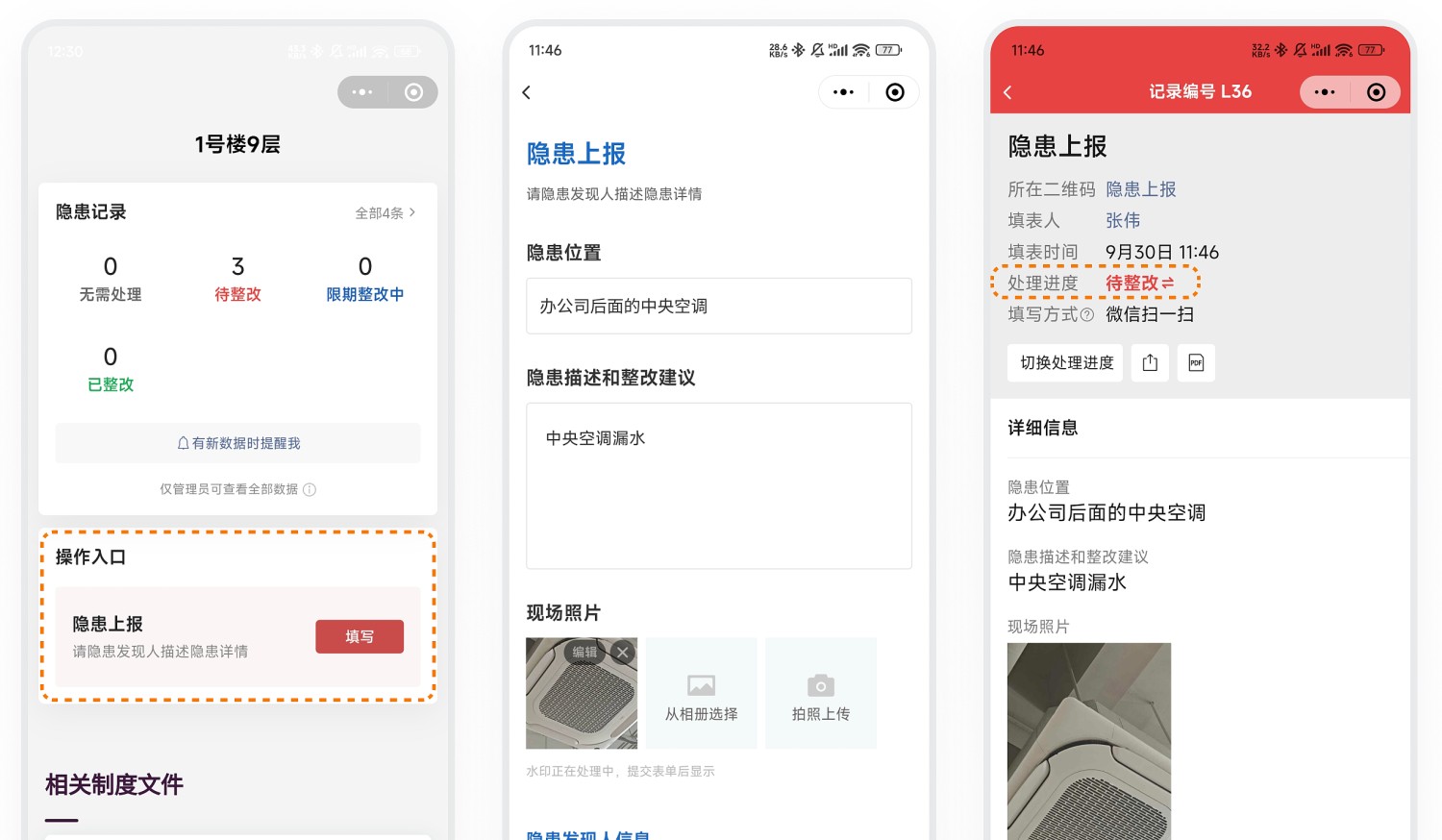
1. Inspectors Report Hazards
- Scan QR Code and Fill Out Hazard Report Form: Upon discovering a hazard, inspectors scan the QR code, provide a detailed description, upload photos, and submit the report.
- Initial Status Set to "Pending Rectification": After submission, the record's status is automatically set to "Pending Rectification".
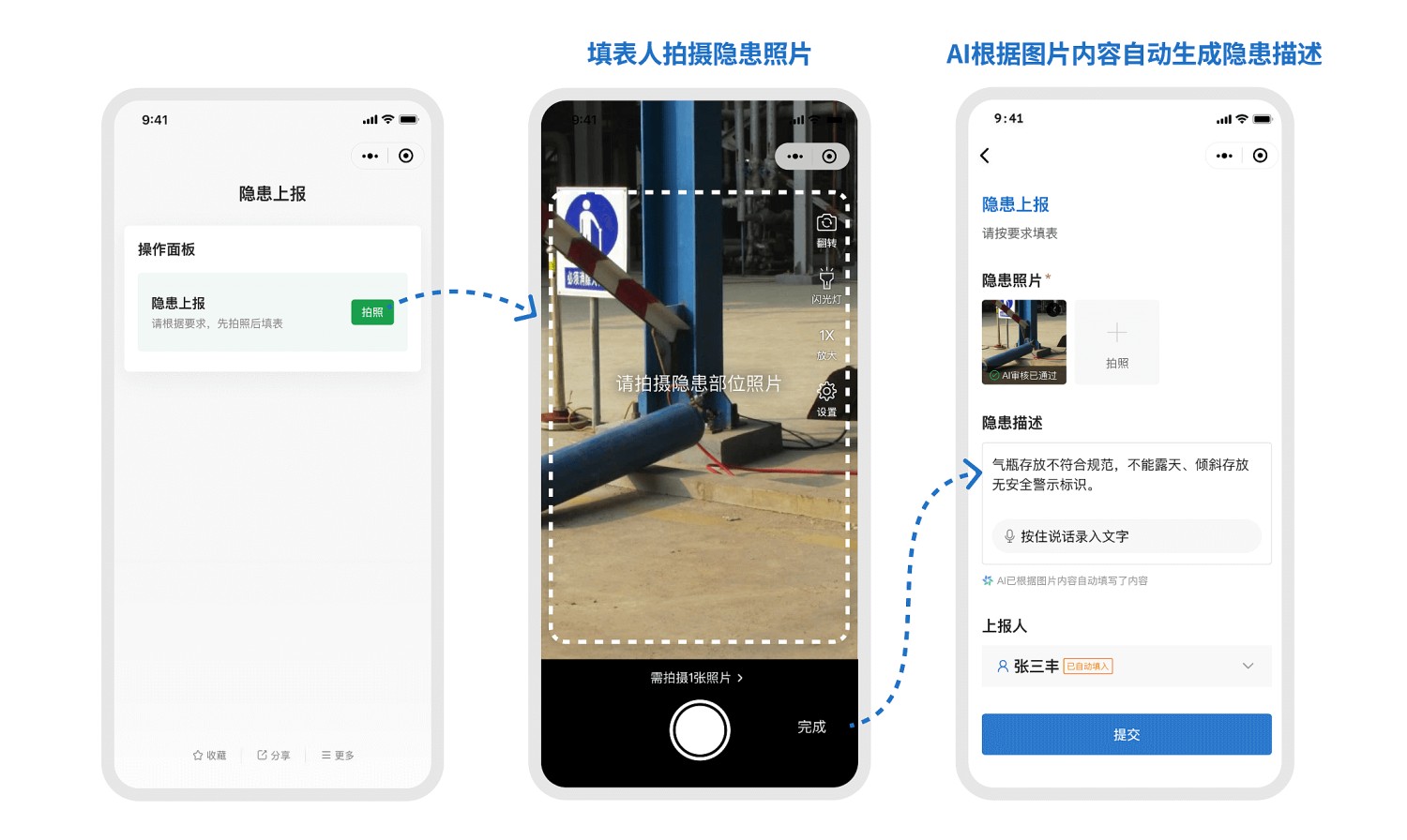
Starting from the Advanced edition, experience the AI Smart Form Filling mode for consistent text and image recording of hazards, facilitating traceability and rectification tracking. Learn more
Example: The reporter takes a photo of the hazard. AI automatically identifies the hazard type and location in the photo and fills in the "Hazard Description". The reporter can manually modify the AI-generated content before submitting.
2. Maintenance Personnel Perform Rectification
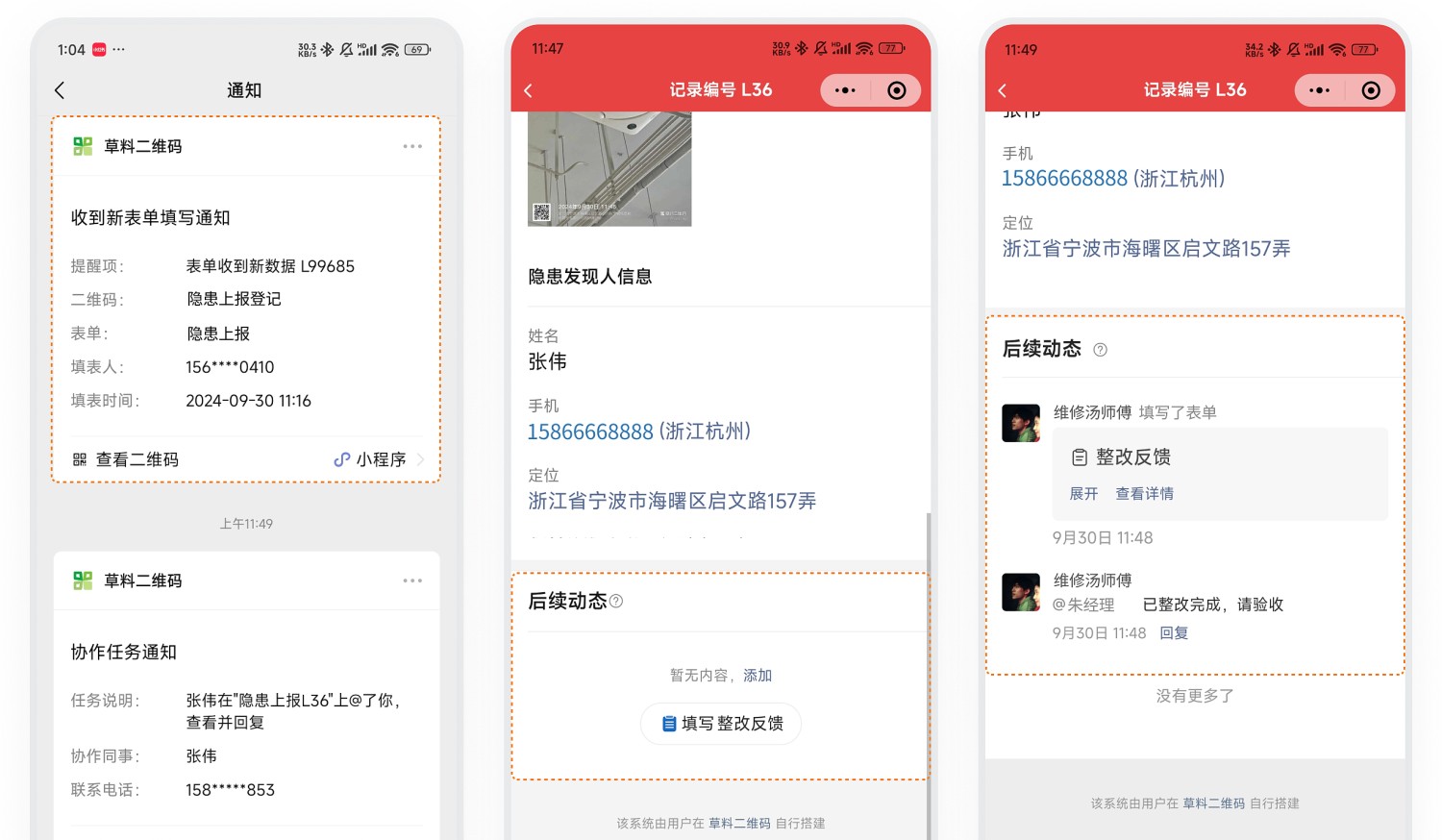
- Automatic Notification to Maintenance Personnel: The system automatically notifies maintenance personnel via WeChat to view hazard details.
- Record Rectification Process: Maintenance personnel promptly view and follow up, documenting the entire rectification process.
- @ Mention Acceptance Personnel for Verification: Upon completion, @mention the acceptance personnel within the record to notify them for verification.
Note: To standardize rectification records, associate a Rectification Feedback Form in the follow-up actions of the hazard report.
3. Acceptance Personnel Verify and Close Out
- Acceptance Notification: Acceptance personnel receive a collaboration message @mentioning them via WeChat. They review the rectification process and proceed to the site for verification.
- Update Status to "Rectified": After successful verification, manually change the status to "Rectified" to close out the hazard, completing the management loop.
Note: Time-limited rectification settings are not currently supported. Administrators can filter unremediated hazards by status in the backend and promptly remind relevant personnel.

3. Data Management
1. Data Viewing
- Set Viewing Permissions: Configure hazard report data to be viewable only by administrators to ensure data security. View Tutorial
- Unified Backend Management: All hazard reporting and rectification data is stored under your account. Administrators can log in to the workbench anytime to view detailed data.
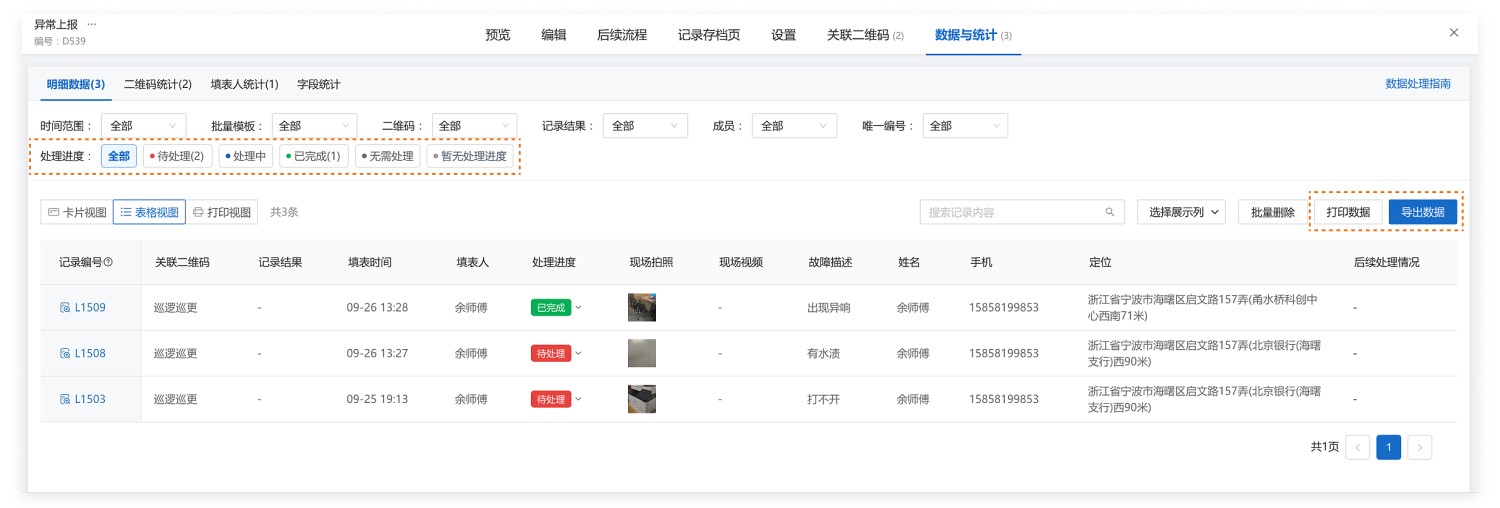
- Filter by Status: Filter data by status to quickly identify unremediated hazards and arrange timely handling.
- Dynamic Data Panel: Scan the QR code to view the dynamic data panel, which provides status statistics for a quick overview of pending rectifications.
Desktop Form Data
On-Code Dynamic Data Panel

2. Data Analysis
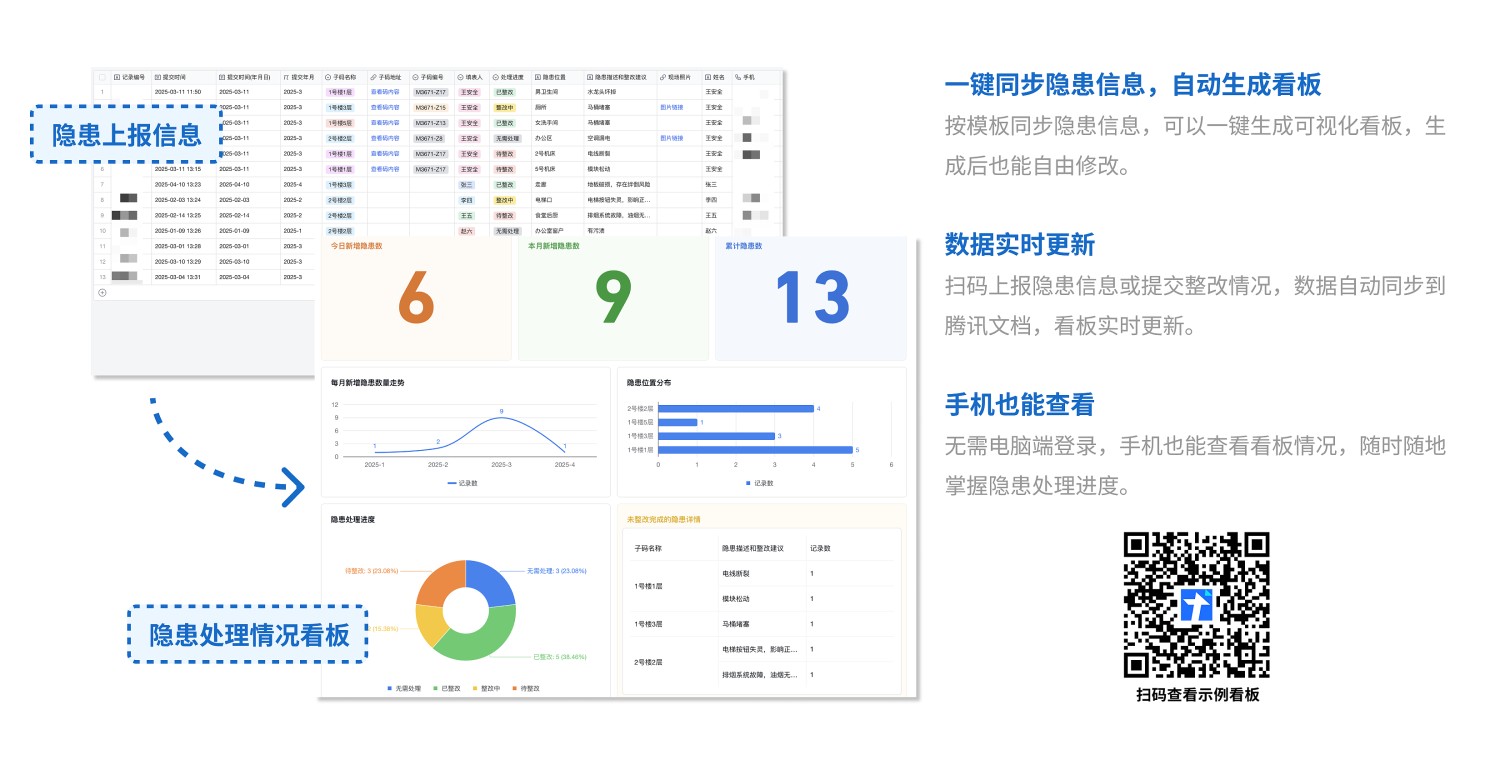
- Hazard Handling Status Dashboard: By synchronizing reported hazard and rectification information to Tencent Smart Sheet, you can quickly build a data dashboard to monitor the progress of hazard handling. Hazard data updates automatically and allows for collaborative management with colleagues. View Example
3. Data Export
- Real-time Data Push: Use the Data API feature to push reported hazard information in real-time to group chats in WeCom, DingTalk, or Feishu.
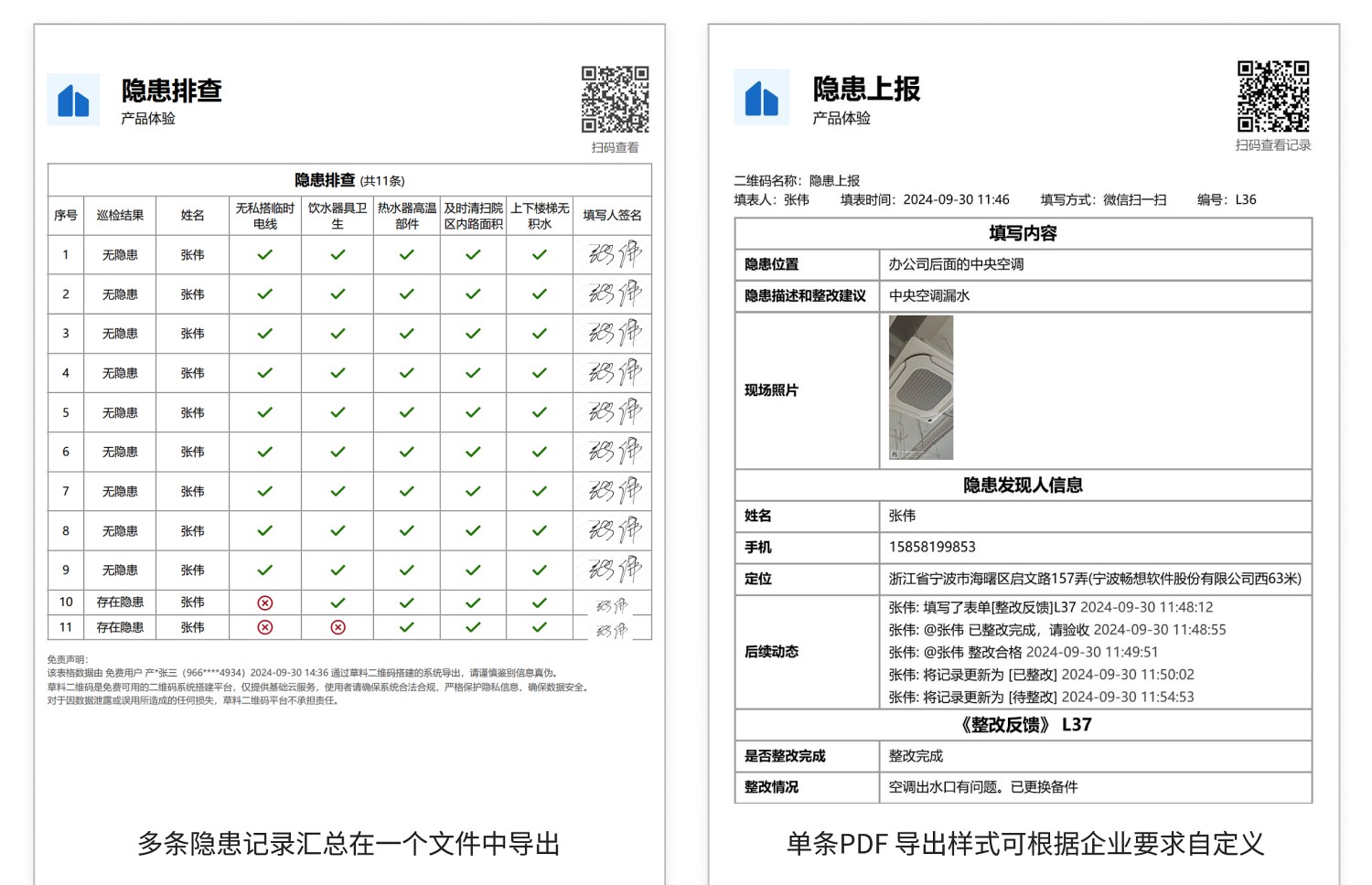
- Data Export for Archiving: Export hazard reports and rectification records as PDF files for archiving.
- Export in Paper Form Format: When exporting a single record, customize the PDF export format according to your company's requirements, matching the original paper form layout.
4. Frequently Asked Questions
1. How to implement hazard investigation?
A: Add a checklist component to the hazard report form and upload the items requiring inspection. Inspectors scan the code, fill out the form, check off normal items, and mark abnormal items with a cross. Rectification personnel can address the abnormal items. Hazard investigation data can be exported from the backend.
2. How to view handling progress by scanning a code?
A: Add a dynamic data panel to the QR code and set it to display status statistics. Submitted hazard reports are counted by status and displayed on the QR code; click to view detailed data. View Setup Tutorial
3. How to require manager approval before rectification for hazard reports?
A: Use the review function. After a hazard is reported, managers are notified for review first. Only after approval is the responsible person automatically notified for rectification; rejected reports require no action. View Setup Tutorial
4. Can the rectification feedback form be linked to the handling status?
A: Linkage is not currently supported. After maintenance personnel fill out the rectification feedback form, the handling status needs to be changed manually. Administrators can filter and view data by status in the backend.