How to Create a Visitor Management QR Code
Original: https://cli.im/article/detail/2411
In places such as enterprises, schools, and hospitals, visitor management is a common yet crucial task. Traditional handwritten registration methods are time-consuming, labor-intensive, prone to information loss or leakage, and difficult to statistically analyze. Using QR codes for visitor access management can significantly enhance security control while reducing labor and time costs. It is suitable for various locations including residential communities, companies, schools, and factories.
This article will use CaoLiao QR Code as an example to explain in detail how to create a visitor registration QR code and optimize visitor management.
1. Creating a Visitor Registration QR Code
Creating a visitor QR code is the starting point for efficient visitor management. The entire process is divided into three steps: creating a registration form and QR code, setting registration and appointment restrictions, and deploying the QR code.
1.1 Creating the Registration Form and QR Code
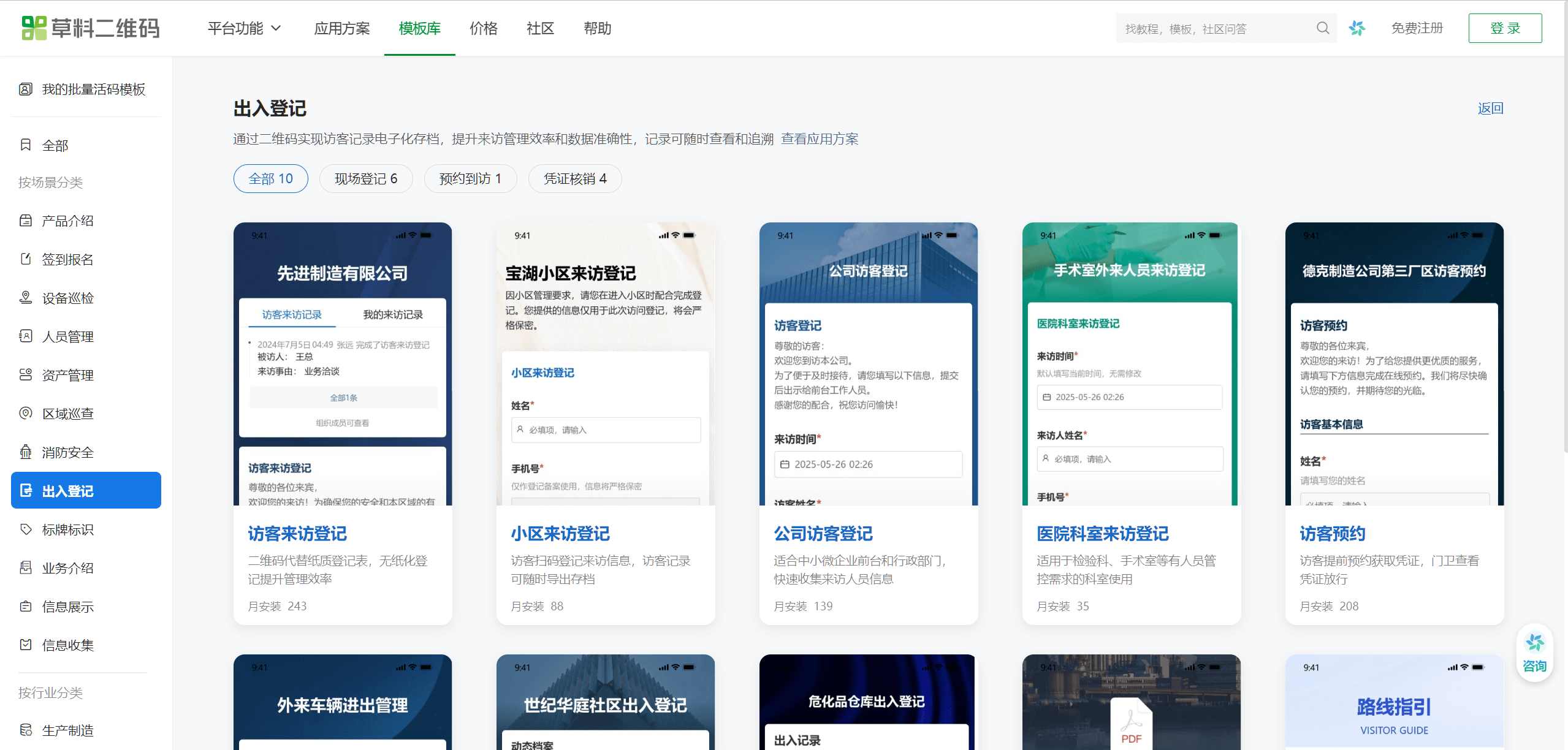
CaoLiao QR Code provides commonly used visitor registration templates. You can select a suitable template from the template library based on your industry, quickly install the template, and modify the content and settings according to your actual needs.
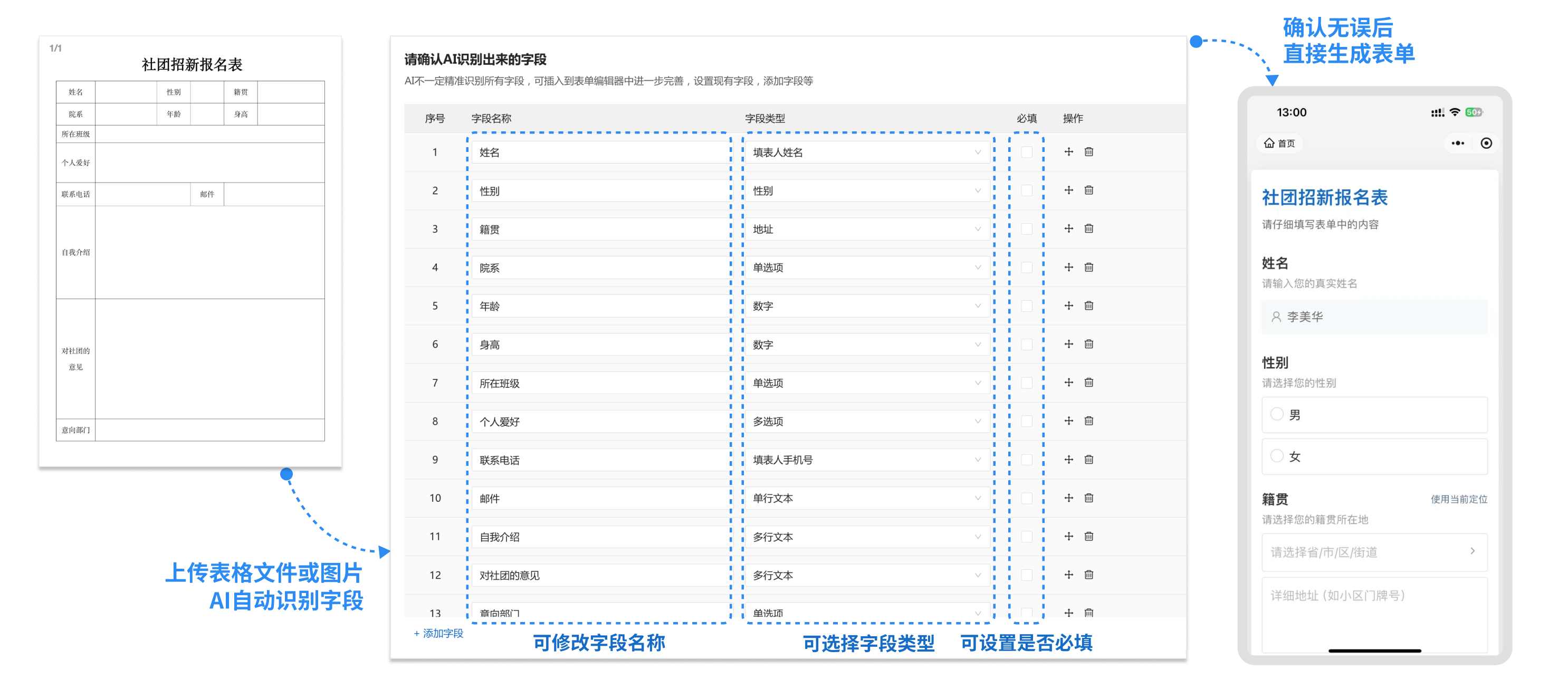
For users who currently have paper registration forms, you can create a form using the blank creation method. CaoLiao QR Code offers an AI automatic form creation feature. You can take a photo of your paper form and upload it to quickly generate a registration form, saving time and effort.
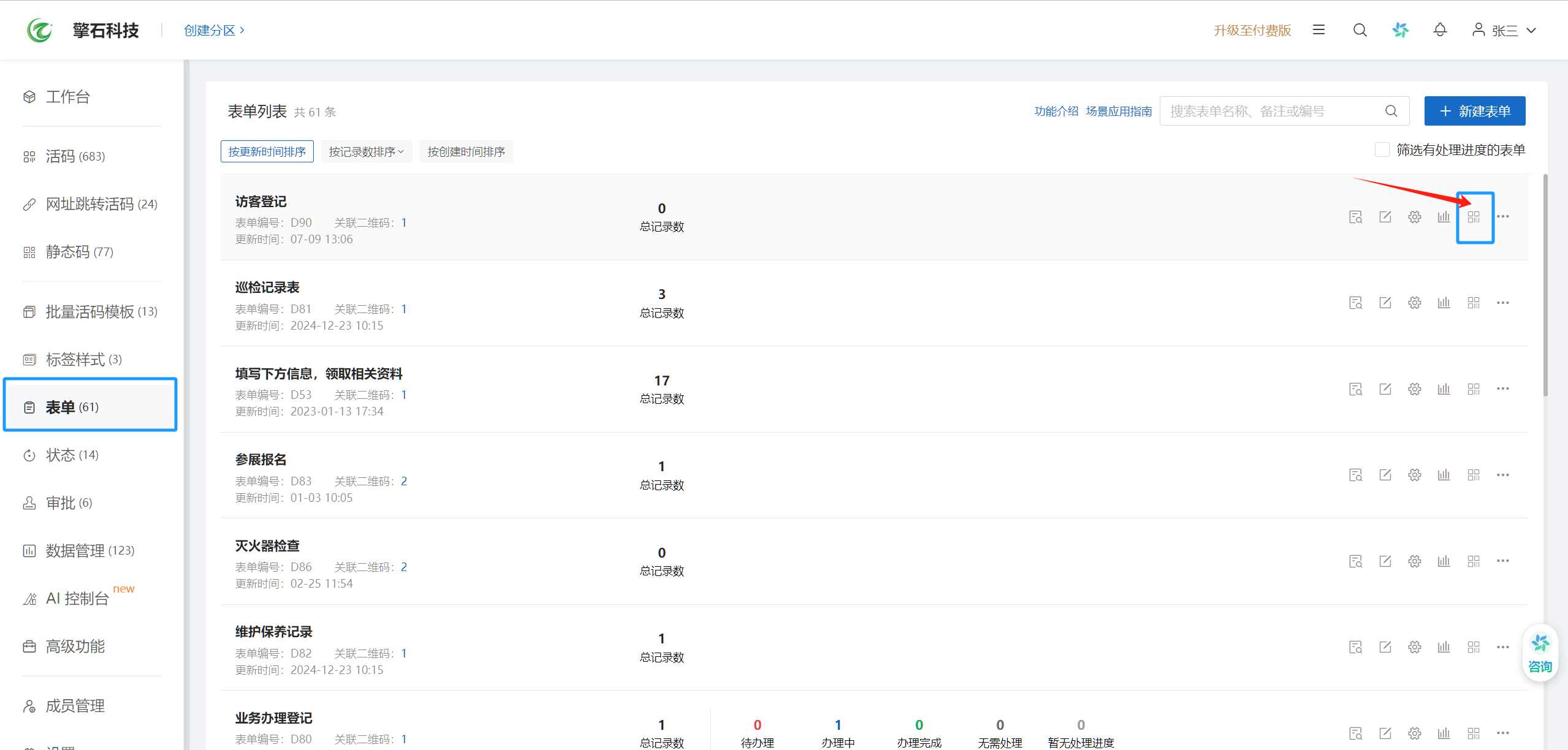
After the form is created, go to the 【Forms】 page, find the created form, and click the 【Generate QR Code】 button to create the visitor registration QR code.
1.2 Setting Visitor Registration and Appointment Restrictions
To ensure the flexibility and security of visitor management, CaoLiao provides various methods for controlling visitor information collection.
1.2.1 Setting Registration and Appointment Options
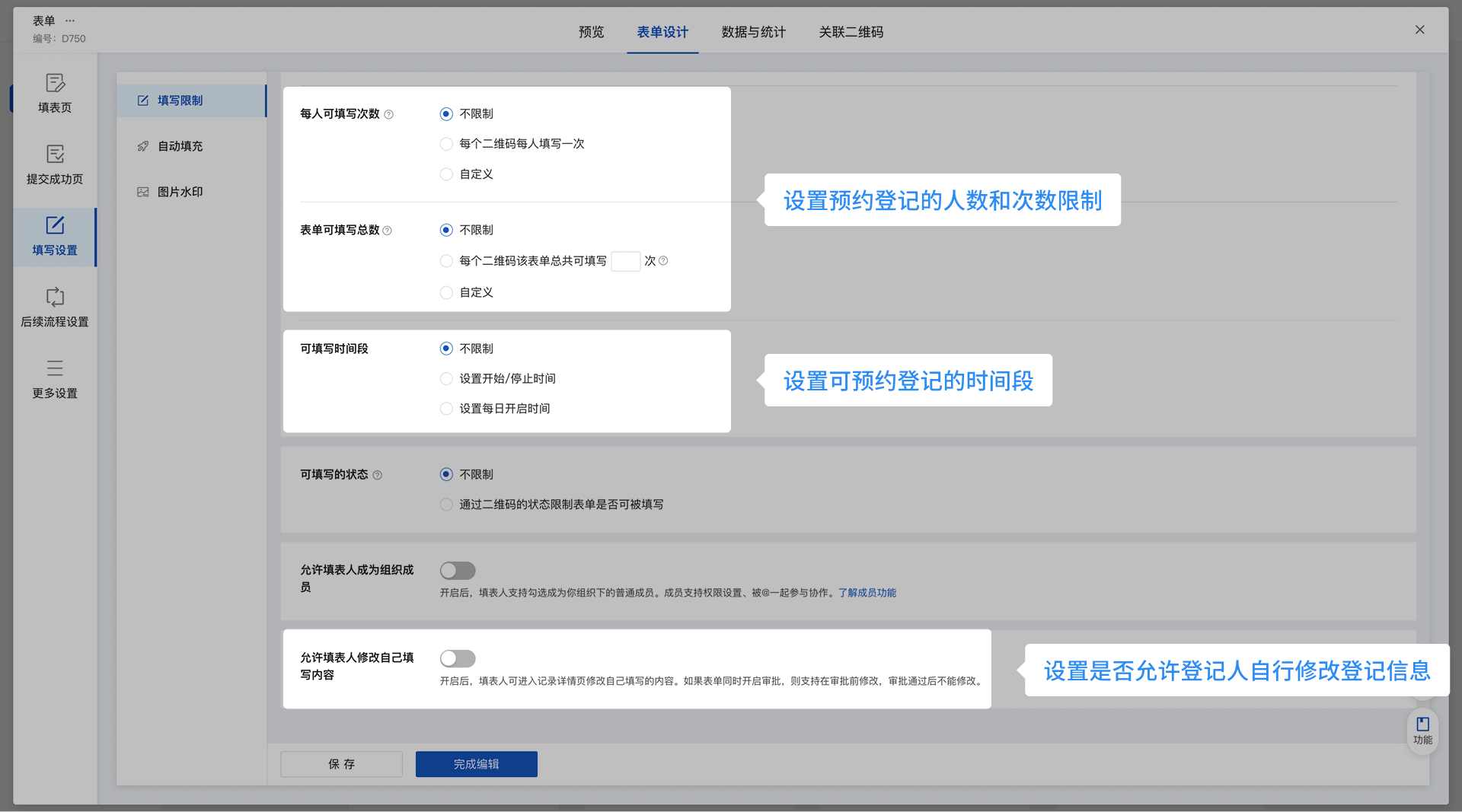
Users can set filling restrictions, such as limiting the QR code's availability to specific time periods (e.g., working hours from 8:00-17:00) or only allowing on-site scanning and filling. Additionally, the data approval function can be enabled. After a visitor submits information, an administrator can review it, enhancing security.
1.2.2 Editing QR Code Content
To facilitate visitors' prior understanding, administrators can add explanations to the QR code, such as visitor guidelines, company maps, or emergency contact information. This information is displayed when visitors scan the QR code, improving the user experience.

1.3 Deploying the QR Code
After the QR code is generated, you can choose different deployment methods based on the usage scenario. The generated QR code supports content updates without needing to be recreated. Even if the visitor process or page instructions change, the QR code itself can remain the same:
1.3.1 For On-site Registration Use
- Indoor Scenarios (e.g., reception desk or lobby): It is recommended to use A4 or A5 sized printouts paired with acrylic frames or card holders for aesthetics and durability.
- Outdoor Scenarios (e.g., gatehouse or guard post): It is recommended to use A3 or larger sizes, with materials such as PVC foam board or aluminum composite panel, paired with standing displays for easy mobility and presentation.

1.3.2 For Online Appointment Use
The QR code can be embedded in WeChat Official Account menus and articles, or sent to visitors in advance via email, etc., allowing them to complete appointments ahead of time.

2. Using the Visitor QR Code
The CaoLiao QR Code Generator supports two main usage scenarios: on-site registration and scheduled visits.
2.1 On-site Registration Use
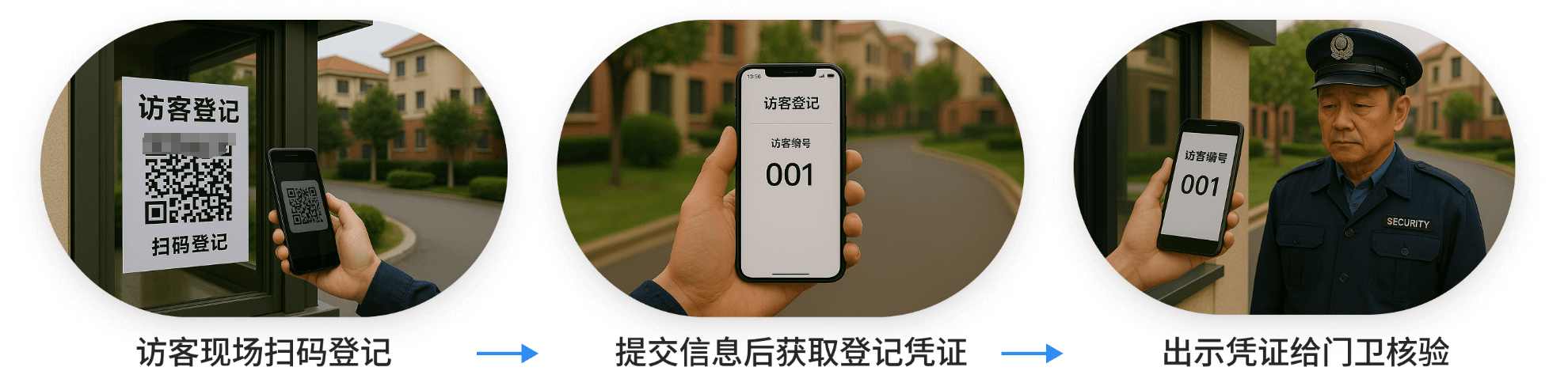
When a visitor arrives on site, they use their mobile phone's WeChat app to scan the QR code at the reception area, enter the registration page, fill in information such as name and contact details, and submit. The system automatically generates a visitor pass QR code. The visitor can show this QR code to the reception staff as proof of identity.
Reception staff can verify the identity and grant access by scanning the code for check-off or by viewing key information on the pass number.
2.2 Scheduled Visit Use
If the appointment approval process is enabled, visitors need to wait for their submitted appointment information to be reviewed. Once approved, the visitor will be notified and can obtain the visitor pass.
Upon the visitor's arrival, reception staff confirm their identity through text verification or by scanning the QR code. Upon departure, reception staff can scan the QR code again to mark the visitor's departure status, ensuring closed-loop management.

3. Statistics and Analysis of Visitor Data
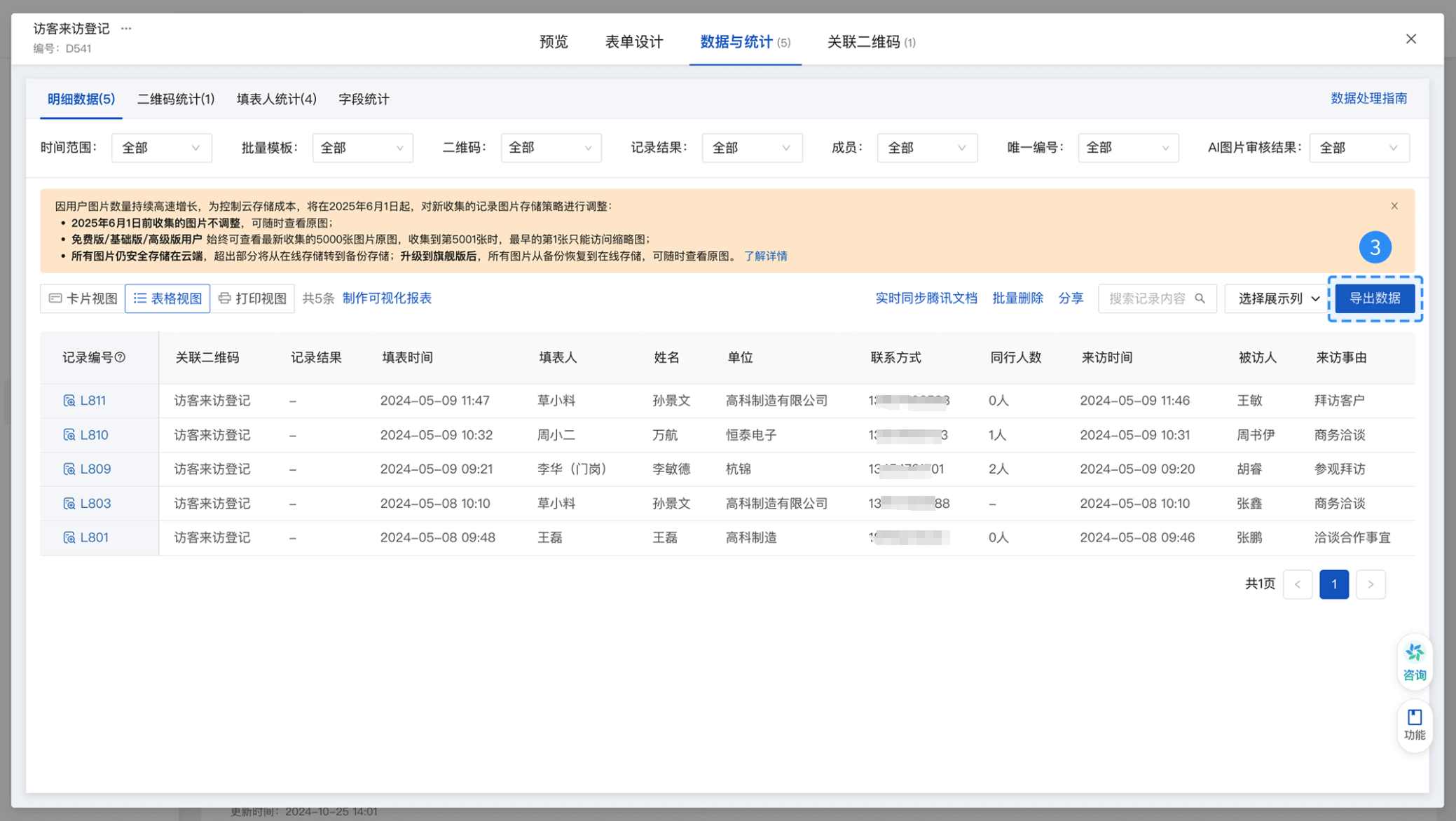
Log in to the CaoLiao QR Code workbench, go to the 【Forms】 - 【Data & Statistics】 interface to view visitor registration and appointment data in real-time. Data can be exported to Excel or PDF format for further analysis and archiving. For example, companies can statistics the number of visitors, purposes of visits, etc., within a certain period, providing a basis for security management and resource allocation.
4. Frequently Asked Questions
Here are some questions users might encounter when using the CaoLiao QR Code Generator, along with their answers:
Is the operation simple? Can security guards or receptionists get started quickly? Answer: Operating CaoLiao QR Code is very simple. Anyone who can use WeChat to scan codes can get started. CaoLiao provides specific usage guides for security guards and receptionists, allowing even beginners to master it quickly.
Is the system stable? Can it handle multiple people scanning the code simultaneously? Answer: CaoLiao QR Code utilizes a high-concurrency and load-balanced architecture. It has successfully supported over 100,000 simultaneous scans in large-scale projects like the Beijing Winter Olympics and the Zhejiang Provincial Government Office in Beijing, ensuring a stable and smooth experience even during peak access periods.
How is visitor information security protected? Answer: The privacy protection function can be enabled. Sensitive visitor information such as ID numbers, phone numbers, addresses, and names can be masked, visible only to administrators, significantly reducing the risk of leakage compared to paper registration. Furthermore, CaoLiao QR Code has passed the Ministry of Public Security's Level 3 Cybersecurity Classification Protection certification and Alibaba Cloud security tests, providing multiple layers of data protection.
Can visitors modify their appointment information? Answer: If the administrator has enabled the "Allow submitters to modify their own content" function, visitors can modify their information themselves; otherwise, they need to contact the administrator to make changes.
How is information accuracy ensured? Answer: Form components for phone numbers, ID numbers, etc., have format validation features, preventing visitors from entering random or incorrect information.
How do visitors obtain their appointment pass? Answer: If a visitor has appointment information, they can obtain the appointment pass by scanning the appointment QR code on site, with no additional steps required.