How to Build a Device Inspection QR Code Management System from Scratch
Original: https://cli.im/article/detail/2453
This guide is intended for grassroots managers in small and medium-sized enterprises, explaining how to build a device inspection system based on CaoLiao QR codes from scratch. By generating a dedicated QR code for each device, every device gets its own "electronic record," documenting basic information and full lifecycle data such as inspections and maintenance.
1. Scope of Application: Which Devices Are Suitable for QR Code Inspection?
The QR code inspection solution is versatile and suitable for most devices and assets that require regular inspection, maintenance, and need to keep records:
- Mechanical Equipment: Such as production line machinery, boilers, forklifts, etc., that require regular checks. QR code inspections can promptly identify issues like insufficient lubrication or loose parts, enhancing production safety.
- Electrical Equipment: Such as distribution boxes, transformers, elevators, etc. Scanning the code checks operating parameters and circuit integrity, with abnormal data recorded in real-time and maintenance personnel notified for handling.
- IT Office Equipment: Such as servers, copiers, air conditioners, etc. Linking the operational status and maintenance records of these devices to QR codes facilitates recording and querying regular inspection and maintenance data.
- Other Assets: Including firefighting facilities, medical instruments, vehicles, etc. Implementing "one object, one code" for daily checks meets the safety standards and maintenance needs of different industries.
The above devices achieve digital management through "one QR code per device." All inspection data is summarized in real-time in the backend, supporting statistical analysis and report export. This solution requires low investment and shows quick results, making it very suitable for enterprises without a dedicated IT team to implement independently.
2. Roles and Basic Process
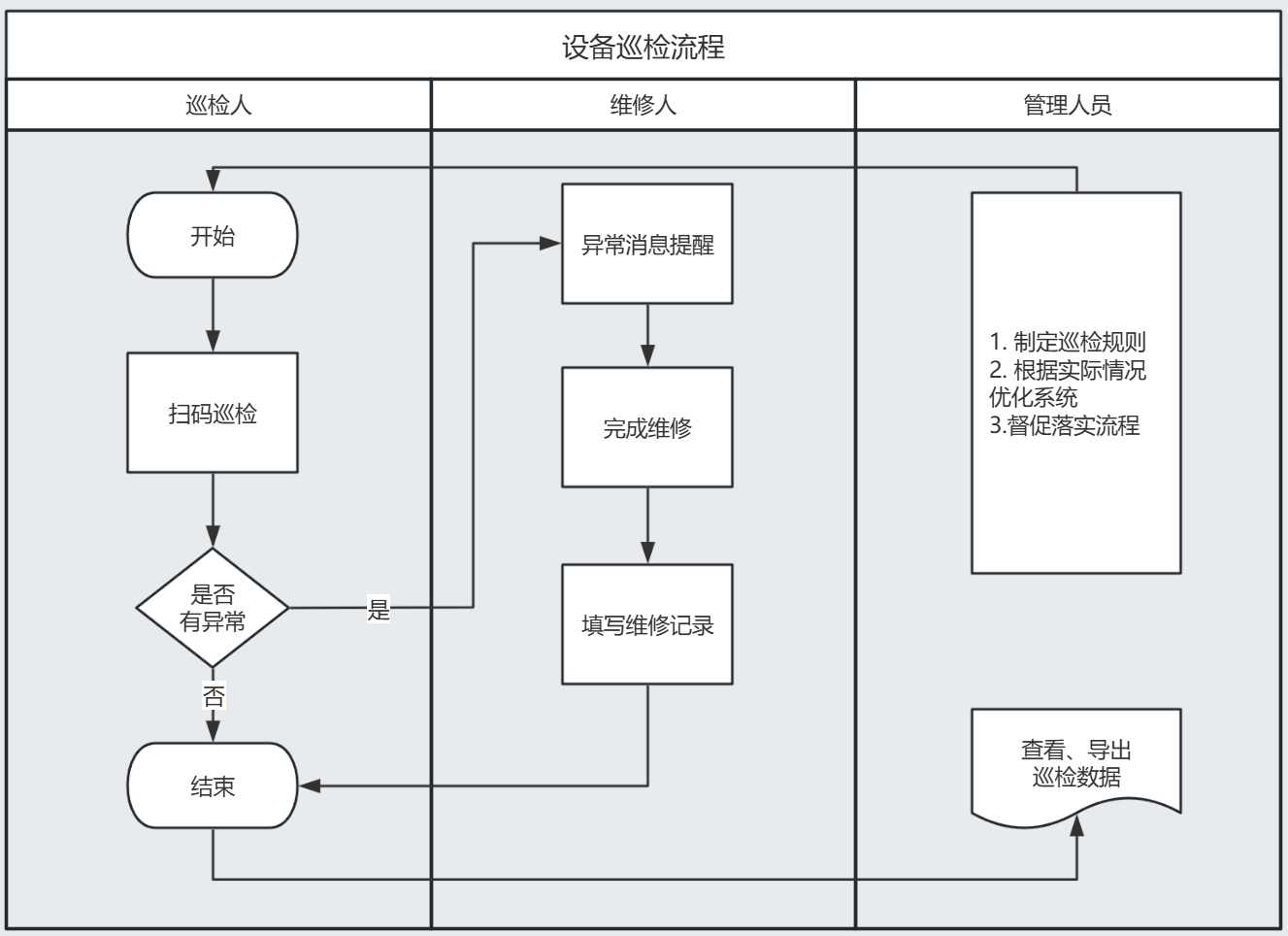
The solution revolves around the following three core roles, building a simple and clear workflow:
- Inspector: Uses WeChat to scan the device QR code for daily inspections, fills in and submits the device's operational status.
- Maintenance Personnel: Receives abnormal notification alerts, fills in maintenance feedback after completing repair tasks.
- Manager: Views the operational status of all devices, understands the specific situation of abnormal devices. Regularly exports device inspection records for subsequent analysis, statistics, and archiving.
3. Basic Steps for Building from Scratch
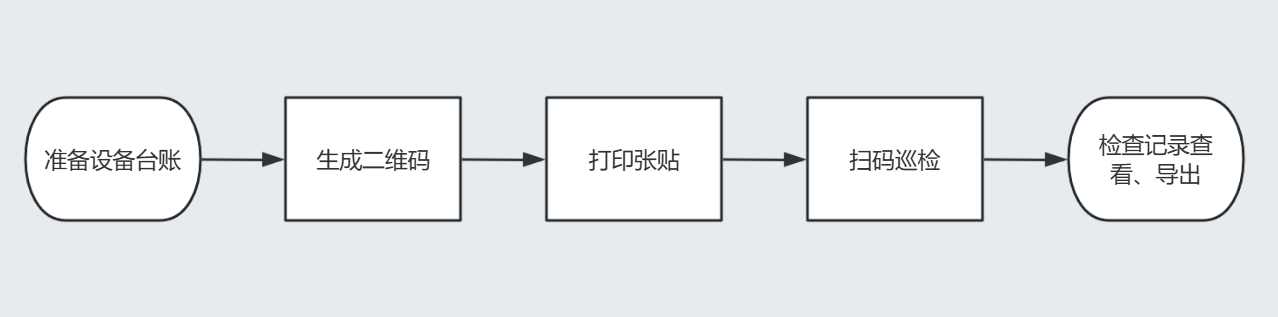
The basic process of using QR codes to build a device inspection system is divided into 5 steps. Following these steps will allow you to complete the setup and basic usage of a device inspection QR code system.
1. Prepare Device Records and Inspection Content
First, compile the equipment inventory of your unit. Then, based on safety management regulations and previous paper records, list the inspection checklist for each type of device, such as: appearance, indicator lights, unusual noises, remarks, etc. This will serve as the basis for subsequent form configuration. It is recommended to align it as closely as possible with the actual on-site operations.
2. Generate Device QR Codes
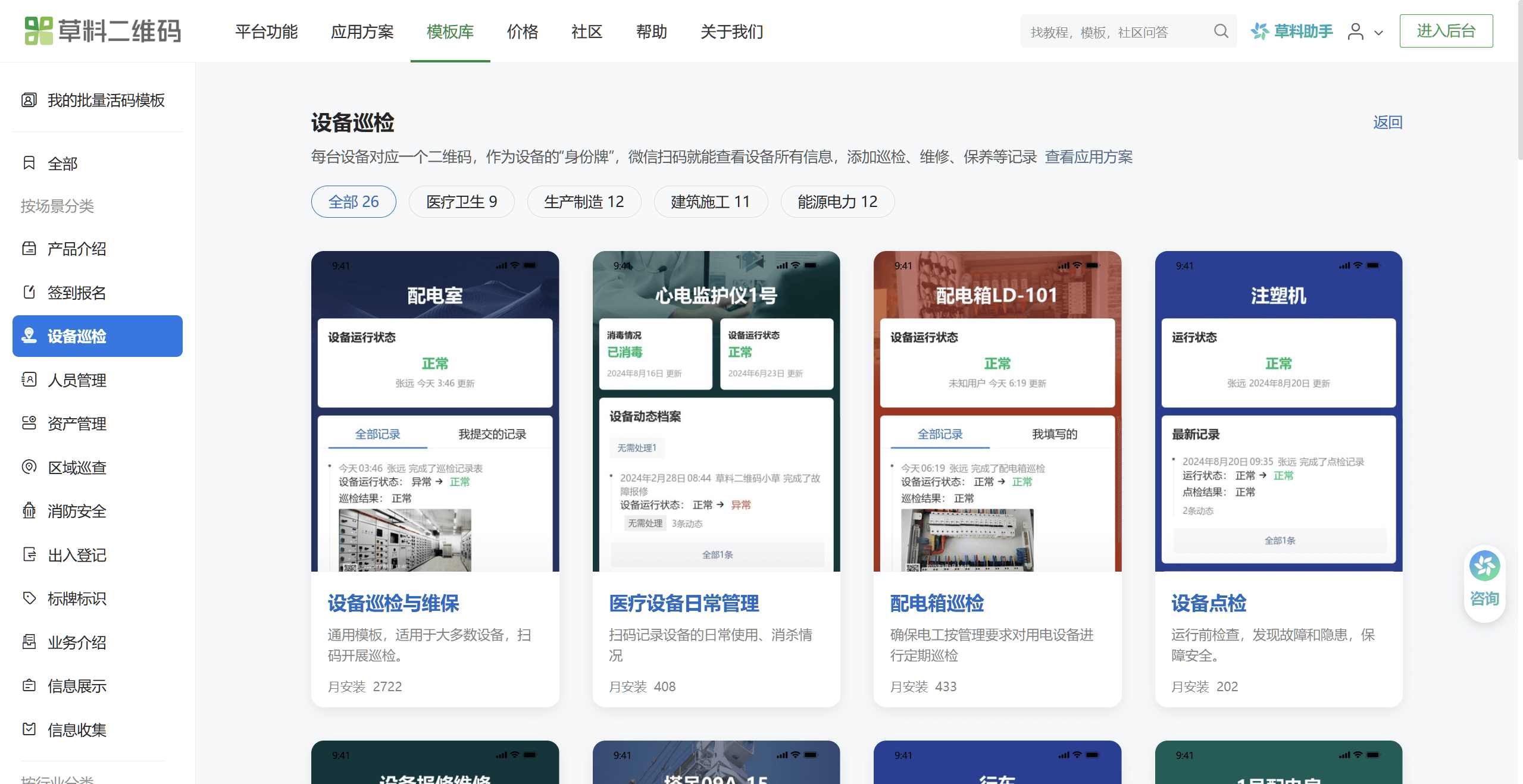
Access the CaoLiao QR code official website on a computer, select the "Device Inspection and Maintenance" template, modify the device information and form content in the template according to your own device information. After modification, click "Generate QR Code" to create a device QR code.
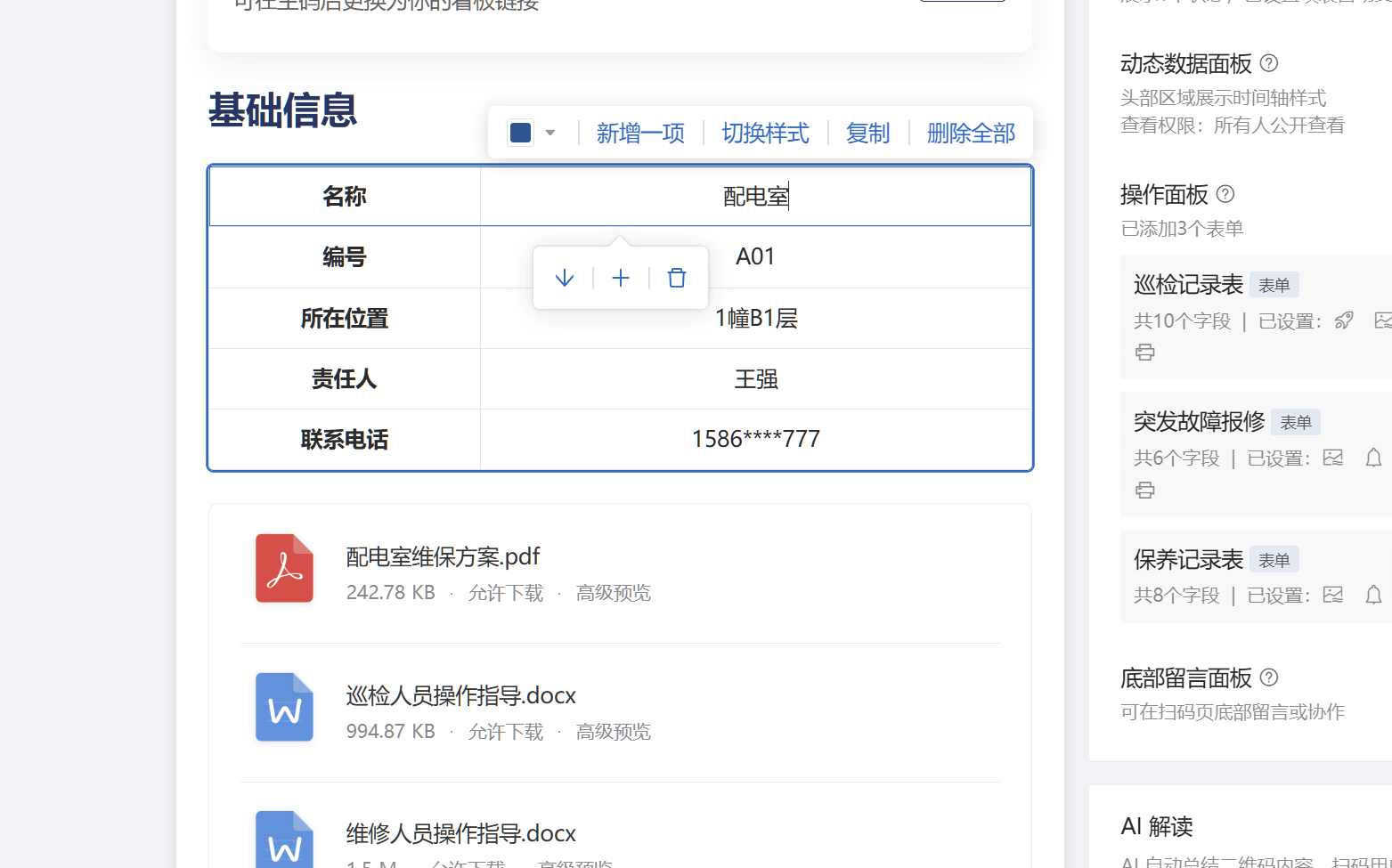
Modify Device Information
Replace the default fields in the template with your own device's name, number, location, etc.
Configure Inspection Form
The template comes with forms like "Inspection Record Form," which can be freely adjusted according to the enterprise's actual inspection content. Add the inspection items listed in Step 1 one by one. They can be set as required fields, and photo upload components can be added to comply with safety inspection requirements. If you have existing paper checklists, you can use the AI function to automatically recognize and generate electronic forms, thus quickly completing the creation of custom inspection forms.
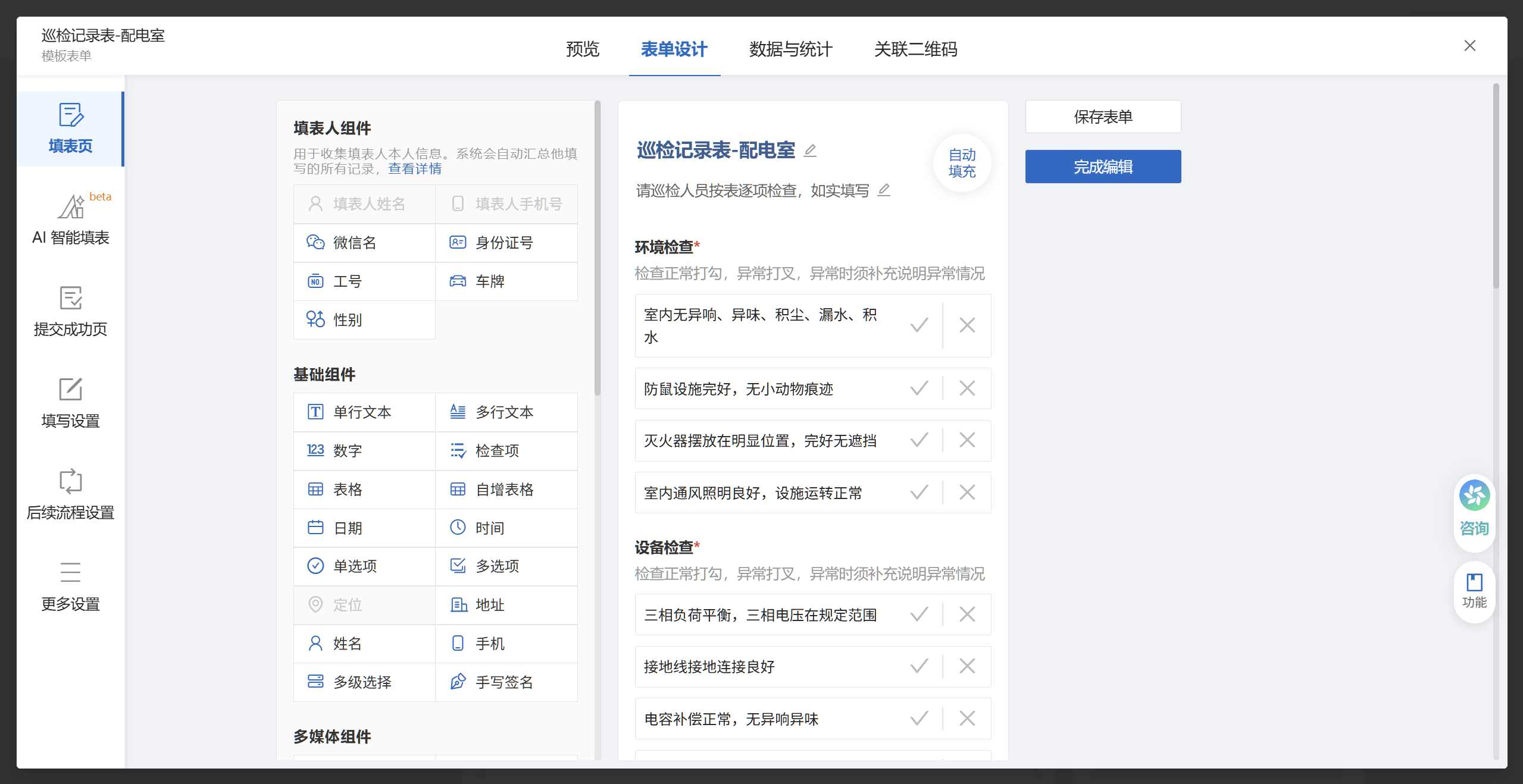
CaoLiao QR Code offers two methods for generating codes: single code creation and bulk QR codes generation. Suggestions for selection are as follows:
- Single Code Creation: Suitable for a small number of large devices, such as boilers, tower cranes, etc., and for first-time users.
- Bulk QR Codes Generation: For a large number of devices with the same inspection items, such as fire extinguishers, distribution boxes, elevators, etc., device information can be imported in bulk to generate QR codes at once.
3. Print and Post QR Code Labels
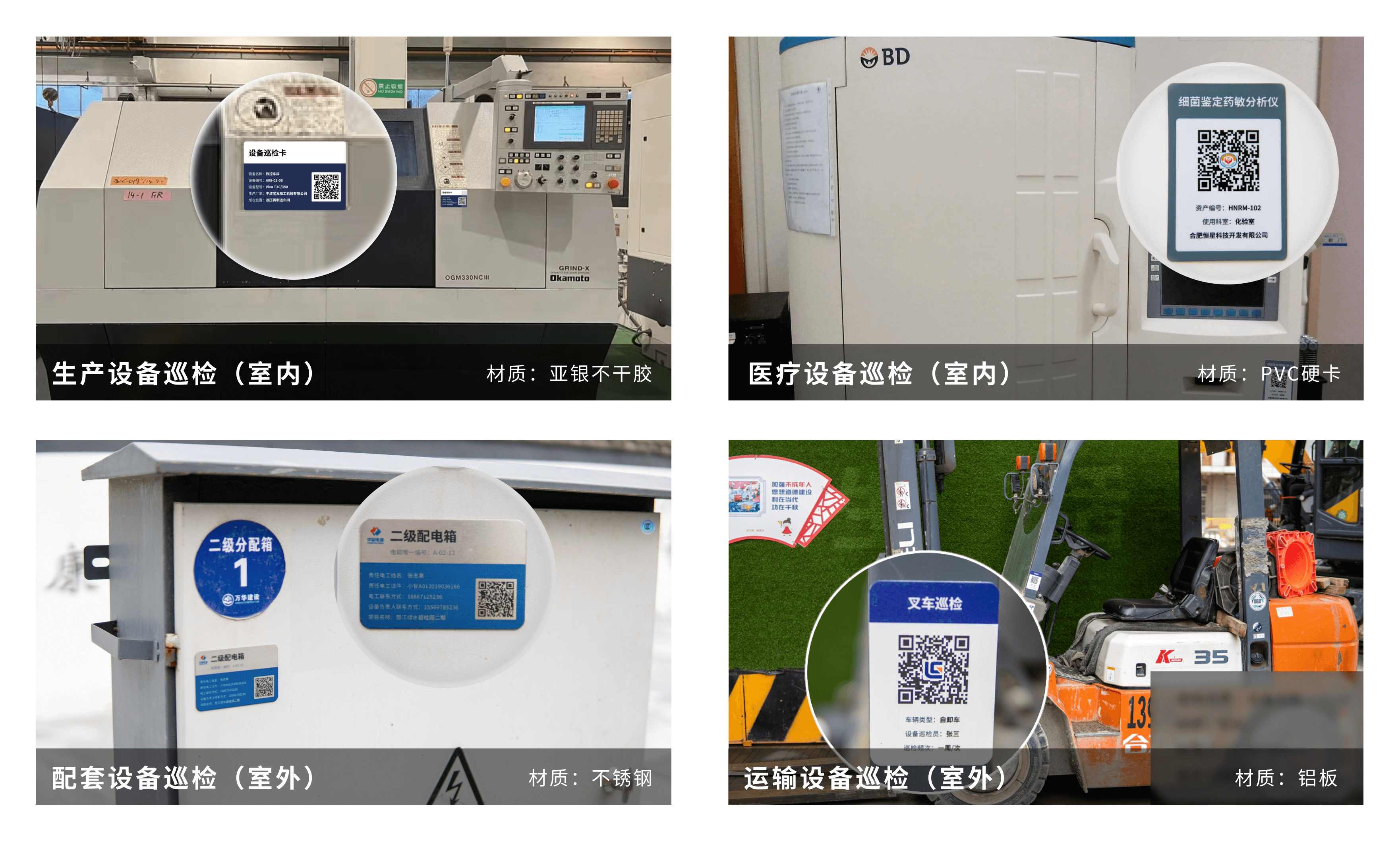
After the QR codes are generated, choose a suitable label style, download and print the QR codes, and paste them onto the corresponding devices. It is recommended to choose a conspicuous, clean, and easy-to-scan location for pasting, avoiding high-temperature and greasy areas.
- Indoor Devices: Materials like PVC stickers can be used.
- Outdoor Devices: It is recommended to use sun-resistant and waterproof metal nameplates, such as stainless steel or aluminum plates.
During the initial trial run, you can first print the QR codes on ordinary paper and temporarily attach them to the devices with transparent tape for small-scale testing and verification. Replace them with durable labels after the verification process is successfully running.
4. Scan Code for Inspection
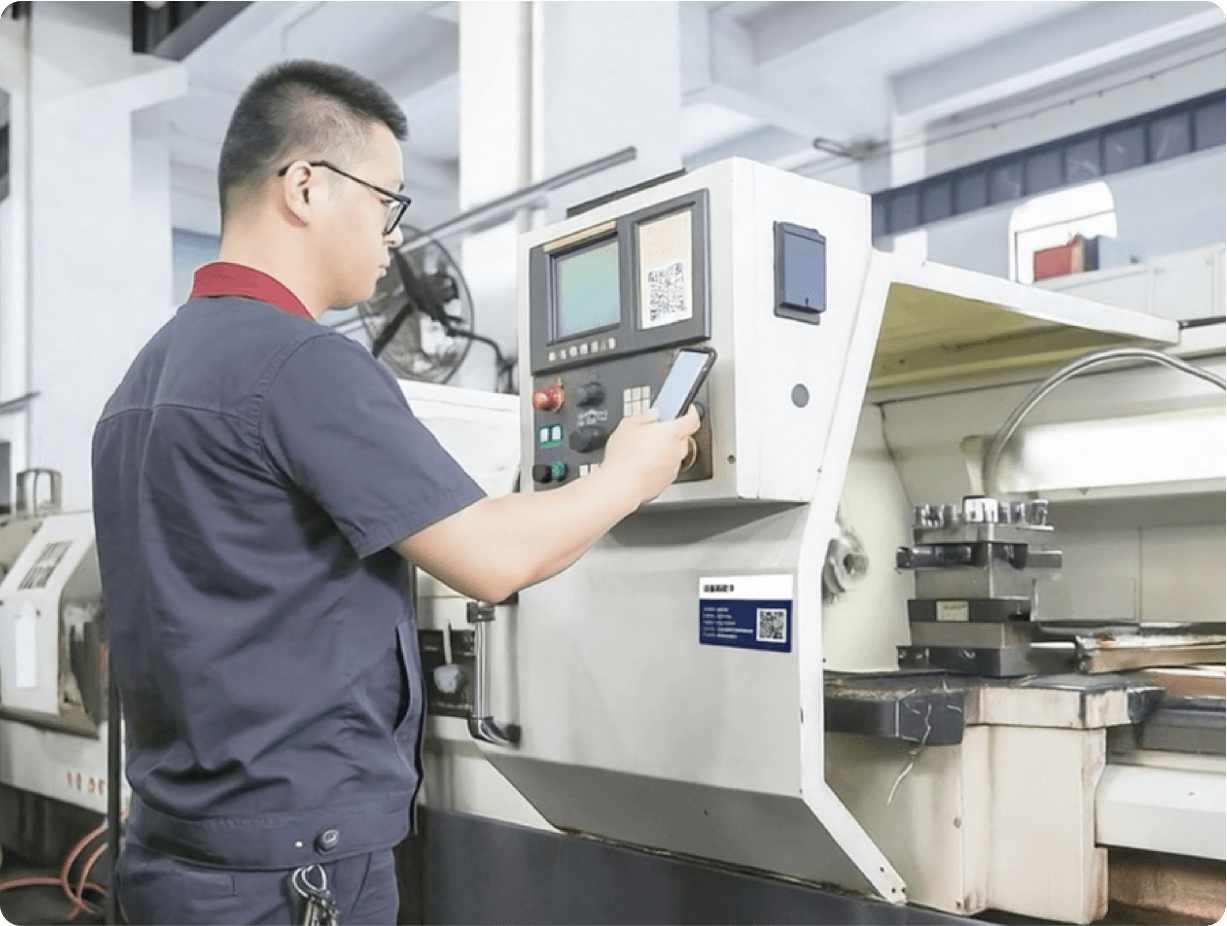
Once the QR code labels are pasted, they can be put into use. Inspection personnel can use WeChat to scan the code, view the basic information of the device, fill in inspection records, and upload on-site photos. After submission, the system automatically records the time. No login or additional software installation is required.
5. View and Export Inspection Data
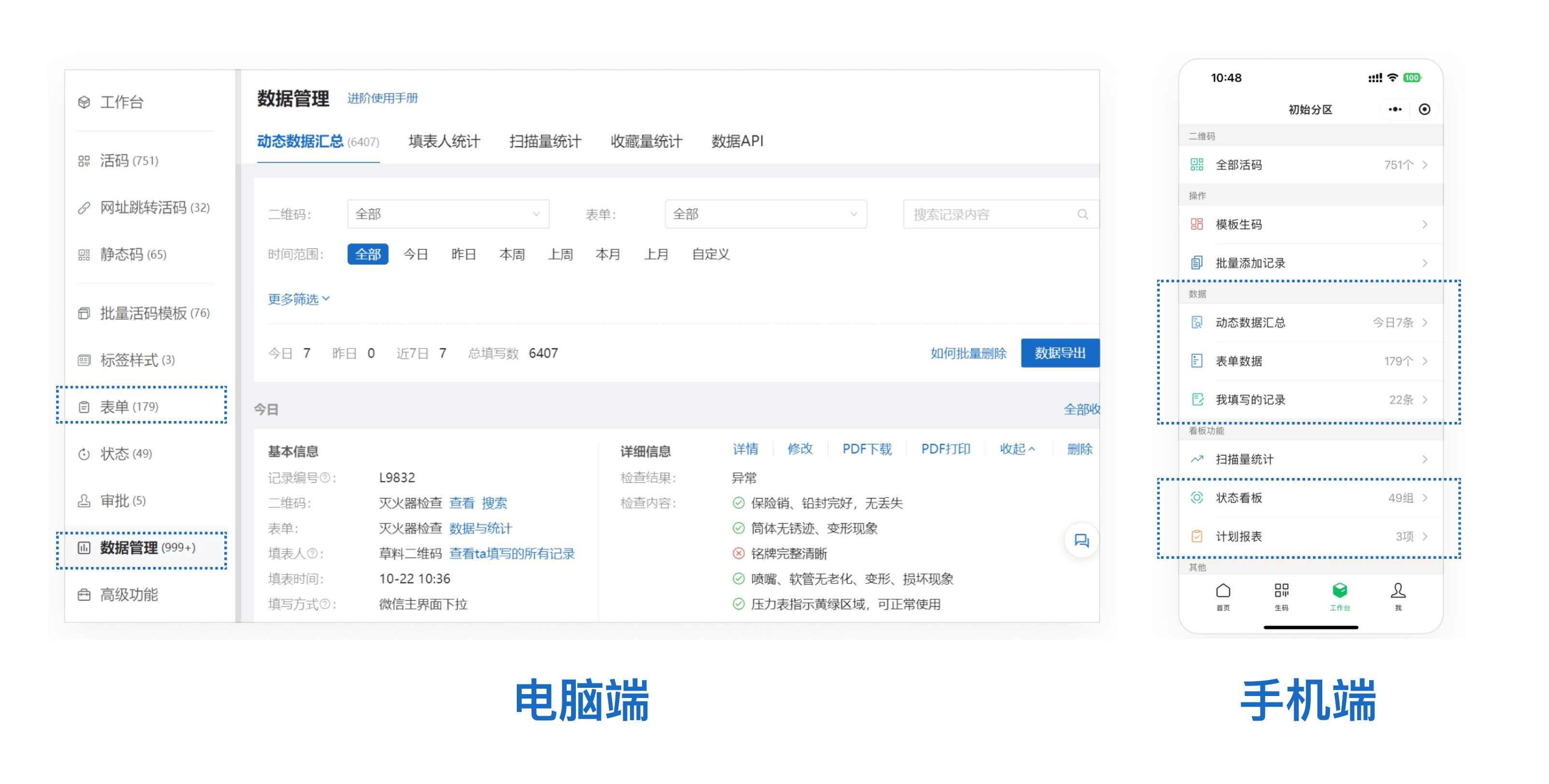
All inspection records are automatically synchronized to the backend. Managers can view summarized data on a computer or mobile device, and can also export Excel sheets or PDF documents for printing and signing, archiving, responding to inspections, etc.
4. Advanced Usage
After the basic process is running smoothly, if you want the inspection system to better fit your internal management requirements, you can incorporate more features to achieve the following effects:
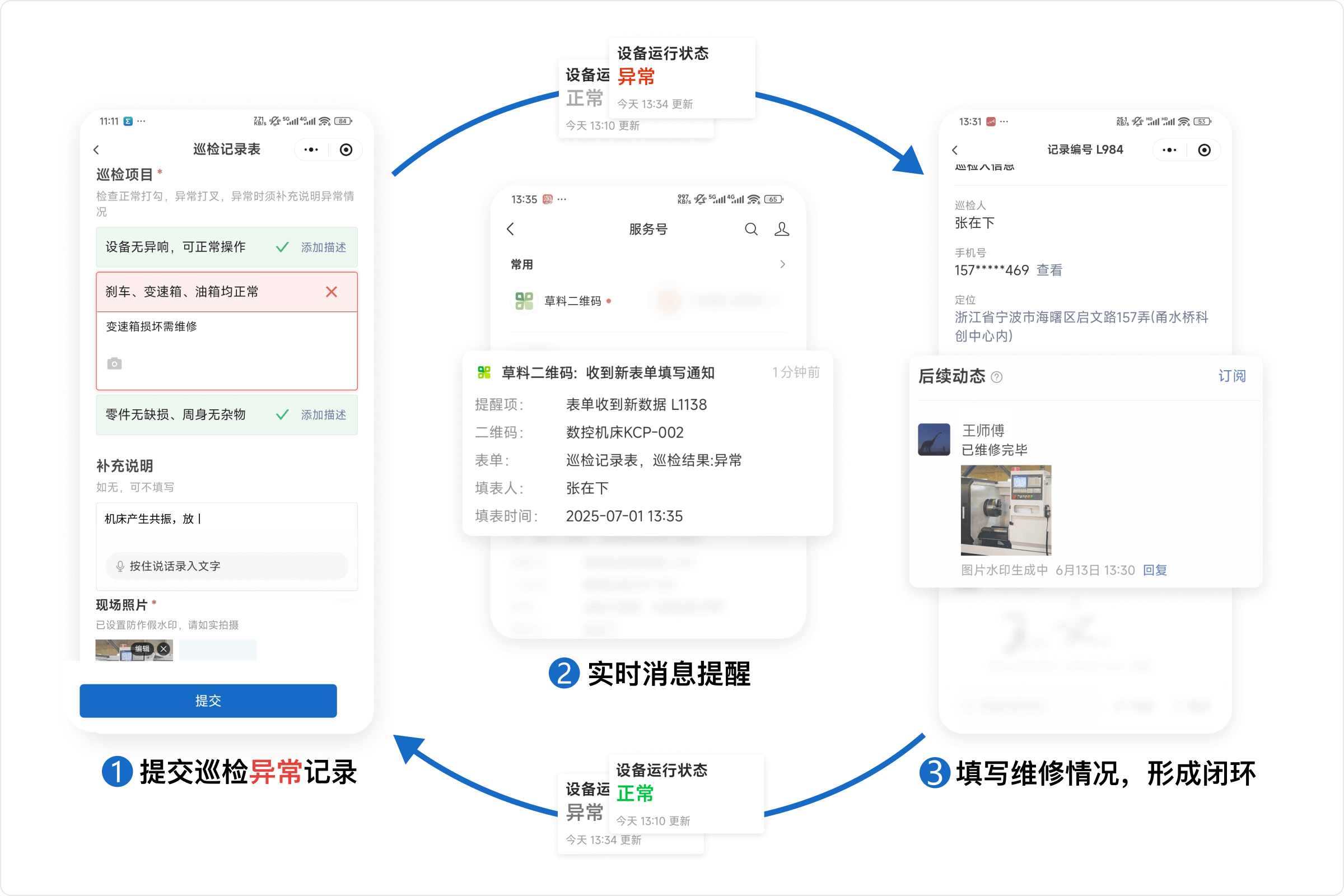
- Automatic Abnormal Alerts and Closed-Loop Handling: Enable the "Notifications" and "Status Updates" features. Upon detecting an abnormality, the system will automatically update the device status to "Abnormal" and notify maintenance personnel. After maintenance is completed, maintenance personnel can fill in the maintenance results in the "Follow-up Actions" section of the QR code, forming a data closed loop. This ensures there is a record, follow-up, and closure.
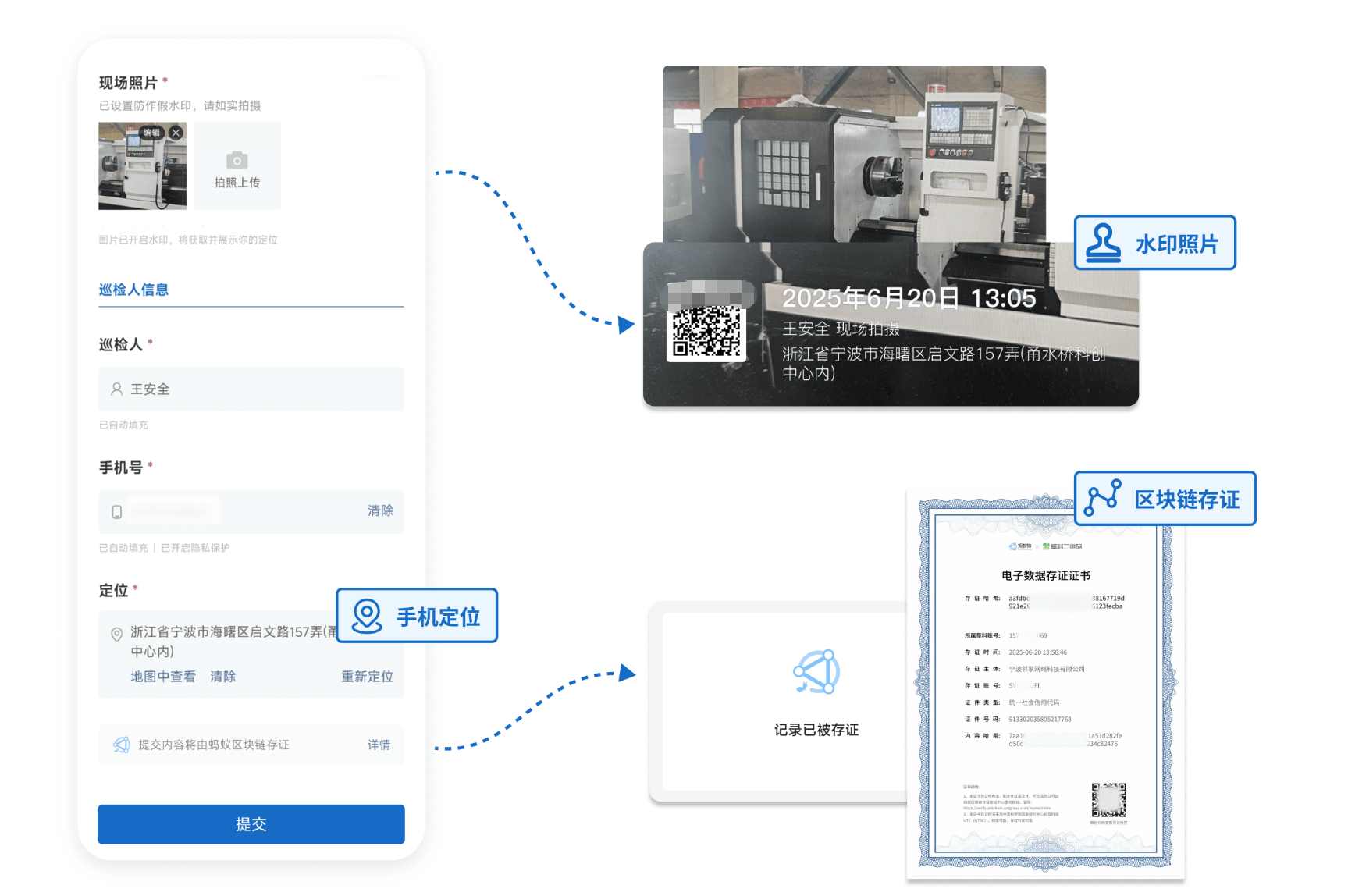
- Prevent Inspection Fraud: By restricting geographic location, forcing on-site photos, adding photo watermarks, etc., ensure that inspectors actually go to the site to perform checks, effectively preventing omissions and falsification. Combined with "Blockchain Notarization," inspection data is stored on the blockchain and cannot be tampered with. It can serve as judicial evidence reference during later tracing.
- Set Inspection and Maintenance Plans: Utilize CaoLiao's "Plan Management" feature to set inspection and maintenance cycles (e.g., weekly, monthly) based on the device's nature and risk level. The system will automatically remind relevant personnel to complete tasks on time and mark unfinished items to prevent omissions.
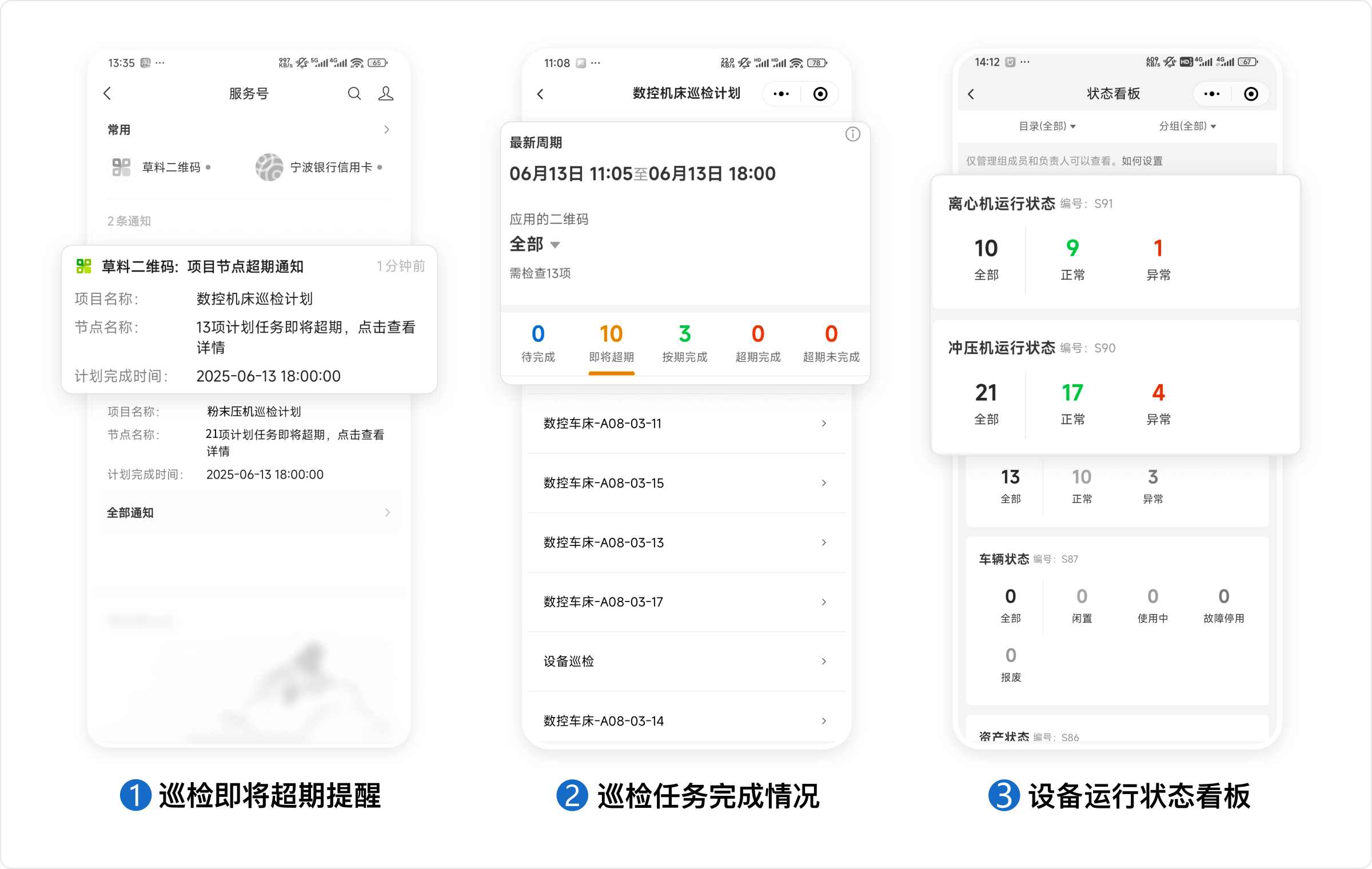
- Data Analysis and Dashboard: Through the mobile data dashboard, administrators can view the status of various devices, the proportion of abnormalities, overdue tasks, etc. If using the API function to connect to third-party data analysis tools, visual data reports can be further created to more intuitively analyze equipment failure trends and evaluate personnel performance.

5. Employee Usage and Training
The CaoLiao QR code inspection system itself is designed to be very simple. Employees do not need to install any App; they only need to use WeChat's "Scan" function on the device's QR code to fill in inspection records and upload photos. However, to ensure the smooth implementation of the new solution, simple training and promotion for relevant employees should be conducted before launch:
- On-site Demonstration: Before official launch, arrange an on-site demonstration (which can be completed in 5 minutes) to ensure frontline personnel know how to scan, fill in, and upload photos. It is recommended to let employees personally scan and experience the process to familiarize themselves and increase acceptance.
- Clarify Institutional Requirements: Reiterate the importance of inspections and company safety regulations, emphasizing that inspections must be performed on-site by scanning the code, and cannot be filled out by others or recorded afterwards. Explain that the system has enabled anti-fraud features such as location restrictions, on-site photos, and watermarks to ensure employees take inspection work seriously.
- Post Operation Guides: For easy daily reference by employees, compile the "QR Code Inspection Operation Process" into a one-page illustrated guide and post it on the workshop bulletin board or near the equipment. The CaoLiao official website provides standard templates that can be downloaded and used with minor modifications.
- Collect Feedback and Continuously Optimize: Collect employee opinions during the trial run and promptly optimize form fields and process details.
6. Practical Tips for Implementation
During the actual implementation process, some seemingly minor issues can easily affect the effectiveness of use. Here are a few reminders summarized from experience:
Many enterprises directly use the default template in the initial stage, ignoring the particularities of their own equipment. As a result, the inspection forms do not fit the actual on-site situation well, and employee enthusiasm for reporting is low. Improper selection of QR code labels and careless pasting often lead to脱落 and unscannable codes, especially for outdoor equipment in complex environments, where material and pasting methods must be taken seriously. Furthermore, some enterprises only stop at the "generate QR code" step, with no one setting the inspection frequency or designating responsible persons, causing usage to quickly become a mere formality. More seriously, some discovered equipment abnormalities are not followed up with timely maintenance, leading to problem backlogs and模糊 responsibilities.
Some employees, seeking convenience, may engage in代扫 or补录,破坏 the authenticity of the records. To prevent such behavior, it is recommended to enable anti-fraud features while combining them with institutional spot checks for verification. Also, many managers, in pursuit of "quick launch," roll out the system across the entire factory from the start, resulting in poor effectiveness due to the lack of pilot testing and feedback optimization.
The most稳妥 approach is to first select a department or workshop as a pilot, spend a week or two smoothing out the process, and thoroughly addressing issues. After gaining成熟 experience, gradually promote it to the entire factory, making it easier to be accepted during promotion.