Sample Inspection Report Collection
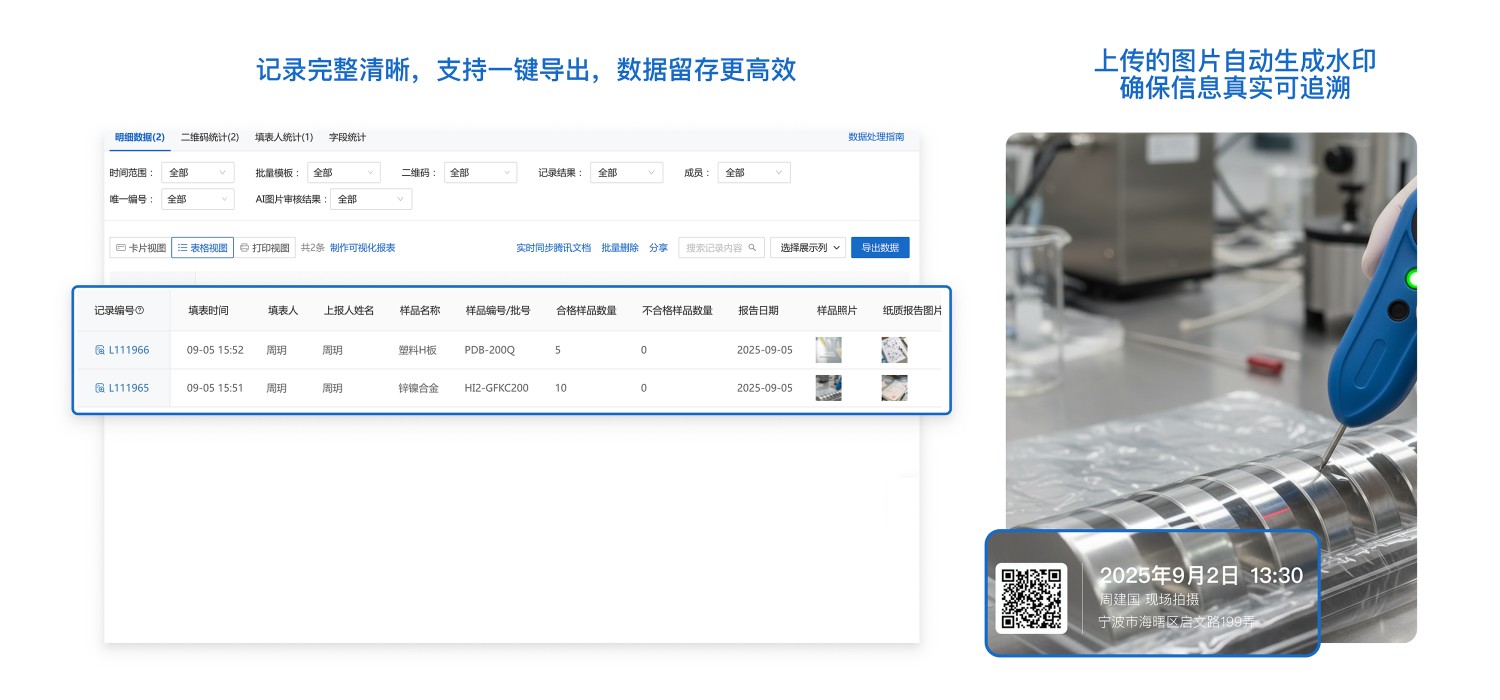
Suitable for sample inspection scenarios in industries such as manufacturing and chemicals. Inspectors can scan the code to enter sample information and inspection results, upload photos, and the system automatically adds watermarks to ensure data authenticity and traceability. Managers can view inspection data in real-time, search by batch or product, and export data tables for quality traceability and statistical analysis, helping companies standardize processes and improve efficiency.
Basic Information
- Monthly Installations: 134
- Monthly Visits: 38
- Original Text: https://cli.im/template/detail/121463685
Case Label Image

Usage Instructions
I. Core Value
Daily Work Documentation
All inspection results and sample photos are uniformly stored, forming a complete inspection archive and avoiding the loss of paper records.
Reliable Quality Traceability
When quality issues arise, corresponding batch inspection reports and photos can be quickly located, supporting accountability tracking.
II. Usage Process
1. Generate a Sample Inspection Report Collection QR Code
Click [Use Now] to create a QR code and modify the form content according to your actual needs.
2. Post the QR Code in the Workplace
Download the QR code label, choose an appropriate printing method, and post it in the workplace.
3. Employees Scan the Code to Fill in Inspection Results
Employees scan the code via WeChat on their mobile phones during work, fill in information such as sample name and quantity, and upload on-site photos and inspection reports as proof.
4. Administrators View and Export Data
Managers can view inspection data in real-time in the workbench and export to Excel with one click for easy statistics and archiving. Data Summary and Statistics Feature
5. Data Trusted Notarization (Optional)
Form records can be connected to Ant Blockchain Notarization. Submitted data is automatically recorded on the blockchain, generating a unique notarization hash and timestamp to ensure the authenticity of records, which can serve as electronic evidence and enhance data reliability. This feature is currently not enabled for this form. If needed, please refer to the tutorial
III. Frequently Asked Questions
1. Is it free to use? What are the differences between the paid and free versions?
Answer: The free version has unlimited usage, data is stored long-term, and the latest 5,000 collected images are stored for free, meeting basic usage needs.
If multi-person collaboration management, data review, viewing more than 5,000 images, or using more advanced data export functions are required, it is recommended to purchase the paid version.
For detailed selection advice, see: Version Selection Recommendations