How Enterprises Can Choose an Efficient Personnel Access Management System
Original: https://cli.im/article/detail/2311
Personnel access management is a crucial part of security management for enterprises, communities, and industrial parks. Traditional paper-based registration methods suffer from issues like incomplete information and illegible handwriting, making post-event queries difficult. With the advancement of digitalization, using an access management system can effectively enhance security and management efficiency. This article discusses how to choose a suitable access registration system from the perspective of information management, sharing some practical cases and ideas, hoping to provide you with some inspiration.
I. Requirements in Different Scenarios
1. Commercial Buildings: High Visitor Volume, Balancing Efficiency and Security
Commercial office buildings experience a high daily volume of visitors, requiring differentiation of access permissions for various tenants, necessitating a balance between security and efficiency. Internal employees typically access using employee cards or access control cards, while managing external visitors such as clients and couriers is more complex.
- Core Needs: Visitors should be able to quickly register information such as name, purpose of visit, and contact person. The system should support verification and approval; in special cases, signing a safety commitment letter might be required. It should be able to issue temporary QR code passes to restrict the visitor's activity areas and time slots.
- Selection Suggestion: Simple registration + Approval functionality + Handwritten signature
2. Residential Communities: Safety First
The core task of residential communities is to ensure the safety and order of the community. Regarding personnel management, residents within the community can generally move freely, while external personnel, including visitors, delivery personnel, and maintenance workers, need to be registered. Previous paper-based access registration had many issues, such as incomplete information filling and illegible handwriting, making subsequent investigation difficult.
- Core Needs: Visitors need to record identity, visited resident, vehicle license plate, etc. The system should distinguish between homeowner and visitor permissions.
- Selection Suggestion: Quick registration + Data export + Permission levels
3. Industrial Parks: Strict Control
Industrial parks cover large areas with multiple entrances and exits, requiring higher security standards. Employees within the park usually access with credentials, while various types of visitors, such as suppliers, contractors, freight drivers, and government personnel, need to register and obtain permission to enter.
- Core Needs: Visitors need to register basic information and a list of carried items; vehicles require license plate and driver information. Stricter review of visitor identity and purpose of visit is needed, supporting pre-booking and approval, and recording entry and exit times.
- Selection Suggestion: Strict registration + Photo function + Advance booking + Access pass
II. Comparison of Mainstream Software Platforms
1. CaoLiao QR Code
CaoLiao QR Code is a no-code platform with flexible functionality, supporting users to build access registration systems by combining features according to their actual needs, with low usage costs. It is suitable for buildings, communities, and industrial parks.
- Features: Provides visitor registration templates to quickly generate visitor registration QR codes. Visitors fill in information via WeChat scan, administrators view and export registration information in real-time from the cloud, supports booking approval, pass generation, and notifications.
- Permission Management: Supports multi-level permission settings, allowing assignment of different permissions to property managers, security personnel, and visitors, ensuring security.
- Cost: Basic QR code generation and usage are completely free, with unlimited scan times and long-term data storage. The free version meets 90% of the needs for most enterprises' access management. For more complex personnel collaboration and approval needs, the advanced version (1280 RMB/year) can be purchased.
- Advantage: No need to develop an App, high usability, simple deployment. Currently used by many properties and parks.
2. WeCom Applications
WeCom visitor registration applications are based on the WeCom ecosystem (e.g., WeVisitor Registration), suitable for office buildings, enterprises, and institutions.
- Features: Visitors scan the code on-site to fill in time and purpose, on-duty personnel approve and verify online, backend export to Excel.
- Cost: Basic features are free; paid version is 1598 RMB/year. Suitable for enterprises already using WeCom.
- Advantage: Integrates with WeCom; after visitor registration, notifications can be directly pushed to WeCom; employees can have visitors register or make appointments via WeCom.
3. Other Optional Platforms
Besides the two mainstream solutions mentioned above, there are also some traditional third-party visitor management systems that offer QR code registration functionality, which can be chosen based on specific needs.
- Scallop Visitor System: This is a comprehensive visitor management solution suitable for factories with access control or turnstile integration. It supports visitor booking and invitation, on-site registration, real-name verification, access permission settings, etc., effectively controlling key areas and preventing unauthorized access.
- Property Management APPs: Many smart property platforms, such as Hikvision Interconnection, Country Garden Smart Community System, etc., have built-in visitor booking and QR code access functions. These platforms are typically aimed at communities and industrial parks. Besides visitor scan-and-access, they often integrate intercom access control, video surveillance, and other modules, achieving more comprehensive security management. If the property has already deployed such a platform, its visitor scan registration function can be fully utilized to avoid redundant construction.
- Self-built Simple Registration System: If you have strong technical development capabilities, you can use some form tools to build a simple system with low cost, but limited functionality, suitable for temporary use.
The following is a comparison of the main platforms:
| Platform | Key Features | Cost | Applicable Scenarios |
|---|---|---|---|
| CaoLiao QR Code | WeChat scan for booking, registration, real-time viewing/export, booking approval, notifications | Free | General scenarios, flexible deployment |
| WeCom Visitor | Booking, approval, automatic notifications, record query | Hardware integration requires payment | Enterprises already using WeCom |
| Scallop Visitor System | WeChat booking, dynamic QR codes, full-process management | Priced based on requirements | Scenarios requiring strict control, optional hardware |
| Hikvision Interconnection Platform | Visitor management + Intercom access control + Surveillance | Priced based on requirements | Smart communities and industrial parks |
| Self-built Simple System | Basic form registration | Free or low cost | Temporary use, simple requirements |
III. Implementation Steps for Visitor Registration QR Codes
Whether applied in commercial buildings, residential communities, or industrial parks, you can use CaoLiao QR Code to build a visitor management system.
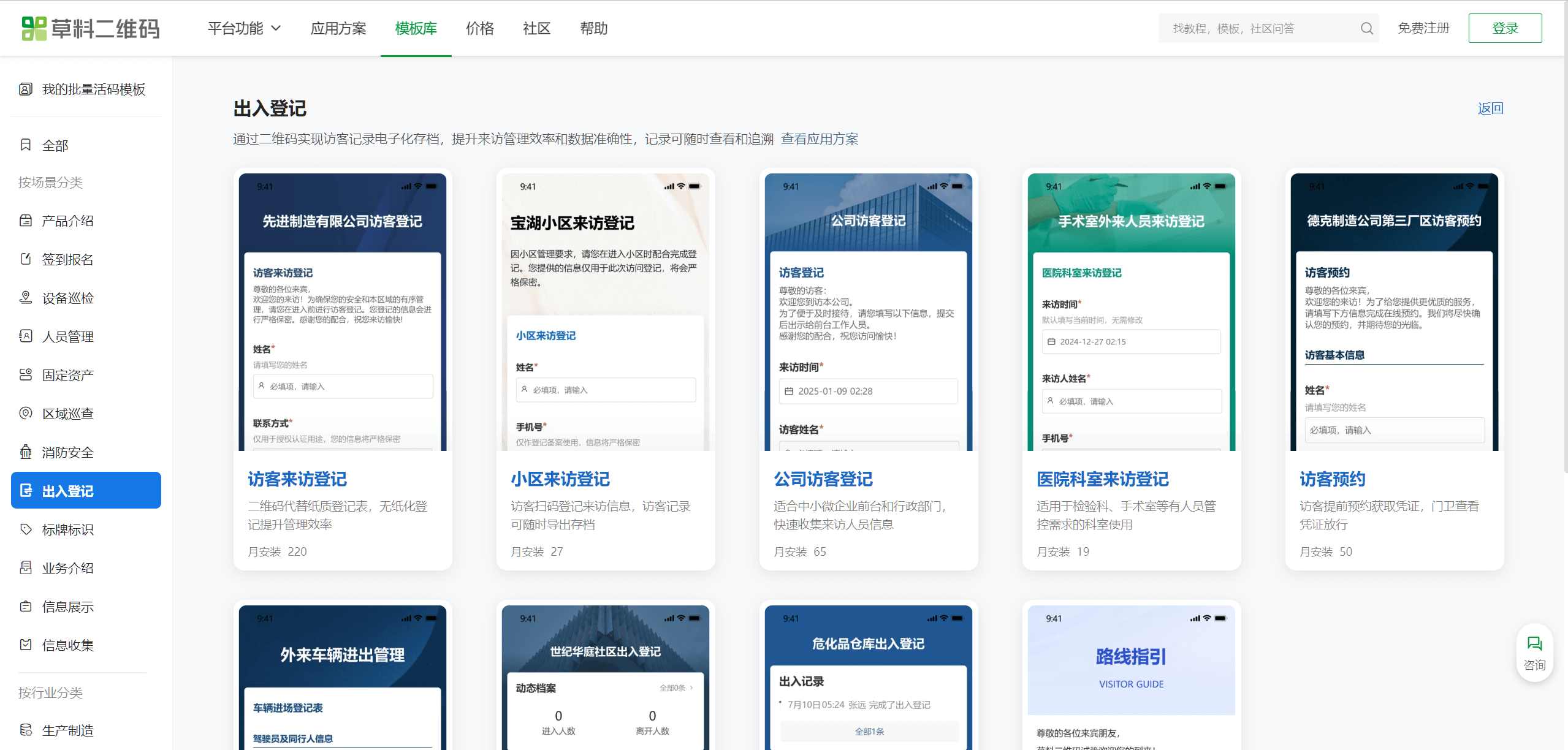
Step 1: Visit the CaoLiao QR Code Official Website
On a computer, go to the CaoLiao QR Code official website, click on [Template Library], and select a suitable access registration template based on your application site. All templates are free to use.
Step 2: Modify the Template Content
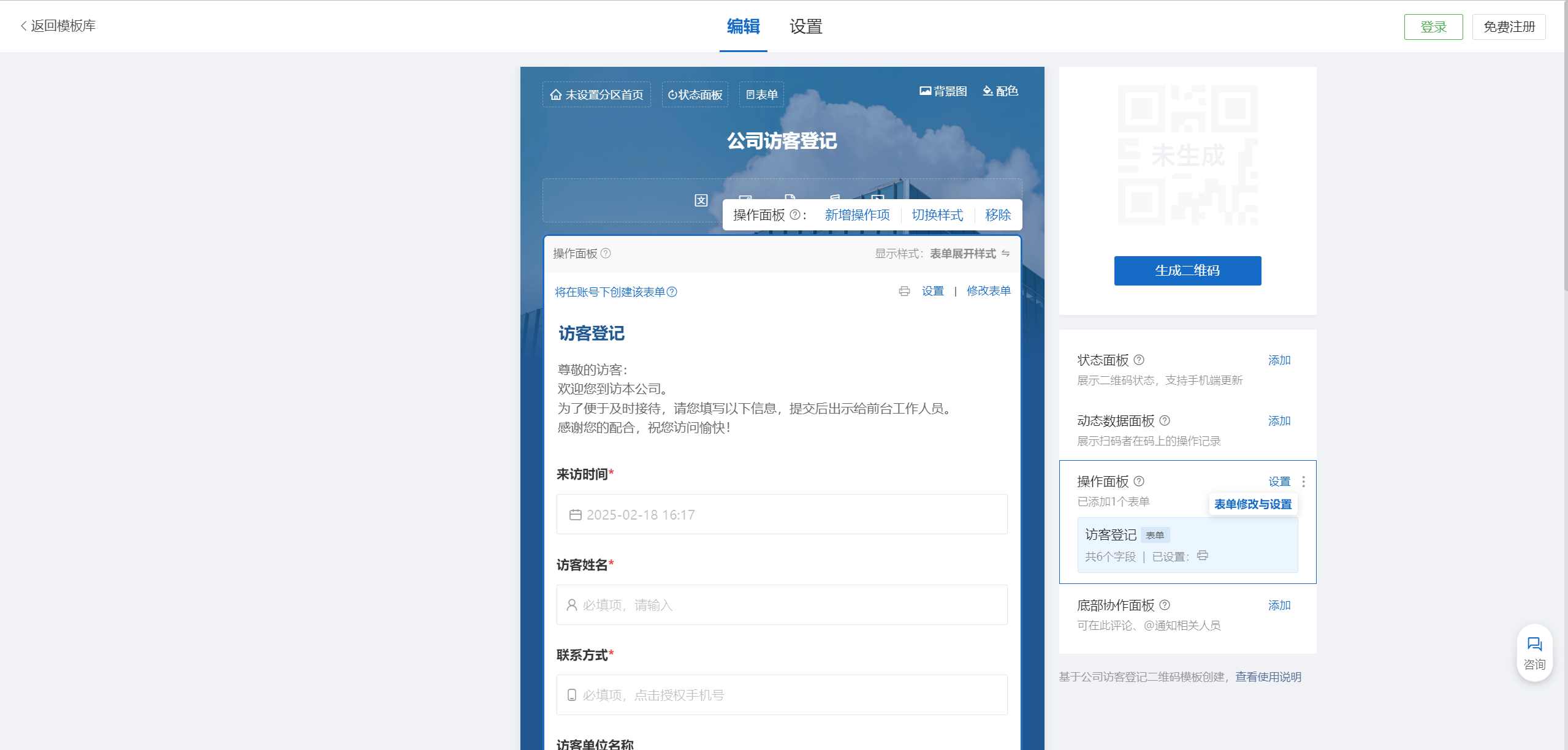
The content in the template is example content. You can add visit instructions, handwritten signature fields, on-site photo uploads, etc., according to your actual needs. You can also delete some information to simplify the required registration content.
Step 3: Print and Paste the QR Code
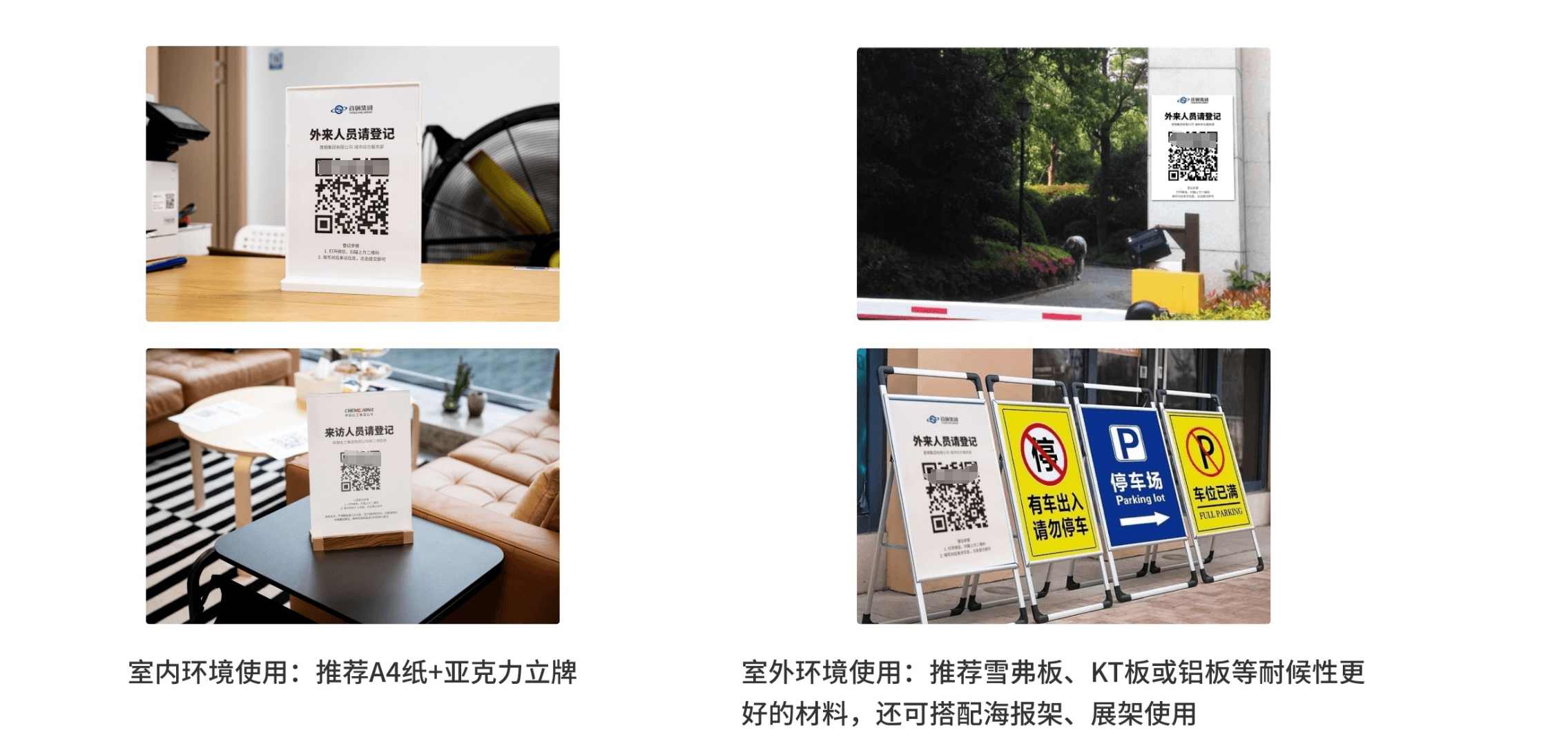
After modifying the template, click [Generate QR Code] to create the visitor registration QR code. The CaoLiao platform provides many QR code label templates. You can choose a suitable label template, download it, and print it on A4 paper using an office printer. Place the printed QR code at the reception desk or paste it at the entrance/exit to start using it.