Event Registration and Check-in
Suitable for events requiring on-site check-in, such as performances, exhibitions, or forums. After registration, participants present their QR code for on-site scanning and check-in. Organizers can track attendance in real-time and export check-in data.
Basic Information
- Monthly Installations: 5360
- Monthly Visits: 18085
- Original Text: https://cli.im/template/detail/121463023
Case Label Image

Instructions
Using the registration and check-in template achieves the following:
- Register and check-in via WeChat scan; no additional app download required.
- Link event registration with check-in. Upon successful registration, participants receive a unique verification code as an entry pass for on-site check-in.
- View registration and check-in records by scanning the code or export them directly to an Excel file for archiving.
Usage Flowchart:
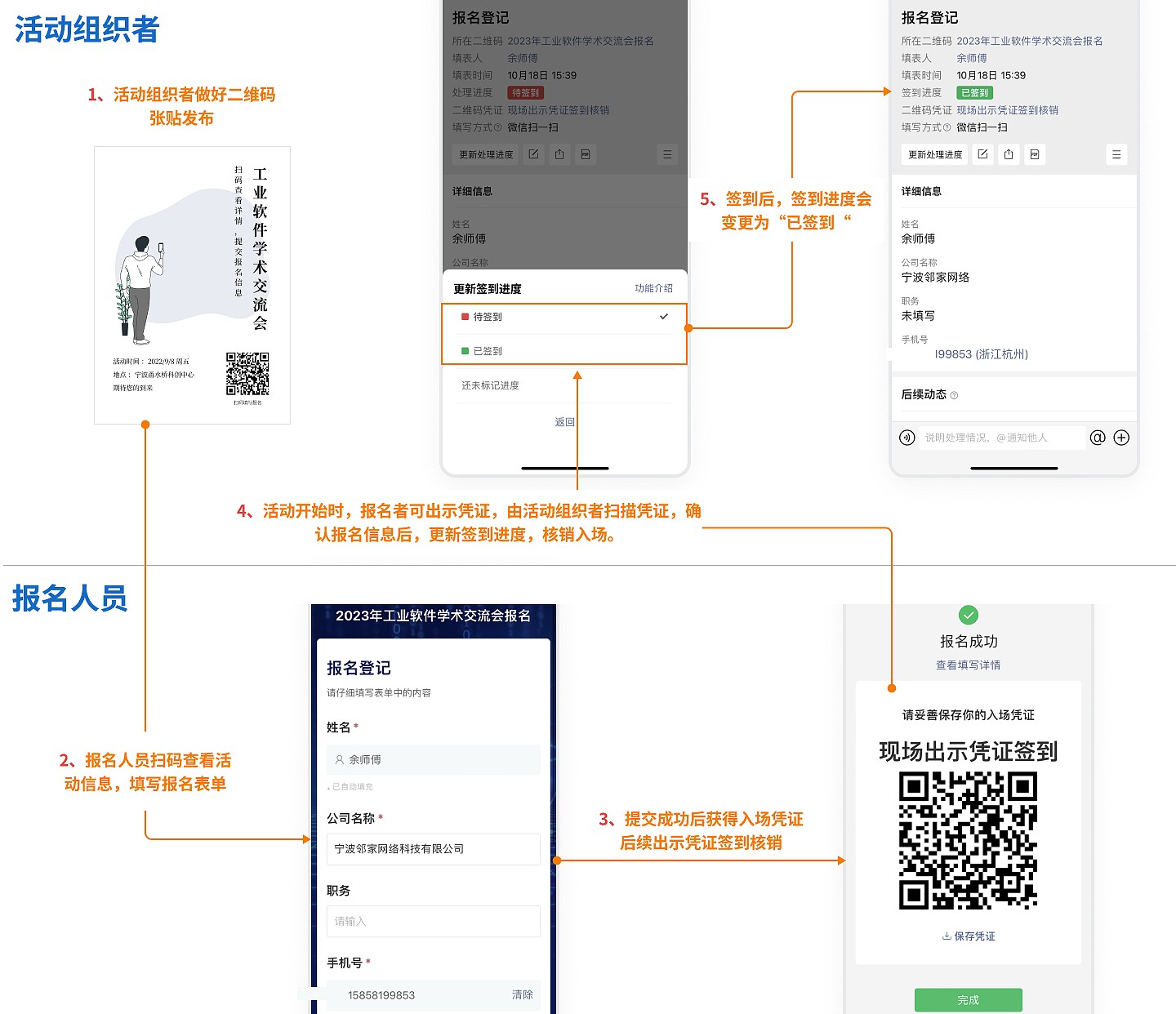
Steps:
Step 1: Generate QR Code
Click "Use Now," modify event information and QR code style, then click Save and Generate Code.
Step 2: Download and Publish
After successfully generating the code, click "Download and Print" to print and post using standard A4 paper. It can also be published online for participants to scan and register.
Step 3: On-site Check-in
At the event start, scan the QR code voucher displayed by participants upon successful registration. Update the processing status to complete check-in.
Step 4: Export and Archive
After the event, administrators can scan the code to view all registration and check-in records or export them from the backend for archiving. View Tutorial