Building Fire Protection Facility Inspections
Created with reference to the building fire protection facility inspection record form from GB25201-2010 "Maintenance Management of Building Fire Protection Facilities". Inspection content can be freely added or removed. Used for building fire protection facility inspections. Data is permanently saved and can also be exported for physical archiving.
Basic Information
- Monthly Installations: 108
- Monthly Visits: 32
- Original: https://cli.im/template/detail/121463637
Case Tag Image

Usage Instructions
I. Applicable Scenarios & Industries
Suitable for daily inspection management of building fire protection facilities, reporting facility faults, and tracking their resolution.
Relevant Standards
Referencing GB25201-2010 "Maintenance Management of Building Fire Protection Facilities", the following are mandatory requirements:
- Personnel Qualifications: Personnel engaged in inspecting building fire protection facilities must pass the vocational skill appraisal specific to the fire protection industry and hold a Vocational Qualification Certificate at the Primary Skill level or above.
- Inspection Frequency:
- Public entertainment venues during business hours: Should be integrated with the requirement to inspect public entertainment venues every 2 hours. The inspection of building fire protection facilities may be partially or fully incorporated accordingly, but all building fire protection facilities must be inspected at least once daily.
- Key units for fire safety: Inspect daily.
- Other units: Inspect at least weekly.
II. Core Features
1. Standardized Inspection Records
- Fill out forms by scanning a WeChat QR code to record inspection time, personnel, and facility status.
- Automatically generate inspection logs with timestamps, replacing paper record books.
2. Closed-Loop Fault Management
- Report Complex Faults: For faults that cannot be resolved on-site, use a dedicated form to trigger the maintenance process, supporting images and text descriptions.
- Track Repair Status: Allows reporting of repair progress and confirmation of fault resolution in the follow-up actions for the fault report, forming a closed-loop for fault handling.
3. Facility Information Display
- Centrally display basic parameters like facility brands and quantities, facilitating responses to regulatory spot checks.
III. Usage Process
- Create QR Code: Modify the template form content based on your unit's fire protection facilities and inspection details, then generate a QR code.
- Configure Permissions: You can set the form's filling permissions to be assigned only to inspection personnel.
- On-site Use: Inspection personnel scan the code to fill out inspection records according to the specified frequency (supports location tagging). When encountering faults that cannot be resolved immediately, fill out the "Fault Report" form, which will automatically notify the administrator.
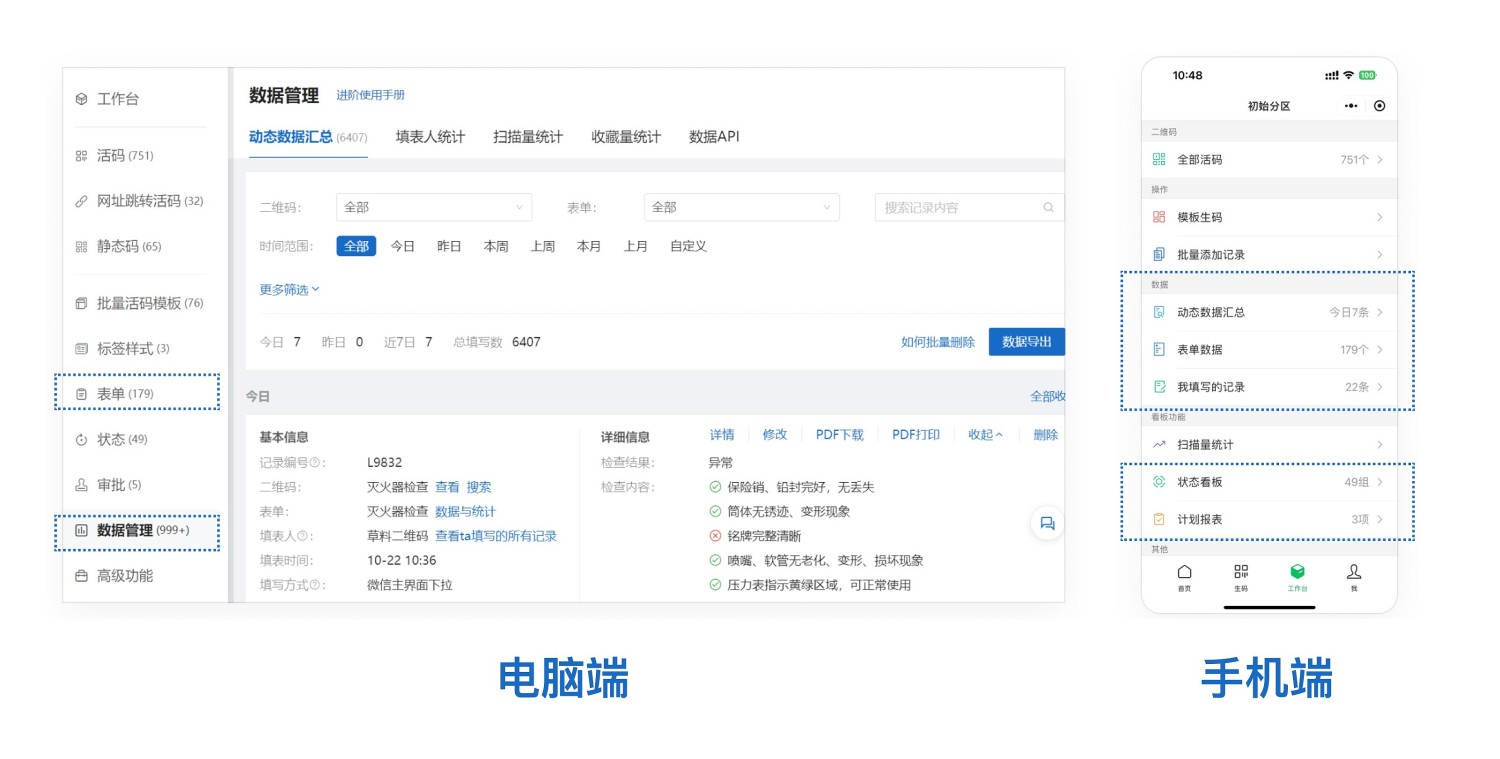
- Data Management: Managers can scan the code to view all inspection records or use the dynamic data summary to review all data.
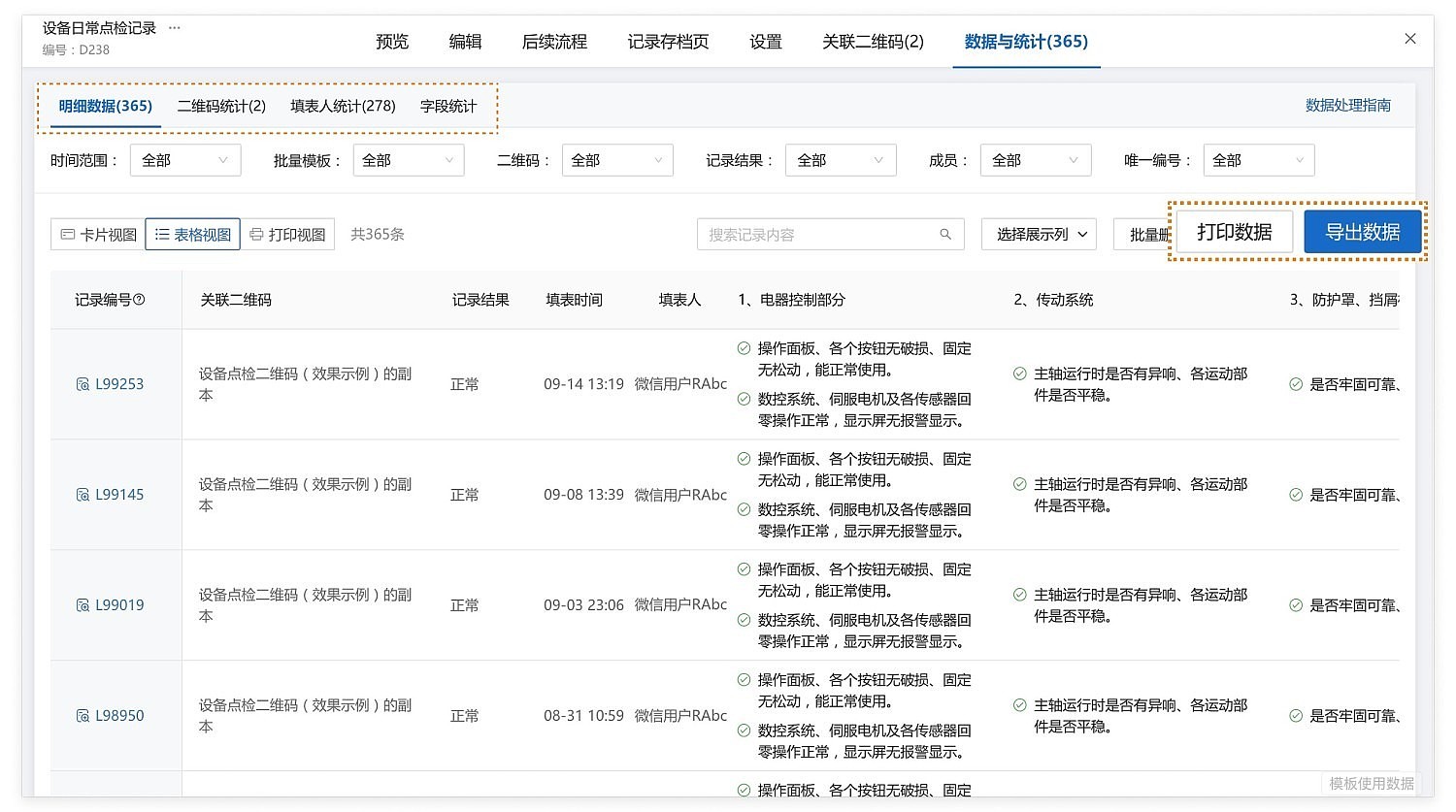
- Data Export: Inspection records can be exported as Excel or PDF files for archiving.
Frequently Asked Questions
Q1: How to prevent fraudulent inspections?
A: Enable photo watermarks (including time/location), enforce on-site location tagging, and restrict access to historical records. For details, see: https://cli.im/help/53134
Q2: How long is the data saved?
A: Referencing GB25201-2010 "Maintenance Management of Building Fire Protection Facilities", the following are mandatory requirements:
The original technical documentation for building fire protection facilities should be kept permanently. The archiving period for the "Fire Control Room Duty Record Form" and the "Building Fire Protection Facility Inspection Record Form" shall be no less than one year. The archiving period for the "Building Fire Protection Facility Fault Repair Record Form" shall be no less than five years.
Data from QR code inspections is saved online permanently and can also be exported or printed for physical archiving.