Fire Safety QR Code
Original: https://cli.im/case/detail/2256
Solution Overview
By posting a dedicated QR code on each fire safety device, facility, or location, using the QR code as an electronic record to log basic information and all inspection/rectification details, helping you complete daily fire safety tasks more conveniently and compliantly.
- Inspectors: Scan with WeChat, check items, take a photo on-site – no training required.
- Managers: Data is no longer scattered. Use the dashboard to see which devices were missed or have anomalies. Records can be exported to Excel for statistics or visual reporting.
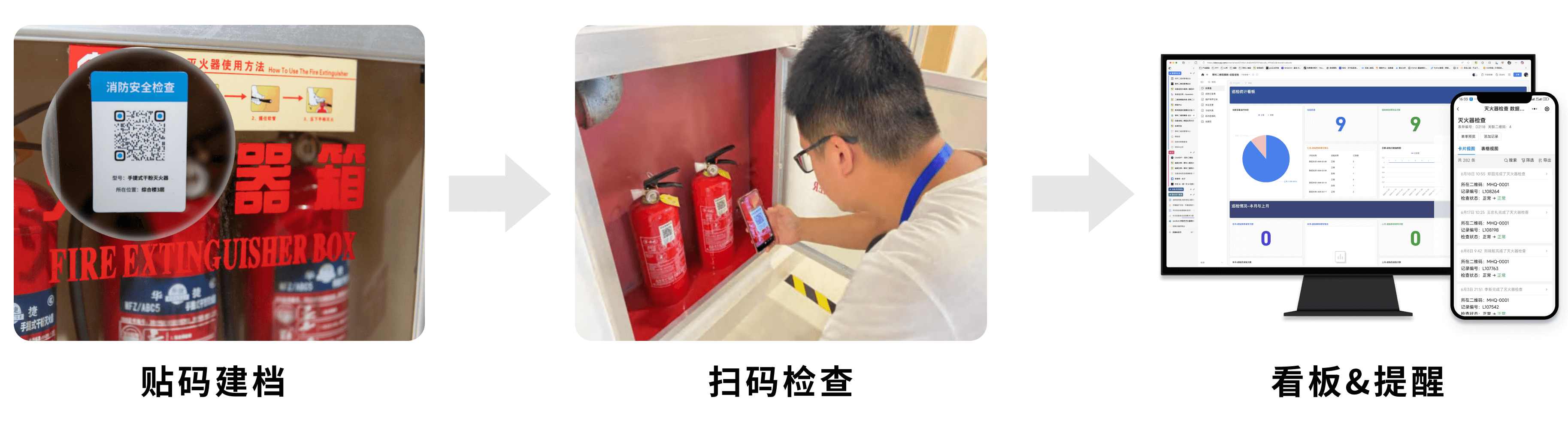
This solution features quick deployment, low cost, and requires no training for frontline staff, making it ideal for small and medium-sized enterprises to rapidly implement digital management for daily fire safety work.
If you already understand the solution's effectiveness, you can directly jump to the setup tutorial to start building your fire inspection QR code system.
Solution Effectiveness

1. For Managers: Standardize Inspection Data, Improve Management Level
Before Inspection
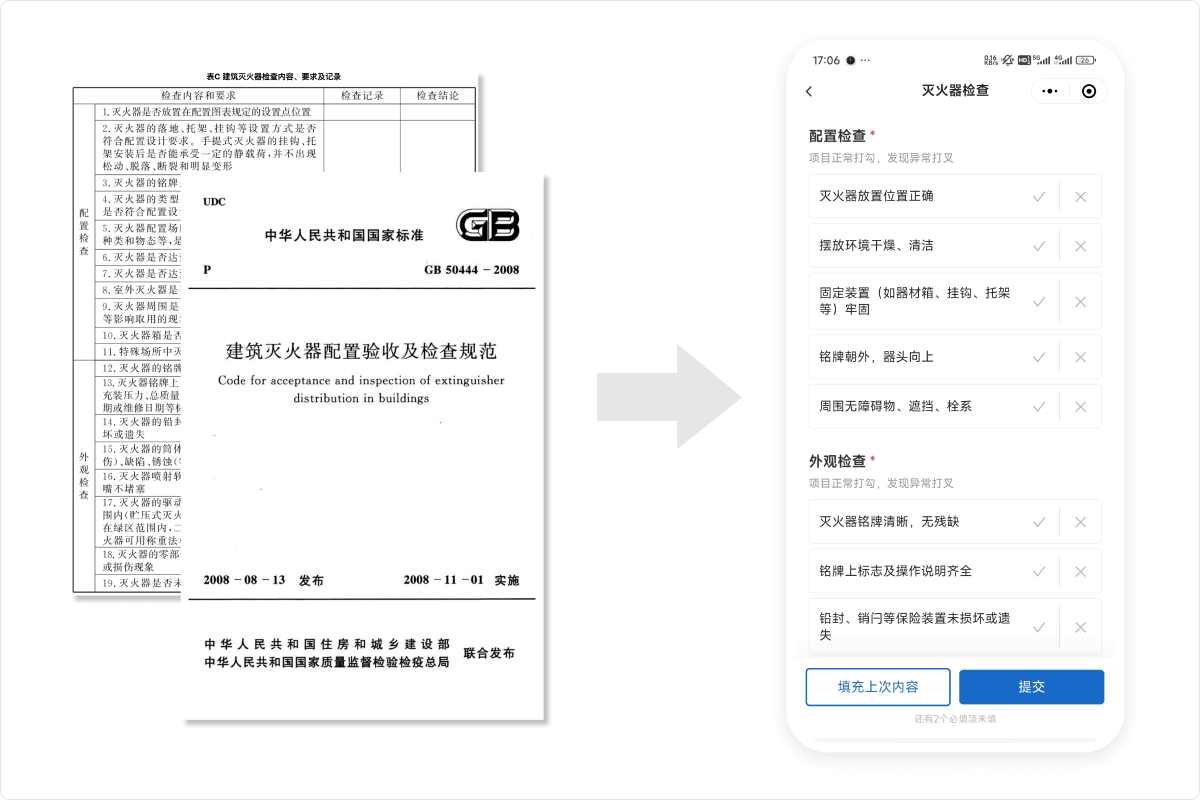
- Standardized Templates: Templates created based on relevant national standards and industry regulations like GB50444-2008, GB55036-2022, GA95-2015, etc., ready to use without modification, improving compliance.
- Automatic Task Scheduling: Set inspection cycles, generate inspection plans with one click, reducing omissions.
- Clear Role Division & Permissions: Clear separation of duties between inspection and management, strictly controlled permissions for viewing and form filling.
- AI Smart Form Filling: Starting from the Advanced version, supports preset photo rules, AI automatically identifies and judges photo compliance, further standardizing the inspection process. What is AI Smart Form Filling?
During Execution
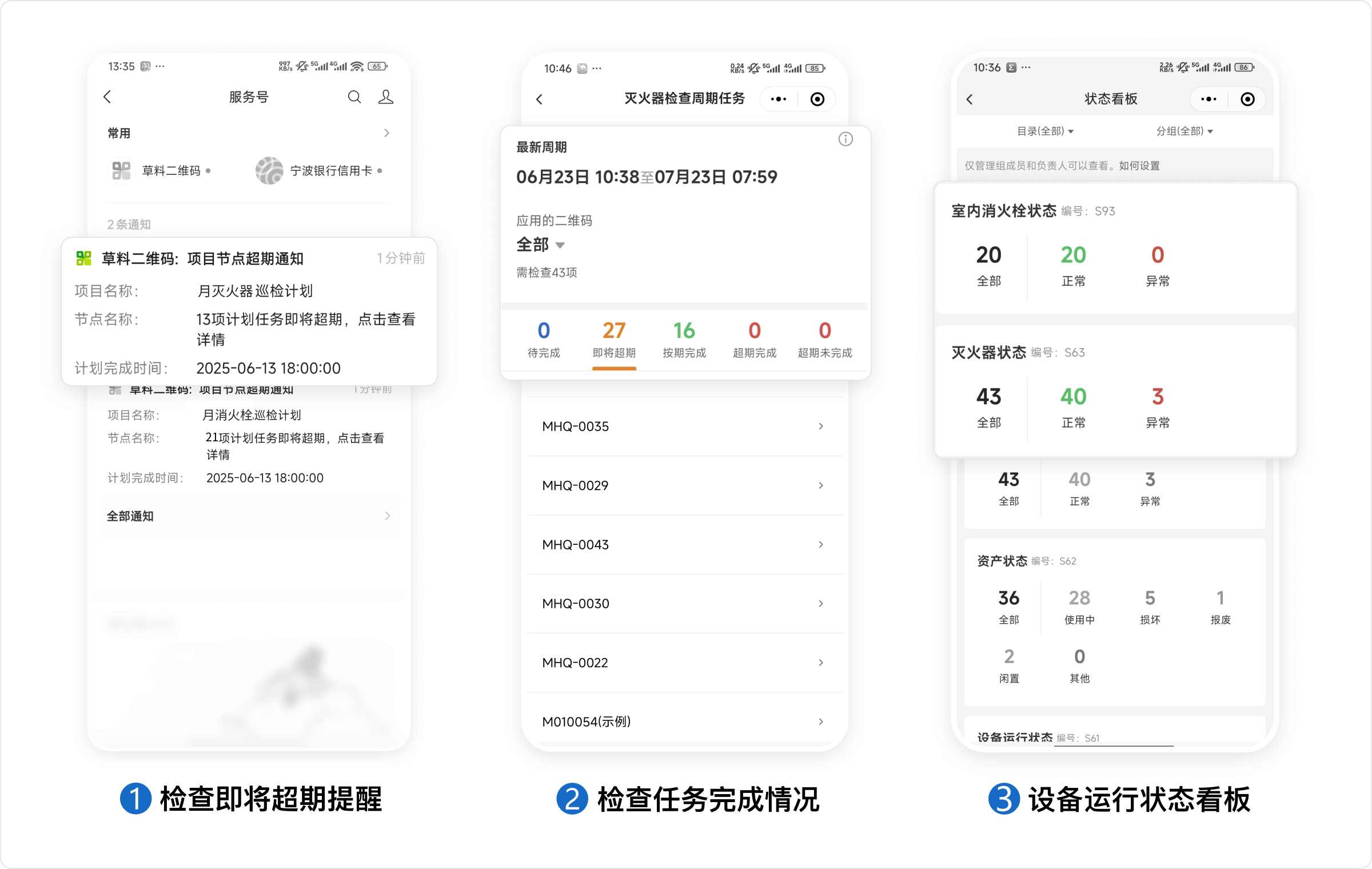
- Overdue Inspection Alerts: System automatically alerts managers when inspection tasks are nearing their due date.
- Mobile Viewing: Check overall inspection task completion status on your phone, identify omissions.
- Grasp Overall Situation: QR codes display the latest device status in real-time; the mobile workbench lets you monitor the operational status of all devices.
After Inspection
- Permanent Record Retention: Cloud storage, export Excel by cycle, zero-barrier statistical analysis and archiving.
- Zero-Code Visualization: Data integrates with visualization tools in 5 minutes; dashboards auto-generate charts after setup, saving time and effort in reporting.

2. For Inspectors: Scan and Work, Minimal Staff Resistance
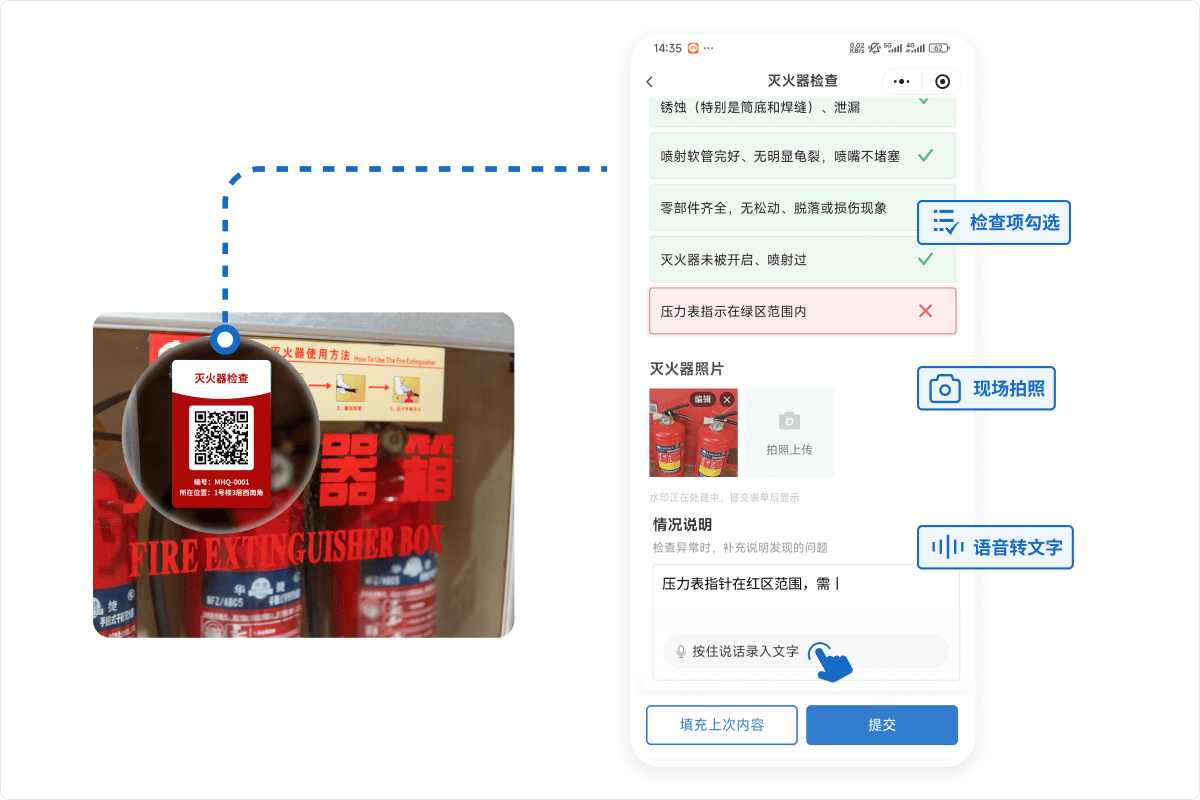
- WeChat Scan to Inspect: Paste QR codes on devices, no need for paper forms or installing any APP.
- Standardized Item Checking: Check normal items directly, write details only for problematic ones, saving time while ensuring quality.
- Photo Evidence: Forms support uploading on-site photos, visually recording device conditions.
- Easy Filling: Auto-fill repetitive content; use speech-to-text for descriptions, avoiding typing hassle.
Anti-Fraud Measures
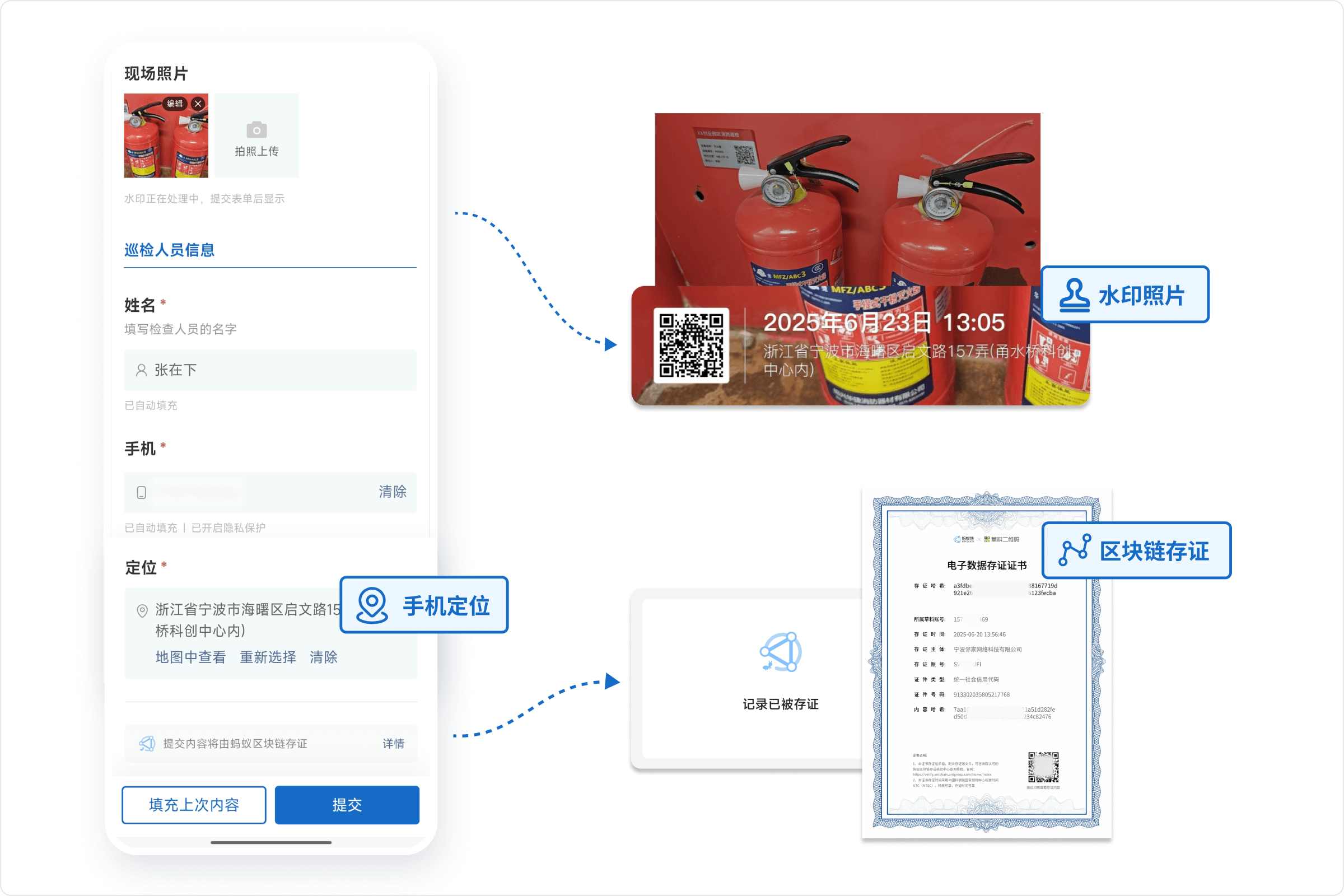
- Location Restrictions: QR code cannot be opened if the inspector is beyond a certain range from the device, ensuring on-site inspection.
- Mandatory On-Site Photos: Device photos can only be taken and uploaded on the spot, prohibiting uploads from the phone gallery.
- Photo Watermark: System automatically adds inspection time, inspector name, and phone location to photos as proof.
- Blockchain Notarization (Optional): Inspection data stored on the blockchain, immutable. Can serve as judicial evidence reference for later tracing.
Solution Cost
We recommend:
- Free Trial: For pilot phases or small-scale use, start with the free version to create QR codes and experience the basic scan-and-inspect process.
- Pay as Needed: Upgrade to a paid version when the number of fire safety devices increases, or during promotion, e.g., when specific needs arise like "device fault messages need to be pushed to designated personnel" or "large volume of monthly inspections requiring viewing of many original images".
| Requirement Item | Free Version | Advanced Version | Flagship Version |
|---|---|---|---|
| Scan to inspect, run the process | Unlimited QR codes, scan times, record entries | ||
| Different devices, different responsible persons | - | ✅ | ✅ |
| Real-time fault alerts | Only the administrator | Can alert maintenance group | Can alert maintenance group |
| Original device photos | Last 5000 photos | Last 5000 photos | Unlimited |
| AI Smart Form Filling | - | ✅ | ✅ |
| Recommended Users | Single manager, small-scale pilot | Small teams with fewer devices/managers | Campuses, residential areas, office buildings with many fire facilities/devices and managers |
| Price | - | 1280 RMB/year | 2680 RMB/year |
For detailed version comparison and purchasing advice, please View Pricing Plans
Setup Tutorial
The following are detailed step-by-step tutorials to help you build your fire safety QR code system from scratch.
1. Basic Process
The basic process for using QR codes to complete fire equipment inspections consists of 4 steps. Following these steps will allow you to complete a simple setup and use of a fire equipment inspection system.

We have prepared a basic fire safety information package to help you quickly grasp relevant knowledge: Click to Download
Referencing relevant national standards and industry regulations, we have created QR code templates for common fire facility/equipment inspections and fire hazard patrols to help you set up faster and more standardized.
You can follow the Setup Tutorial, click the template library below, and select a suitable fire safety template to begin your setup.
2. Advanced Usage
The following are advanced features available after mastering the basic process, which can be configured as needed.
| Step | Tutorial |
|---|---|
| Create Inspection Plan | Click to View |
| Define Role Division | Click to View |
| Add Anti-Fraud Measures | Click to View |
| Real-Time Fault Message Alerts | Click to View |
| Data Visualization & Reporting | Sync to Tencent Sheets, Sync to Other Visualization Tools |
More Application Scenarios
Beyond fire facility and equipment inspection, CaoLiao QR codes can also improve management efficiency in the following fire-related scenarios, including but not limited to:
Fire Safety Knowledge Education Create informational pages with fire safety knowledge, video cases, or operating procedures, post them on team bulletin boards or near equipment. Employees scan to learn; content updates without changing the code.
Training & Drill Check-ins Place check-in QR codes at offline training or emergency drill sites. Scan with WeChat to check in, automatically recording name, time, department; export reports with zero manual work.
Fire Safety Tests Push test QR codes after training, supports auto-scoring for single-choice/true-false questions.

User Cases
1. Wenzhou Central Hospital Created "electronic IDs" for hospital fire facilities, standardizing inspection procedures. View Details
2. China Energy Engineering Group Guangdong Thermal Power Engineering Co. Safety inspections for large construction machinery, fire equipment, and tools in key areas. View Details
3. Yuhuan Second People's Hospital Equipped fire extinguishers and hydrants with "IDs", adding a technical safeguard for fire safety. View Details
Frequently Asked Questions
1. Can I set this up myself without an IT department? Absolutely. The CaoLiao platform is designed for frontline managers, requiring no programming or coding knowledge. Users simply drag and drop required functional modules and adjust settings based on needs. Anyone can use it.
2. Will my fire inspection records be saved permanently? Yes, data is permanently saved. You can view inspection status in the workbench at any time.
3. Can I try it first and buy the paid version only after the pilot works? Any impact? Yes. Upgrading your CaoLiao version only adds more benefits and will not negatively affect QR codes already in use. As long as you don't delete them yourself, the inspection records you've already filled out are permanently saved and will not be lost.
Start Building
The following templates are based on real user practices, helping you quickly learn from peers' experience and reduce setup costs.
[

Fire Extinguisher Inspection
One code per set of fire extinguishers, scan to record inspection status.
View Template](https://cli.im/template/detail/2695206 "Fire Extinguisher Inspection")[

Daily Fire Patrol
Conduct fire patrol inspections by area, promptly identify fire hazards.
View Template](https://cli.im/template/detail/121463313 "Daily Fire Patrol")[

Indoor Fire Hydrant Inspection
Scan to record hydrant status, real-time alerts for anomalies.
View Template](https://cli.im/template/detail/2684484 "Indoor Fire Hydrant Inspection")