Hazardous Waste Facility Signs
Simply fill in facility and waste information to generate QR codes for hazardous waste storage, utilization, and disposal facility signs. After generation, download and print them to affix onto existing facility signboards.
Basic Information
- Monthly Installations: 18,970
- Monthly Visits: 53,243
- Original: https://cli.im/template/detail/121463004
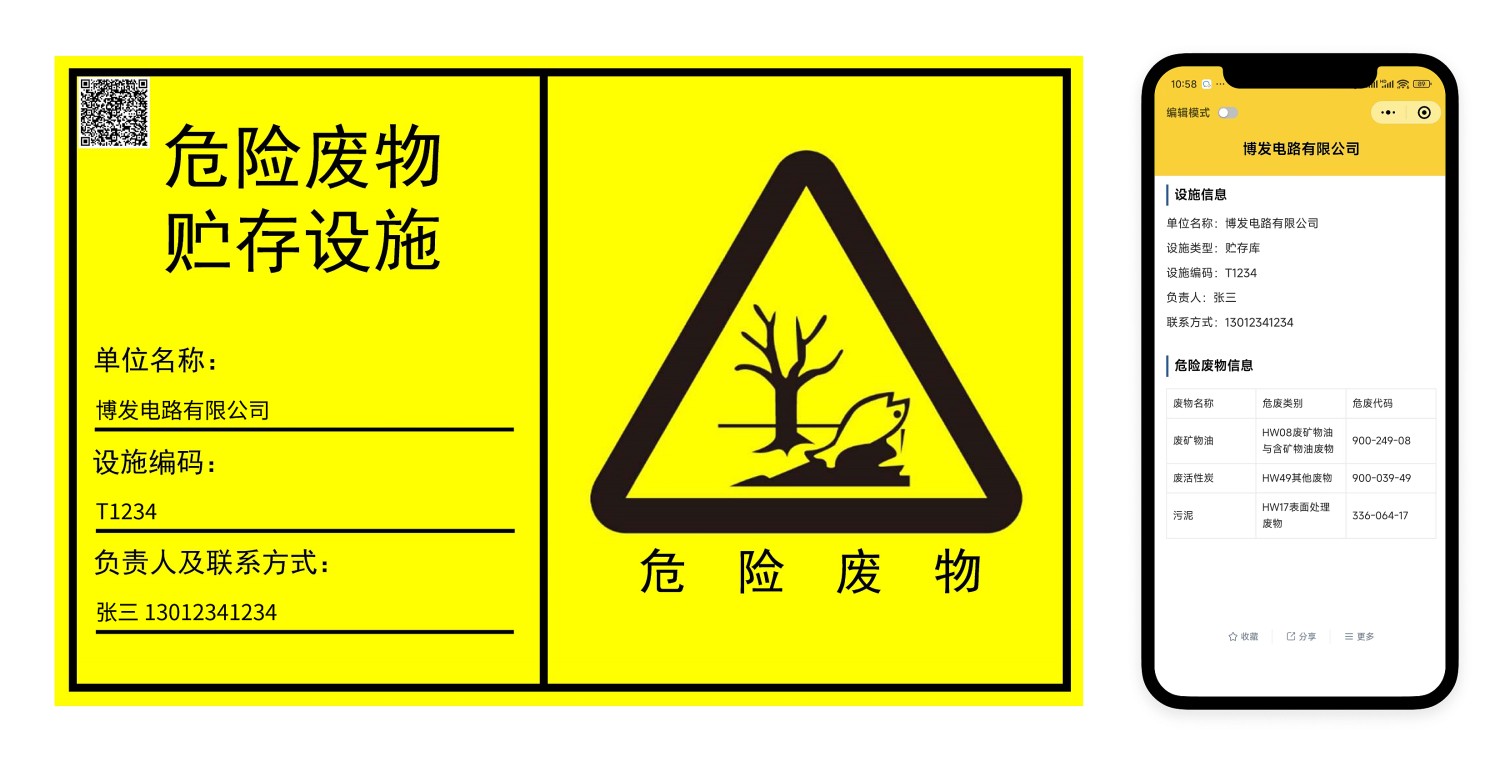
Case Label Image
Instructions
1. Template Purpose
- Compliance Operation: According to the "HJ1276-2022 Technical Specifications for Setting Hazardous Waste Identification Signs" issued by the Ministry of Ecology and Environment, all hazardous waste must have QR code labels. Scanning the code should display content consistent with the detailed hazardous waste information on the label.
- Convenient Production: To help you meet regulatory requirements, we provide pre-designed label templates. You only need to upload or fill in the detailed information of the hazardous waste to batch generate labels containing QR codes, without the need for self-design and layout.
- Scan to View: Each hazardous waste item generates a unique QR code. Scanning the QR code allows you to view all information about that hazardous waste, ensuring completeness and accuracy.
- Information Management: Hazardous waste QR codes generated using the same bulk template are displayed in a table format in your account's workbench, where you can view, add, and modify them at any time, achieving information management.
2. Usage Process
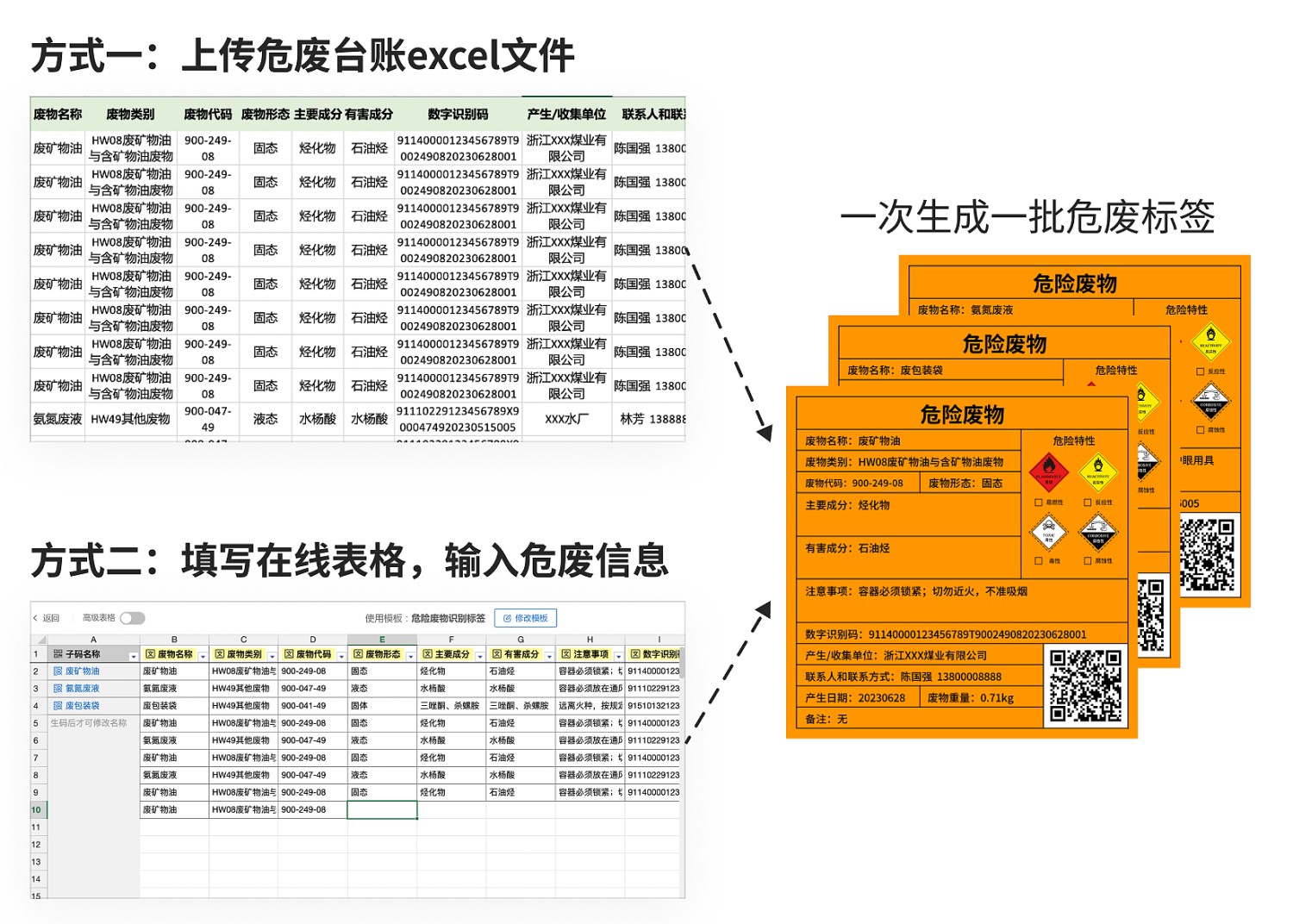
Since the content of hazardous waste signs is relatively standardized, you can use the template directly for code generation without modifying the template structure. To improve efficiency, it is recommended to use the 【Online Form Code Generation】 or 【Upload Excel for Code Generation】 methods to fill in hazardous waste information and batch generate corresponding QR codes:
- Online Form Code Generation: Directly fill in hazardous waste information in the web-based table; each row generates one hazardous waste label and QR code.
- Upload Excel for Code Generation: If you already have an Excel file with a hazardous waste inventory, you can upload it directly; each row of data will generate one hazardous waste label and QR code.
3. Label Download and Printing
After generating the QR code labels, you can download and print them in bulk.
- Material Recommendation: According to technical specifications, it is advisable to use sturdy and durable materials (such as 1.5 mm to 2 mm cold-rolled steel plates) with enamel or film lamination treatment. Materials that deform, deteriorate, or are flammable upon contact with water are generally not suitable. The posts for pillar-style signboards can be made of 38×4 seamless steel pipes or other sturdy and durable materials, treated for corrosion resistance.
4. Frequently Asked Questions
1. Is it free to use?
Answer: The template is free to use, with no restrictions on the number of codes generated or scan counts.
If you have other needs, such as wanting to upload audio/video or large amounts of graphic content, it is recommended to choose the Basic version. During the paid period of the Basic version, 1GB of high-definition, watermark-free storage space is provided; audio/video content can be played long-term, and the CaoLiao logo can be hidden. View Version Details
2. How long can the generated QR codes be used?
Answer: QR codes generated by CaoLiao are valid long-term, with no restrictions on scan counts or the number of users. You can use them with confidence.