How to Use File QR Codes for File Sharing and Management
Original: https://cli.im/article/detail/2337
As a junior staff member in an administrative unit, I often need to distribute various documents in my daily work. Recently, I discovered that the "File QR Code" feature in CaoLiao QR Code is incredibly convenient and practical. It's completely free to use and effectively solves problems related to file sharing and management. Next, I will share in detail, based on my own experience, how to implement multi-scenario applications of file QR codes through CaoLiao QR Code, hoping to provide some reference and inspiration for everyone.
1. Generate File QR Codes Instantly, View by Scanning
The "File QR Code" feature in CaoLiao QR Code is simple yet powerful, capable of generating QR codes for various files—such as Word, Excel, PPT, PDF, WPS, and over 60 other formats. The operation is very straightforward: on the file QR code page of the CaoLiao QR Code platform, upload your file, click the "Generate QR Code" button, and a QR code is created. Scanning it with a phone allows direct viewing or downloading of the file.
1.1 Permanently Valid QR Codes, Files Can Be Updated Anytime
One aspect I'm particularly satisfied with is that these QR codes are permanently valid and do not expire; the files inside can always be viewed and downloaded. This is especially important for QR codes printed on flyers or shared externally, eliminating worries about future invalidation. Furthermore, I can replace the file in the backend at any time without needing to change the QR code itself. For example, if I print a QR code on a poster and later find a minor error in the file, I can simply upload a new version in the backend, and people scanning the code will see the latest content. It's both time-saving and practical.
1.2 Preview Files Without Layout Issues
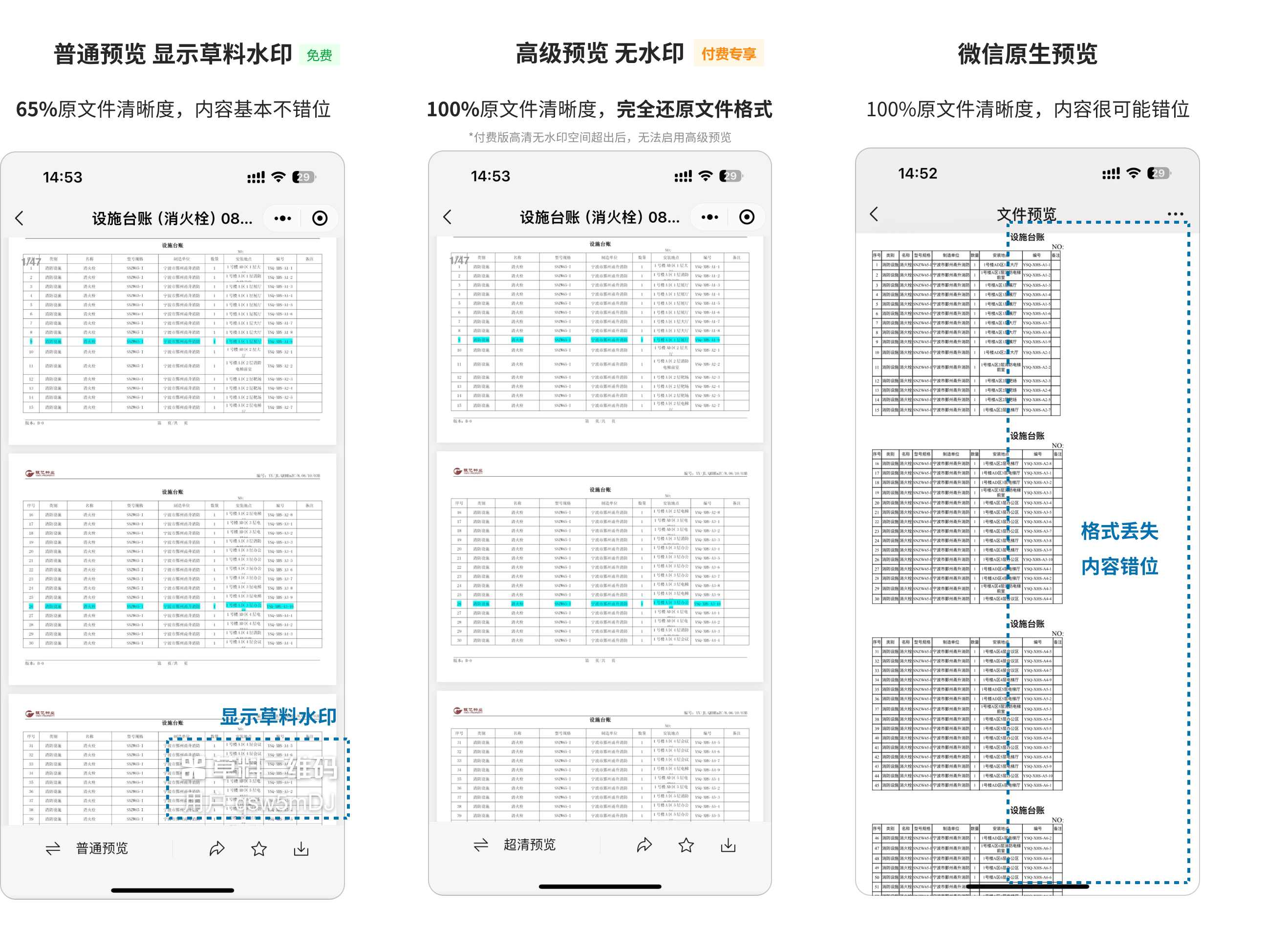
CaoLiao QR Code uses Alibaba Cloud's file preview transcoding service, which adaptively restores the original file layout on mobile devices. Text won't be misaligned, and tables won't display garbled characters. For instance, when I share an Excel spreadsheet, others can zoom in with two fingers after scanning, and the details remain clearly visible. If upgraded to the paid version, you can enjoy high-definition, watermark-free previews with 100% fidelity to the original file, making it particularly suitable for professionally presenting documents externally.
1.3 Controllable Permissions for Enhanced Security
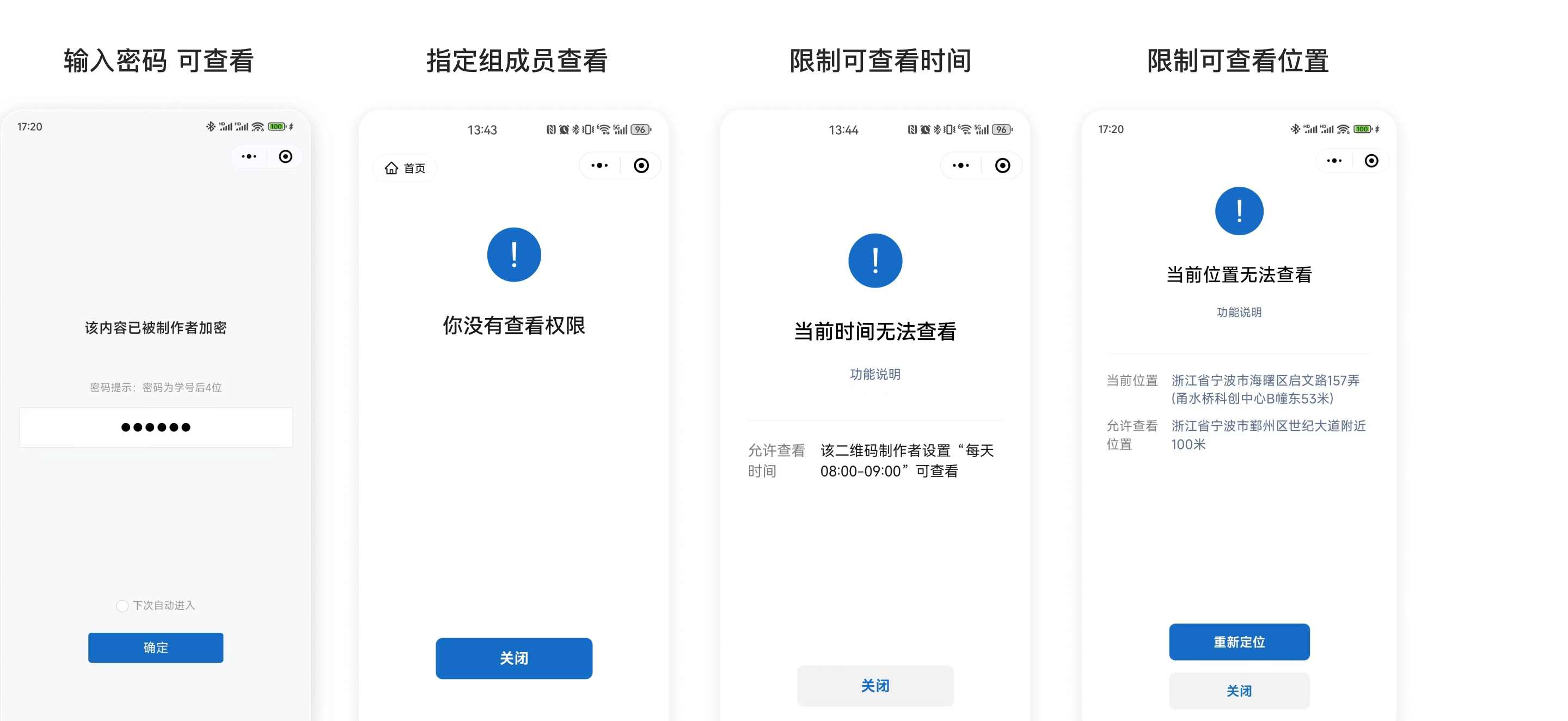
For sensitive documents, security is my top concern. CaoLiao QR Code offers several permission setting options: you can password-protect files so only those with the password can view them; restrict access to only internal company members or specific groups; or set "Online Preview Only" to disable downloads, which is ideal for highly confidential documents. Additionally, you can limit access by time or geographical location, further tightening security measures. It provides great peace of mind.
1.4 Multiple Display Effects, Aesthetic and Professional
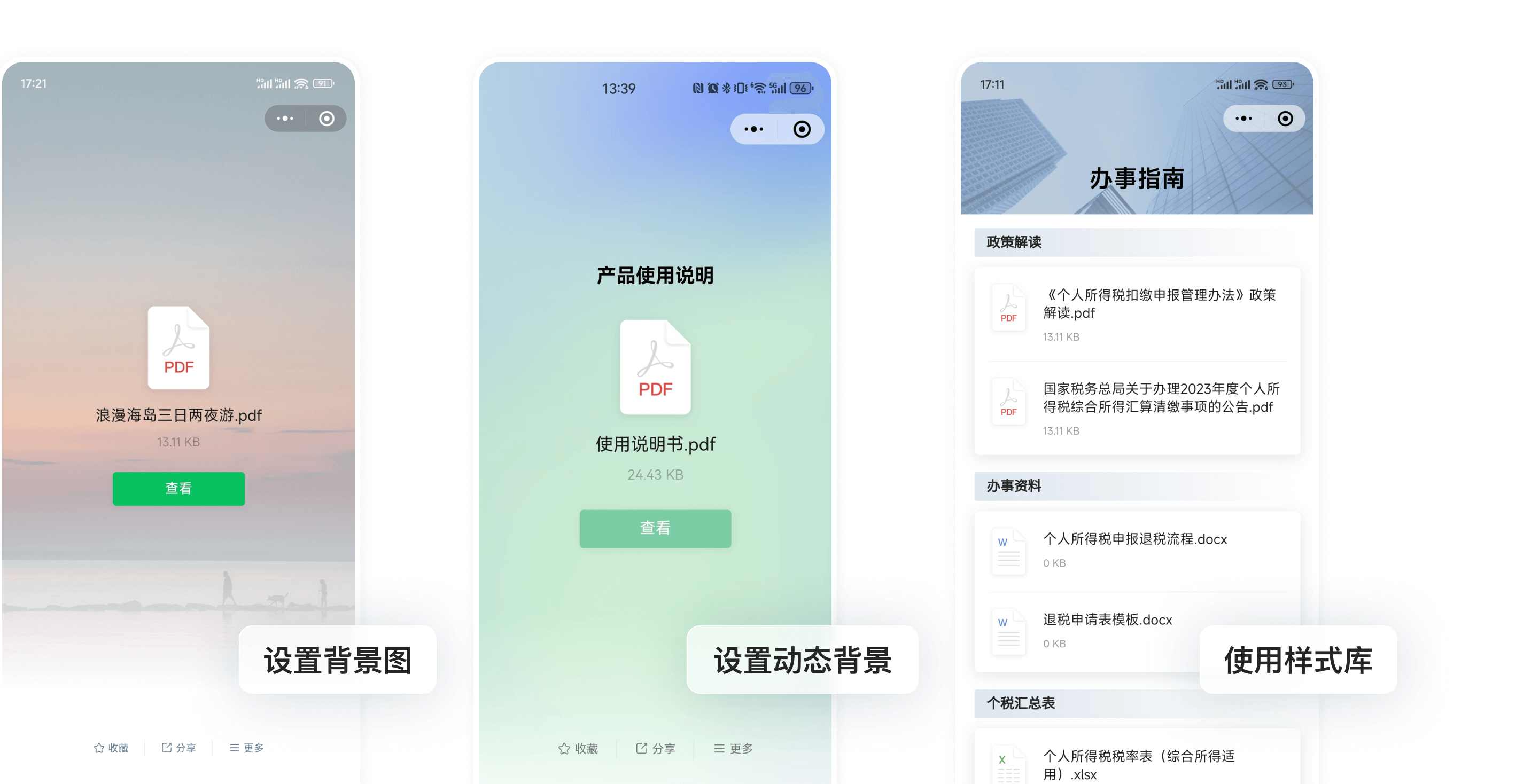
File QR codes also support custom display pages. I can add a beautiful background image, adjust colors, or even add dynamic effects to make the file sharing page look more designed. For scenarios requiring external promotion, this feature is a significant plus.
1.5 Add Multiple Files and Information to a Single QR Code for Richer Content
Sometimes I need to share several file attachments for the public to access by scanning a code, along with some explanatory notes. The file QR code feature supports "adding multiple files to one QR code" and also allows incorporating images, text, videos, and more within the same QR code. For example, when creating a service guide, I can include application material attachments, policy explanation videos, images, and text content all in one place. The public can get all the information at once with a single scan, providing a very complete experience.
1.6 Data Statistics, Clear Visibility into Dissemination Effectiveness
After sharing files, I always want to know how well the QR code is spreading and if people are actually viewing the content. CaoLiao QR Code's statistics feature tells me how many people scanned the code, when they scanned it, where they scanned it from, and even what device they used. This data acts like a "dissemination effectiveness dashboard" for me, providing clear insights into the file's reach and offering valuable assistance for subsequent strategy adjustments.
2. Advanced Uses of File QR Codes
CaoLiao QR Code is not just a simple generation tool; it also offers practical features that make data collection and interaction more convenient.
2.1 Post-Reading Registration, Ensuring Notification Delivery
For important notification documents, it's often necessary to track who has read them and whether they have done so carefully. The "Post-Reading Registration" feature in file QR codes accomplishes this: after the viewer finishes reading the file, the system prompts them to sign for confirmation. All records are aggregated in the backend, readily viewable and exportable. You can also set a minimum reading time before the post-reading registration is automatically completed. In scenarios like internal company announcements or acknowledgment letters, this feature can replace traditional paper-based methods. The signing records are notarized using Ant Blockchain technology, ensuring their authenticity and immutability.

2.2 Adding Form Functionality for Efficient Feedback Collection
Another highlight is the ability to combine forms with file QR codes. While viewing the file, users can fill out their name, phone number, or feedback. For instance, after modifying a new operational process, I used a QR code to publish the notice and added a form to collect suggestions. It can also be used in daily training meetings by adding a form to the meeting document QR code for meeting check-ins.
3. How to Create File QR Codes
3.1 Tutorial for Creating a Single File QR Code
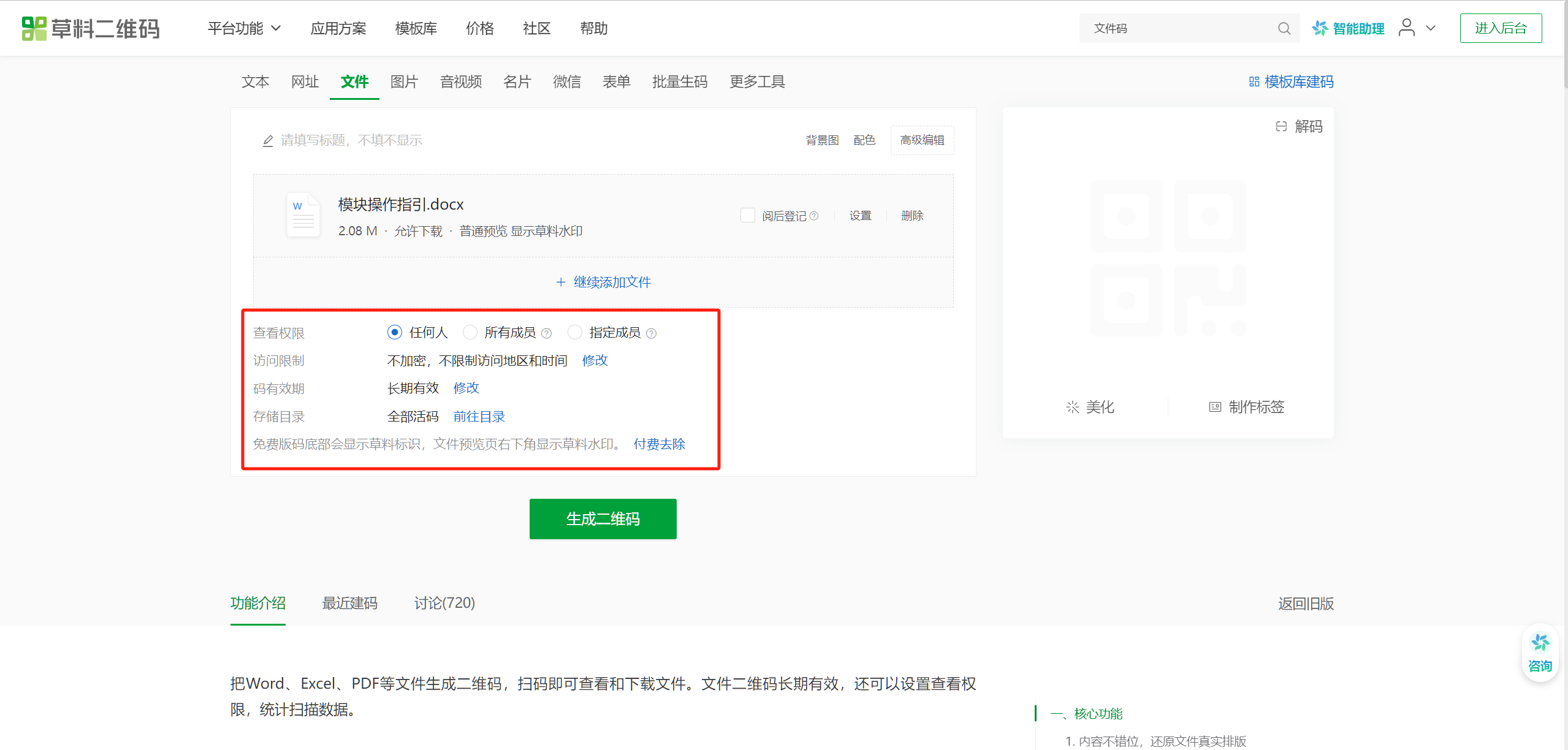
Go to the CaoLiao QR Code official website, navigate to the "File" page, upload your file, and click the "Generate QR Code" button to create a file QR code.
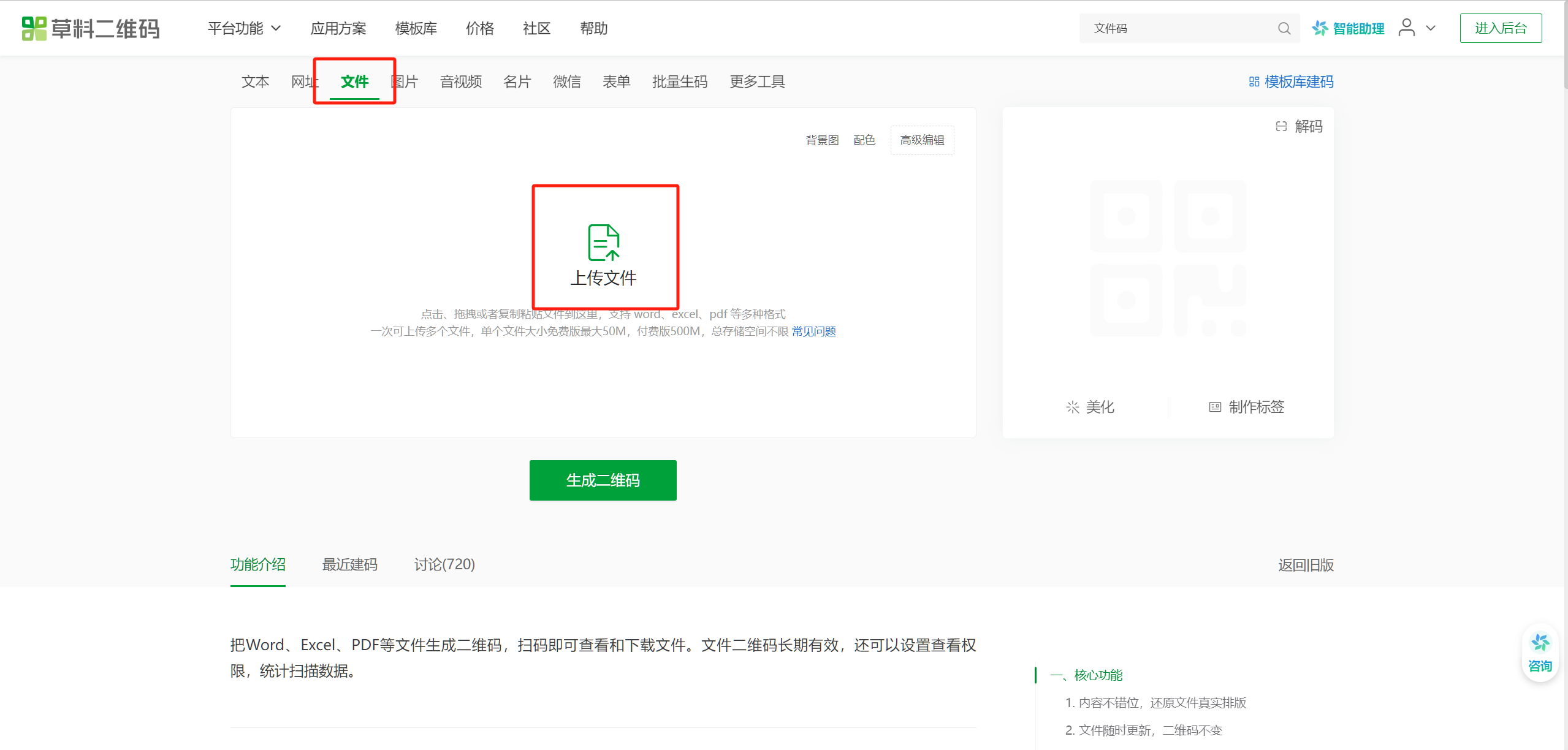
Set functions like viewing permissions and validity period according to your needs. Later, if you modify the file within the QR code, the QR code image remains unchanged; there's no need to regenerate it.
3.2 Creating One QR Code for Multiple Files
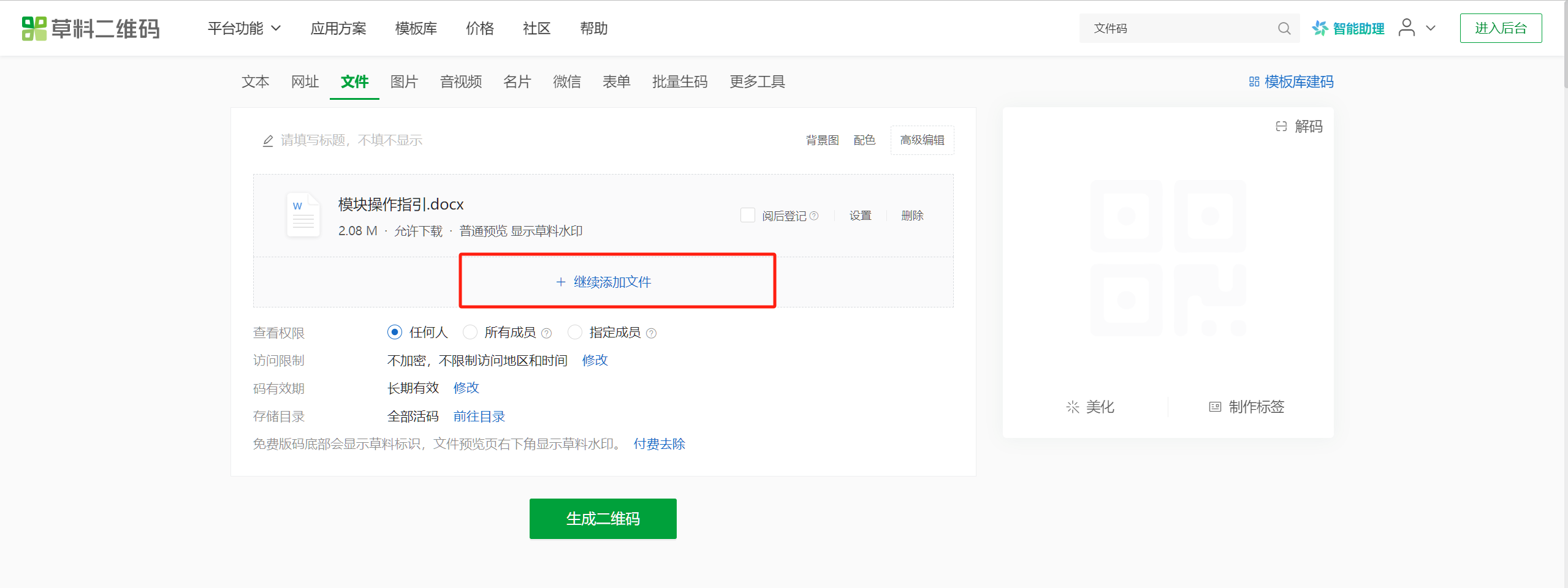
Based on generating a QR code for a single file, click "Continue Adding Files." After adding all files, click "Generate QR Code."
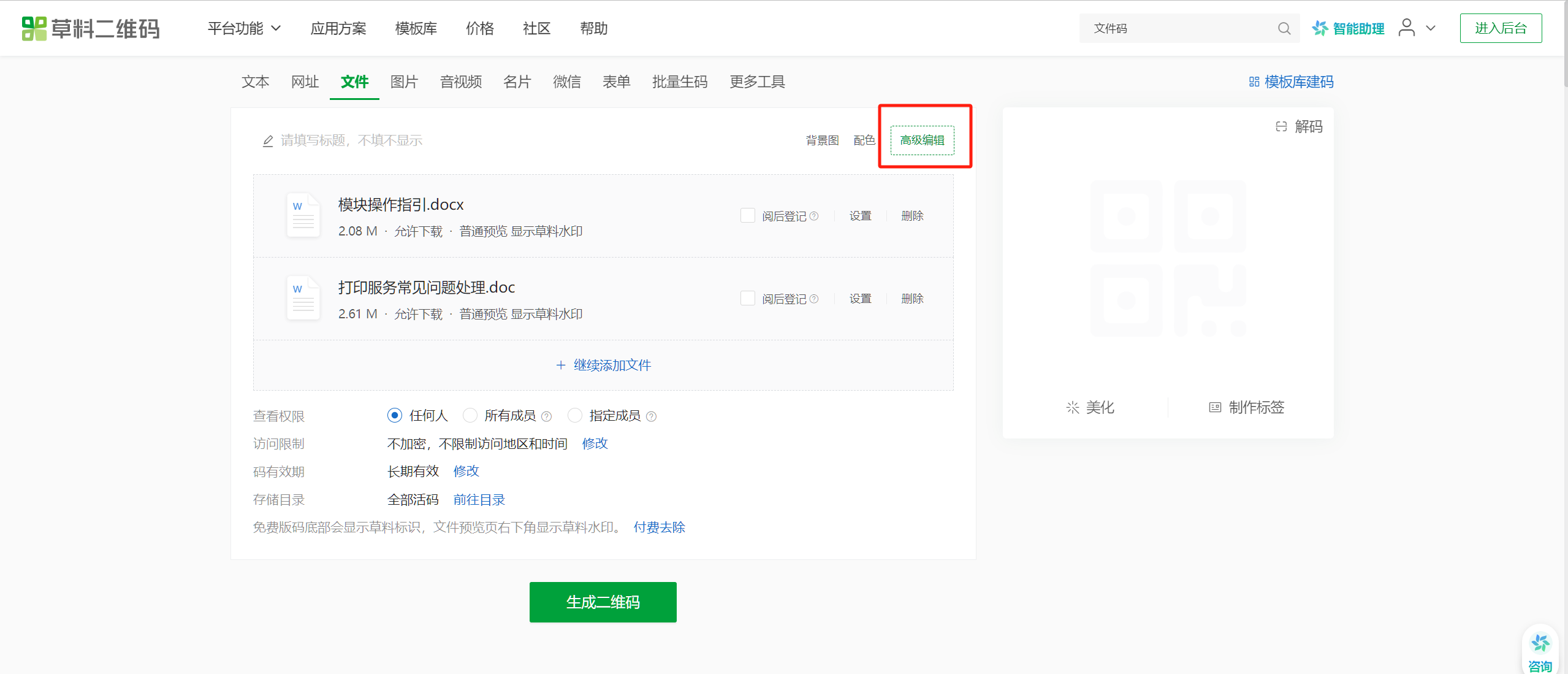
If you need to add images, text descriptions, audio, video, forms, electronic forms, etc., to the QR code, click "Advanced Editor" in the upper right corner to add them. After adding, click "Generate QR Code."
4. Application Scenarios for File QR Codes
File QR codes have numerous applications, not limited to just displaying files but also showcasing any other information you wish to present. CaoLiao QR Code also provides many templates and cases to help you find usage methods that suit your needs. For example:
- Electronic Document Sign-off: Used to track who has read unit notifications or meeting minutes. Combined with Ant Blockchain notarization, it holds legal effect.
- Post-Reading Registration for Documents: Restricts scanning users from completing registration until a specified reading duration is met, ensuring important notification content is read carefully.
- Document and Material Summarization: Classify and archive materials into one QR code, forming an electronic directory for easy access and management.
5. Frequently Asked Questions
During use, I encountered some minor issues, but I could generally find answers through CaoLiao QR Code's community and help documentation. Here's a summary:
5.1 Is the File QR Code Feature Free?
The file QR code feature is free to use. Compared to some other QR code generators, CaoLiao QR Code's free version is already very powerful. There is no limit on the total file capacity—you can upload as many files as you want. The QR codes are permanently valid, and there are no restrictions on generation or scanning counts. However, the free version displays the CaoLiao logo during file previews, and the maximum single file size is 50MB. After paying, you can remove the CaoLiao logo. The free version is entirely sufficient for general users. If you use it externally and want a better image, you can purchase the basic version for 780 RMB.
5.2 How to Set the QR Code to Open the File Directly Upon Scanning?
Scanning to directly open the file for online preview is only supported when the QR code contains a single file; it is not supported if a QR code has multiple files. In the "Settings" for the corresponding file QR code, enable "Open Directly Upon Scan."
5.3 How to Update the File in the QR Code?
The file within a file QR code can be updated at any time. Go to the backend, find the QR code, click "Edit," replace the file, and save. The QR code remains the same, and the content updates automatically.