Personal Protective Equipment (PPE) Receipt Registration
Scan the code to register the name and quantity of items received each time, and take photos for documentation. Data can be exported for statistics, facilitating the management of received items and procurement analysis.
Basic Information
- Monthly Installations: 296
- Monthly Visits: 77
- Original: https://cli.im/template/detail/121463666
Case Tag Image

Instructions
1. Applicable Scenarios and Industries
Applicable Scenarios: Suitable for the issuance and receipt registration management of enterprise labor protection supplies, particularly in industries such as manufacturing, construction, and chemicals that require standardized management of PPE.
Regulatory Basis: According to the requirements of GB 39800-2020 "Specifications for the Provision of Personal Protective Equipment" and AQ 6111-2023 "Safety Management Specifications for Personal Protective Equipment":
For specific tasks, personal protective equipment should be selected based on the equipment list requirements for the job position. After confirmation and approval by the on-site supervisor, procedures for issuing and returning personal protective equipment should be followed, and receipt records should be completed.
2. Core Features
2.1 Standardized Receipt Registration
- Standardized Item Names: Modify the selection range according to the specific PPE items available in your organization. Recipients can select from a dropdown during registration, eliminating the need for manual typing and ensuring standardized statistics.
- Standardized Entry Criteria: Key fields such as item name, quantity, and recipient's department are mandatory.
- Photo Documentation: Supports registration of multiple items in a single receipt entry and photo upload functionality to ensure authentic and traceable receipt records.
2.2 Anti-Fraud Verification Mechanism
- Photos automatically include time/location watermarks.
- Phone number authorization verifies the recipient's identity.
2.3 Digital Record Management
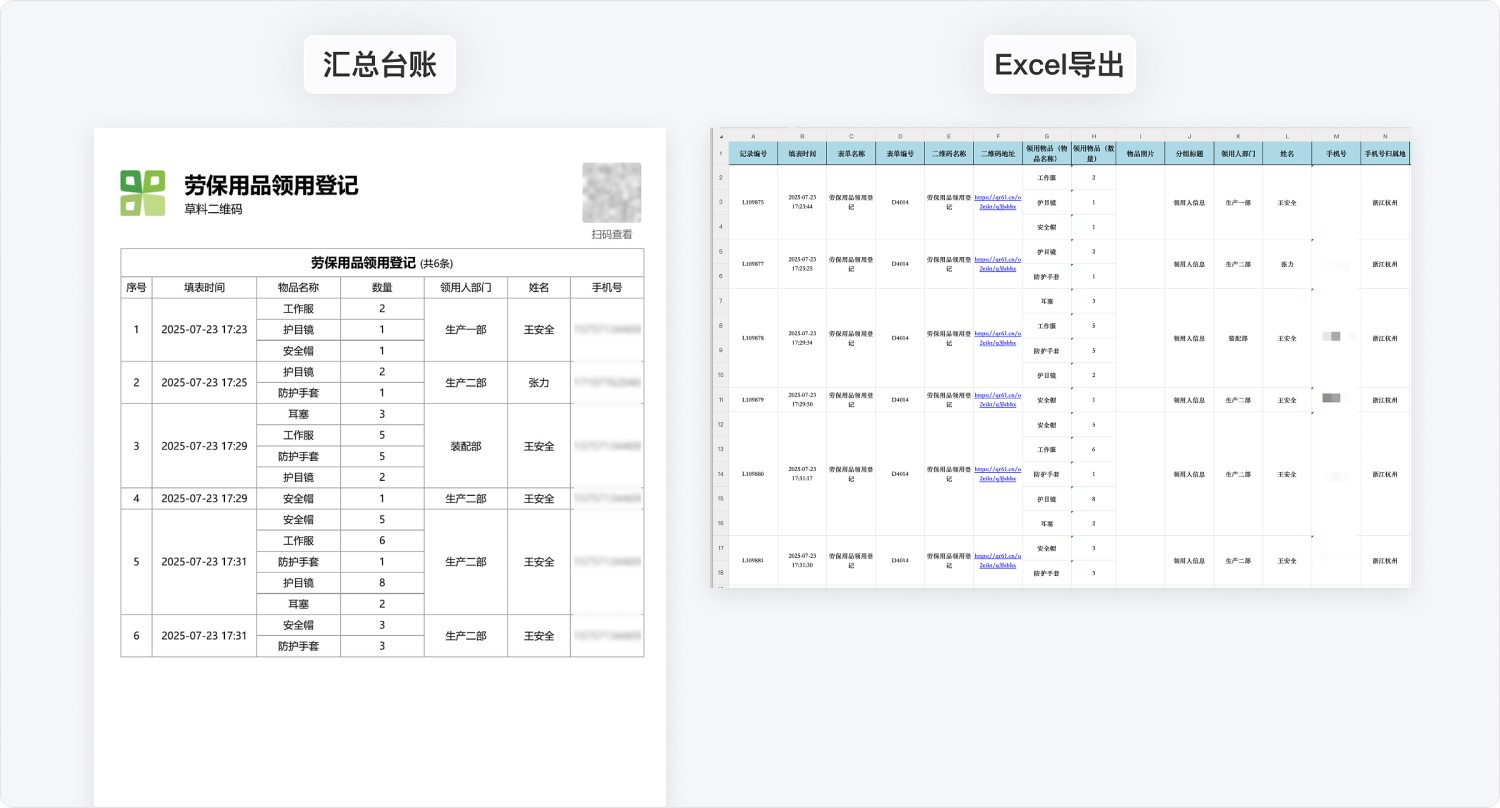
- Automatically Generated Ledger: Replaces traditional paper-based registration methods by automatically generating a summary ledger of receipt records. Entries are clear and can be exported to Excel or printed.
- Data Statistics: Supports viewing historical data via WeChat Mini Program. Combined with the data API, it can generate visual reports for more efficient item management.
3. Usage Process
- The recipient scans the QR code to access the registration page.
- Selects the item name and enters the quantity.
- Takes a photo of the item(s) (watermark is automatically added).
- Fills in the department, name, and authorizes with a phone number.
- Submits the form, automatically generating an electronic receipt record.
Frequently Asked Questions
1. What information is included in the photo watermark?
Answer: Includes the shooting time, form submitter, and location information to ensure the authenticity of the record.
2. How long are historical records stored?
Answer: Receipt history records are permanently stored under the account. The Advanced edition and below can export records from the last 180 days, while the Enterprise edition and above support exporting records from any time period.
3. Can an approval process be set up?
Answer: Yes. The Basic edition and below only support single-level approval by a super administrator. The Advanced edition and above support multi-level approval functionality, allowing configuration of supervisor review steps.