Construction Progress Recording
Project construction personnel can directly record project visual progress by scanning QR codes. After scanning, they fill in relevant content and take photos for documentation. These records can be used for project progress payment applications and archived in the data room.
Basic Information
- Monthly Installations: 2535
- Monthly Visits: 6550
- Original Text: https://cli.im/template/detail/72993793
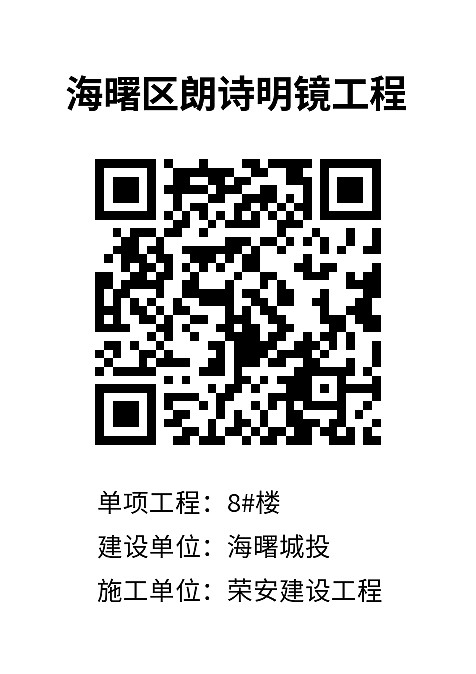
Case Label Image
Usage Instructions
1. Problems Solved
Traditional construction progress recording and inspections rely on paper checklists and manual records, leading to the following issues:
- Error-Prone Manual Entry: Inspection data may suffer from falsified or missed checks, affecting data accuracy.
- Delayed Exception Reporting: Inability to respond quickly, making it difficult for administrators to monitor and handle exceptions promptly.
- Difficult Data Management: Paper documents are easily lost, hard to locate, and data cannot be traced; manual statistics are inconvenient, preventing long-term accumulation of historical data and hindering trend analysis and improvements.
Solution:
- Replace Paper Checklists with QR Codes: Inspectors use WeChat to scan codes, displaying basic site information instantly. Features like location tracking and on-site photo capture prevent false records and standardize inspection requirements.
- Automatic Exception Alerts: Upon exception reporting, the system automatically notifies responsible personnel for follow-up.
- Unified Data Management: All data records are saved under your account, allowing for easy viewing, tracing, and supporting data statistics and export analysis.
This is a general template suitable for recording progress in engineering and renovation projects. It is recommended to use bulk templates for QR code generation, with one code per project to track progress. Learn More
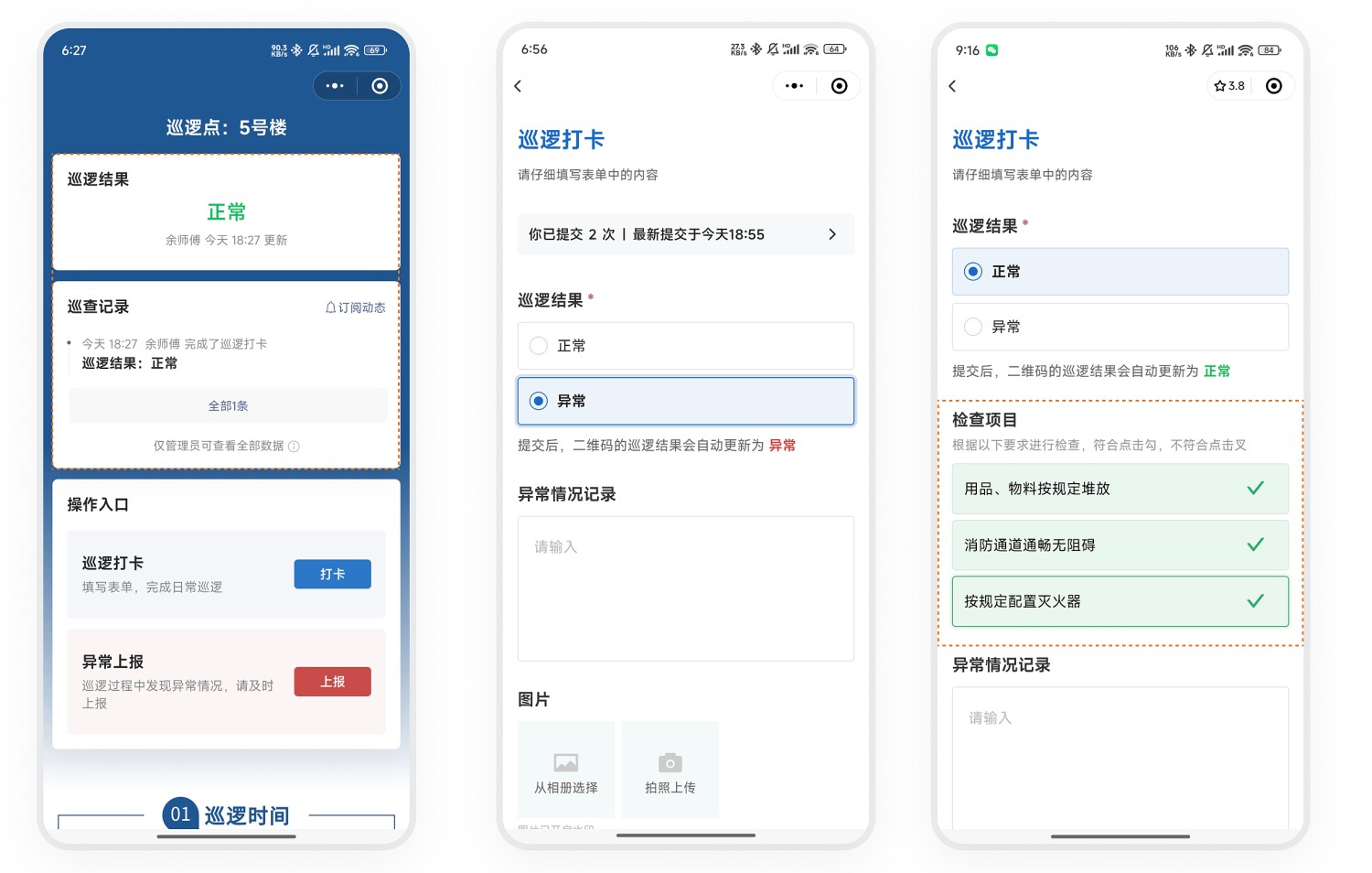
2. WeChat Scan to Fill, Record Inspection Status
- Standardized Recording: Inspectors scan the code and fill out the inspection form to record the status.
- Prevent False Inspections: Utilizes on-site photo capture, image watermarking, and location features to ensure records are authentic and valid.
- Detailed Inspection: Add inspection items for detailed checks per item, meeting various inspection requirements.
- Status Display: The status dashboard on the QR code shows the current inspection result for the patrol point: Normal or Exception.
3. Exception Reporting and Rectification Closed-Loop
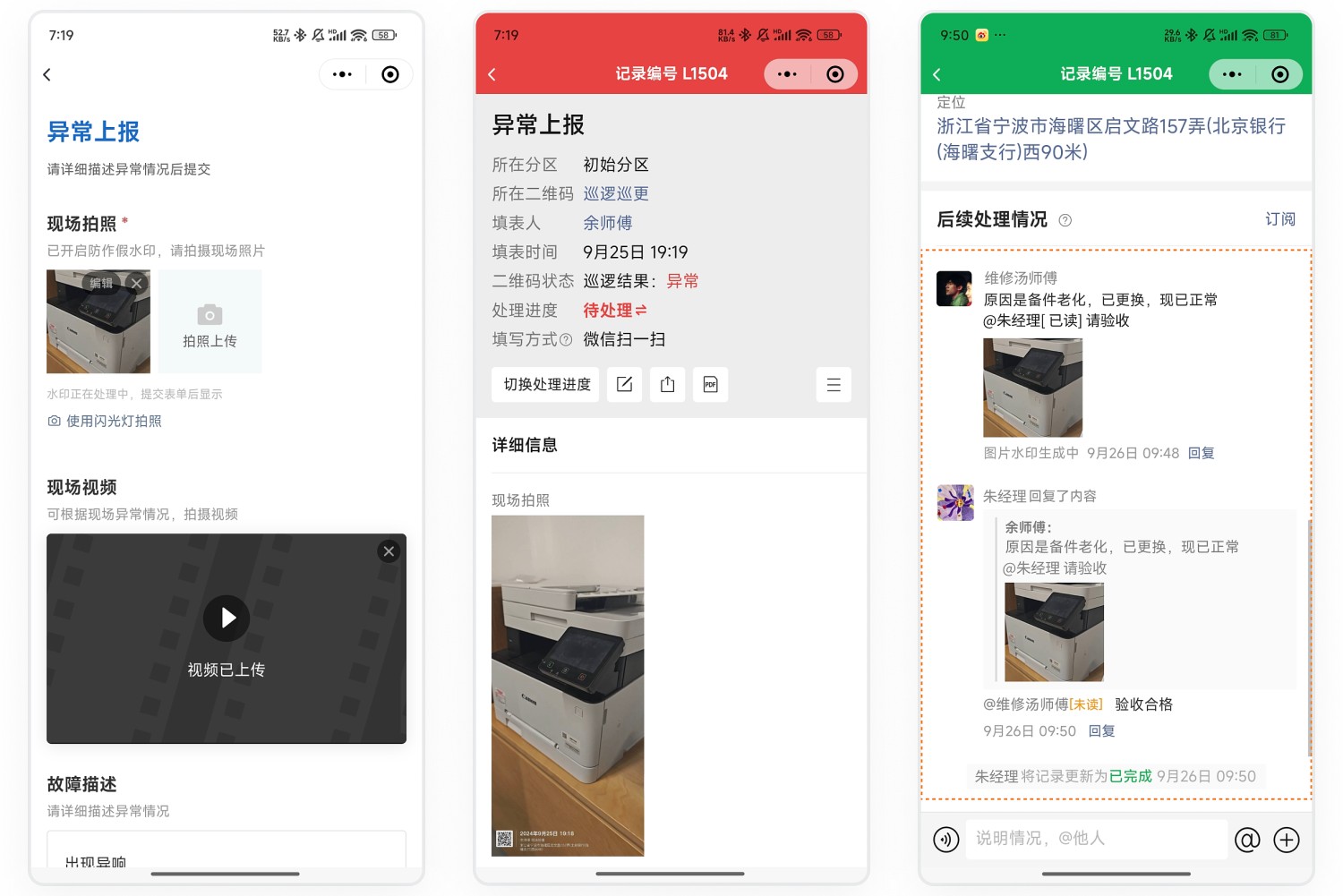
1. Report Exception
- Patrol personnel discover an exception, use WeChat to scan the code and fill out the exception reporting form, detailing the issue and uploading relevant photos.
- Exception details are automatically notified via WeChat to maintenance personnel.
2. Maintenance and Rectification
- Maintenance personnel promptly view the exception record, follow up on handling, and document the entire rectification process.
- During processing, they can @mention the acceptance personnel within the record to notify them for acceptance checks.
3. Acceptance Confirmation
- Acceptance personnel receive the @mention message, review the rectification process, and go to the exception point for acceptance.
- After passing acceptance, manually change the follow-up progress tracking to Completed, completing the closed-loop management.
4. Data Management
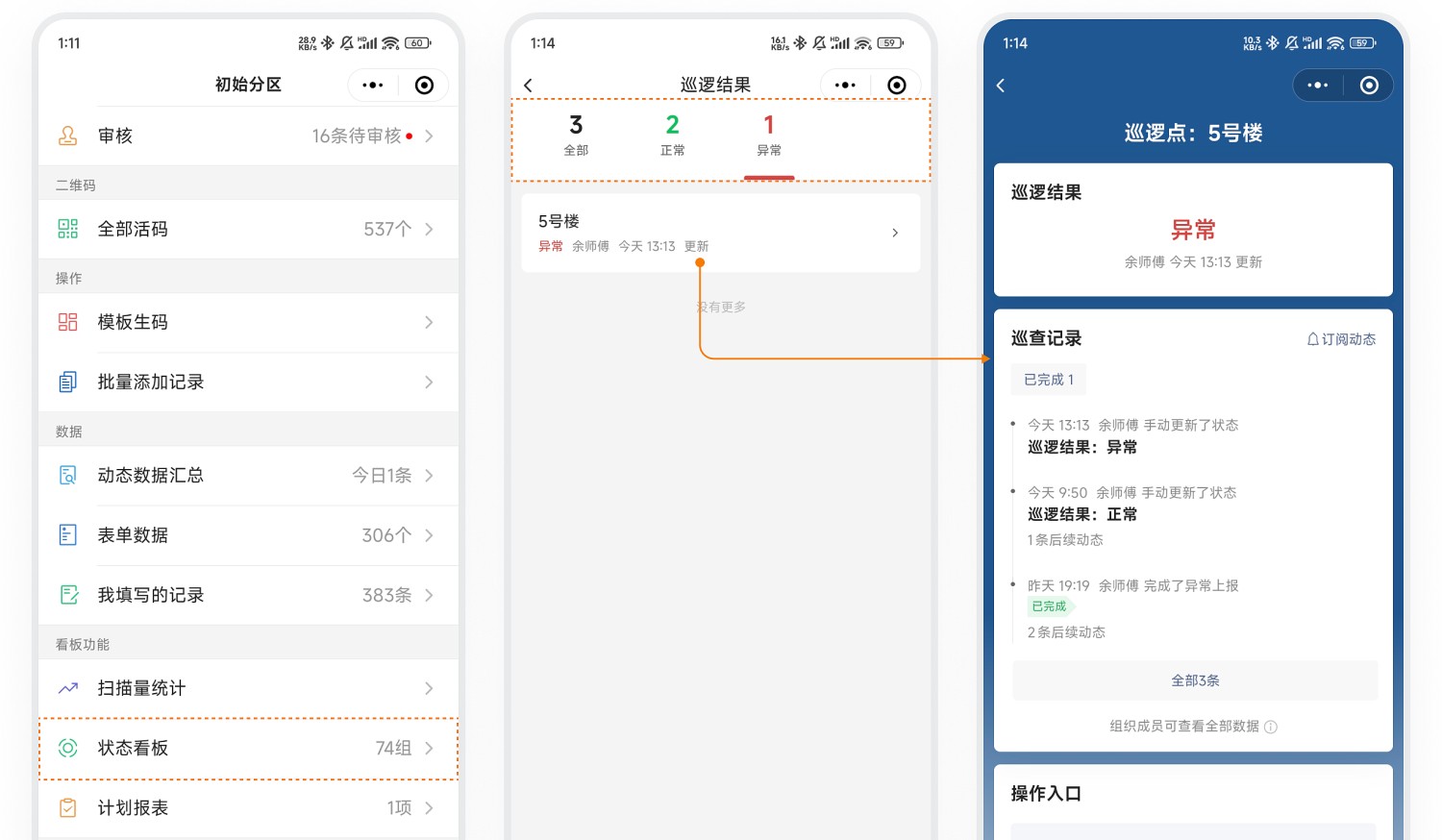
1. View Inspection Result Distribution
- Status Dashboard: The status dashboard on the QR code displays inspection results in real-time for easy viewing.
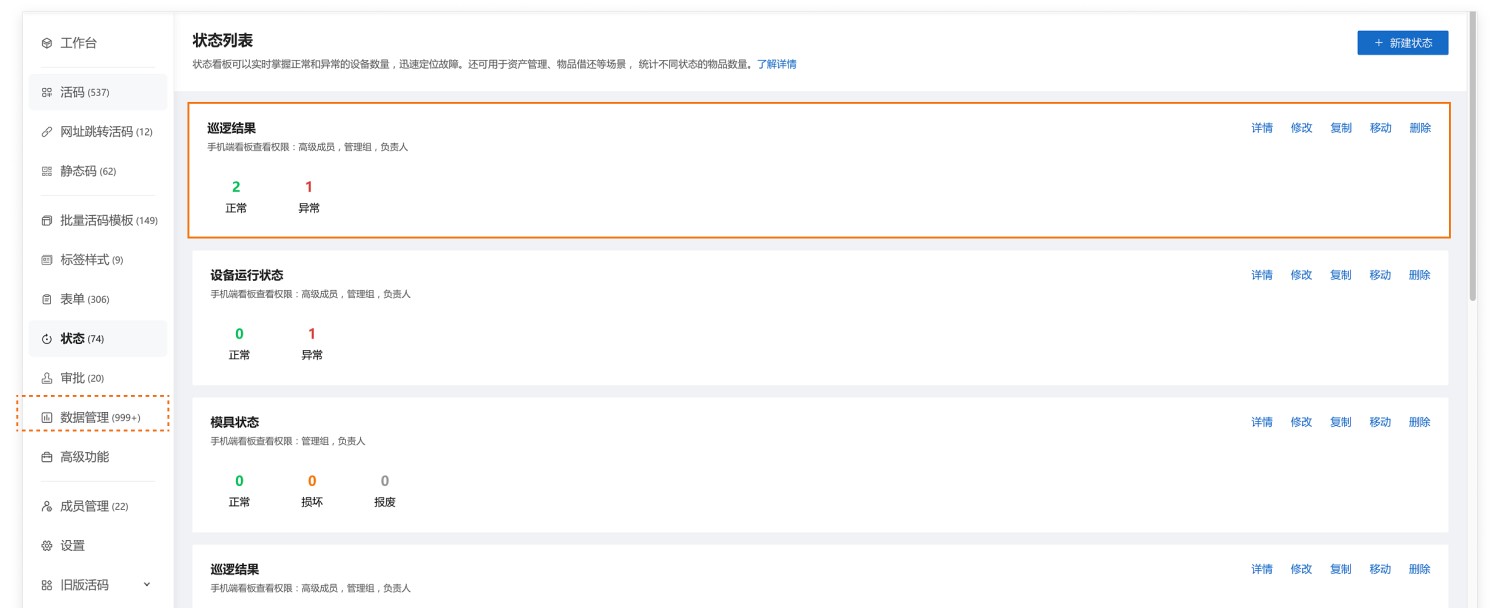
- Real-time Monitoring: Administrators can view the inspection result distribution in the status list on the mobile or desktop workbench, keeping track of inspection status at any time. View Details
Note: Inspection result distribution does not currently support data export.
Desktop Workbench - Status
Mobile Workbench - Status Dashboard
2. View Detailed Inspection Data
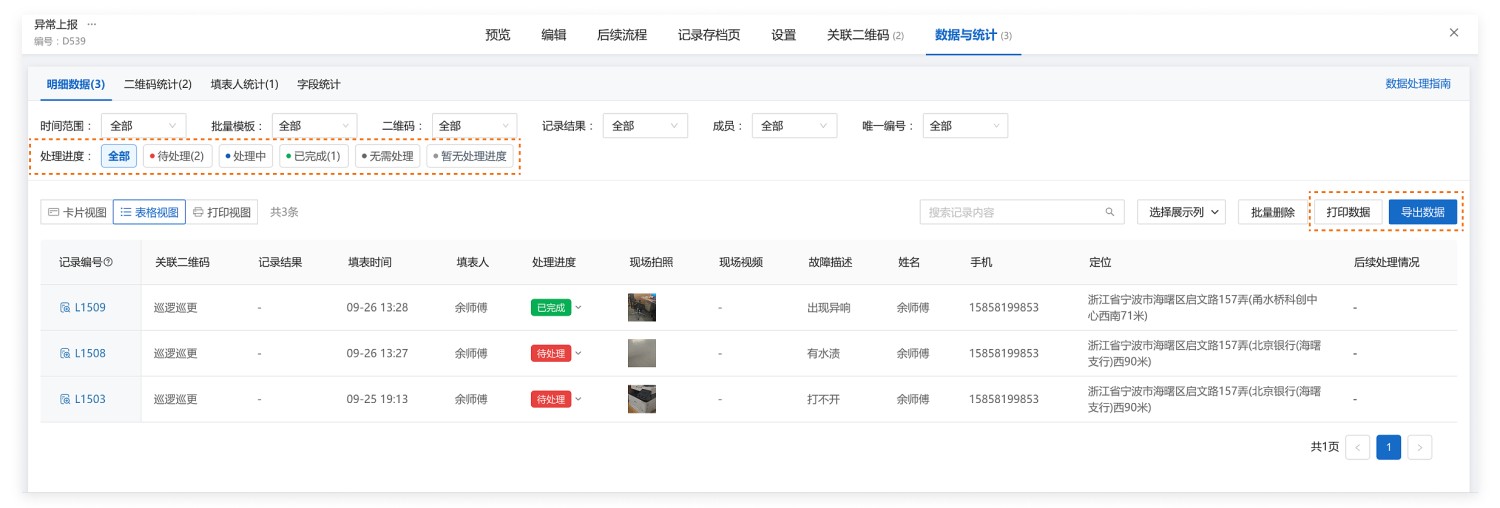
- Data Storage: All submitted inspection data and exception reporting data are saved under your account.
- View Anytime: Administrators can view inspection details at any time via the mobile WeChat Mini Program workbench or the desktop workbench.
- Filtered Viewing: For detailed exception reporting data, filter by follow-up progress tracking to quickly identify which patrol points have not completed exception rectification.
- Data Export: Supports data export for archiving and analysis.
3. Data API
- Real-time Push: Provides data API functionality, allowing inspection data to be automatically pushed to WeCom, DingTalk, or Feishu group chats for real-time data sharing and improved communication efficiency.
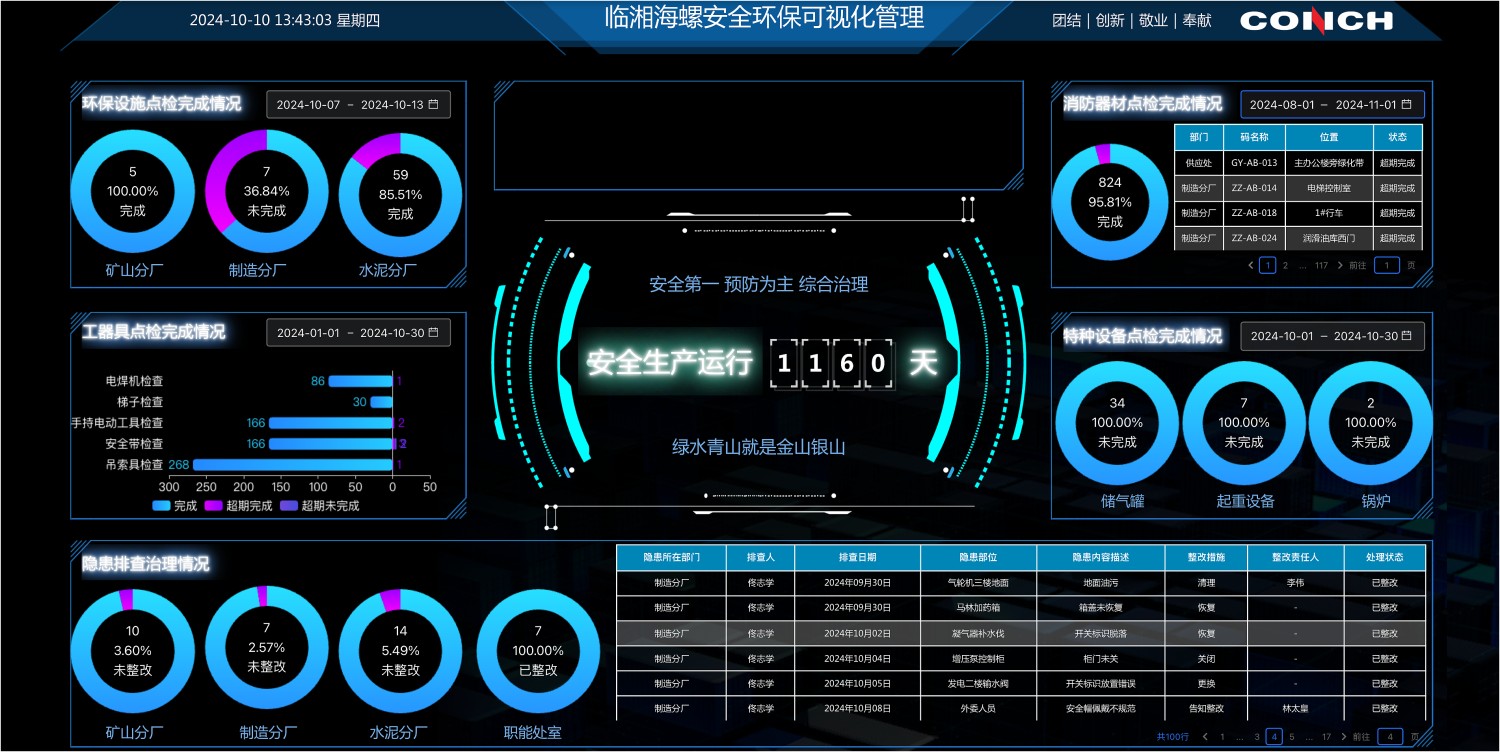
- Data Visualization: Can be integrated with visualization tools to create data statistics dashboards, intuitively displaying inspection and exception rectification status. Learn About Functionality
5. Frequently Asked Questions
1. How to Avoid Missed Inspections?
Answer:
- Create Inspection Plans: Develop inspection plans by cycle, such as daily inspection plans, specifying areas that need daily checks.
- View Plan Reports: Administrators can view plan reports on the mobile end to understand inspection completion status.
- Overdue Reminders: Before inspections become overdue, the system automatically notifies administrators via WeChat about which areas haven't been inspected, facilitating timely personnel assignment.
2. How to Set Up Exception Reporting Requiring Review Before Rectification?
Answer:
- Enable Review Function: After an exception is reported, notify management for review first.
- Review Process: Only after approval will the system automatically notify the responsible person for subsequent rectification; rejected exceptions require no action, avoiding excessive invalid notifications.
3. How to Set Operation Permissions?
Answer:
- Permission Management: Set permissions so that only specific personnel can view QR codes, change inspection results, fill out inspection forms, view data, etc., ensuring data security and operational standardization.
4. How to Improve Inspection Efficiency?
Answer:
- Quick Updates: After patrols, inspectors can manually change inspection results, supporting image uploads and text descriptions.
- Quick Operations: Long-press the inspection result area to quickly update the inspection time, simplifying the operation process.
- Permission Control: If inspectors are not allowed to manually change results, restrict this in the permission settings.
5. Can Subsequent Forms for Exception Reporting Link with Follow-up Progress Tracking?
Answer:
- Current Limitation: Linkage functionality is not currently supported. After maintenance personnel fill out the maintenance form, they need to manually change the follow-up progress tracking.
- Data Filtering: Administrators can filter and view data based on follow-up progress tracking in the workbench to monitor rectification status.
Related Customer Cases
[China Construction Shenzhen Decoration: "One Machine, One File," Improving the Safety Management Model for Large Mechanical Equipment and Facilities](https://cli.im/client/detail/1740 "China Construction Shenzhen Decoration: "One Machine, One File," Improving the Safety Management Model for Large Mechanical Equipment and Facilities")
[China Railway 17th Bureau Group: Entering the Era of "QR Code" Refined Management](https://cli.im/client/detail/1734 " China Railway 17th Bureau Group: Entering the Era of "QR Code" Refined Management")