Tired of generating QR codes one by one? Try bulk QR codes generation
Original: https://cli.im/article/detail/2365
Many people first encounter CaoLiao QR Code to generate a URL QR code or file QR code. They open the official website, upload content, generate a QR code, and save it. Click "Create another" to make the second one. Doing this two or three times isn't difficult. But when you reach the tenth one and realize there are still two hundred left in the list, manually processing each one becomes not only inefficient but also prone to errors.
For scenarios with large quantities and long maintenance cycles, such as product serial numbers, equipment IDs, inventory management, and book coding, relying on manual operations will inevitably slow down the entire project progress. In such cases, there's a more convenient approach: bulk QR codes generation.
What's it like to generate thousands of QR codes at once?
If you have an equipment list containing fields like ID, name, and description, simply import this information into a system, and corresponding QR codes will be automatically generated—each record matched with one QR code. Each QR code carries different information, such as "Equipment ID: A001, Department: R&D, Responsible Person: Zhang San." After generation, they can be uniformly packaged and exported for immediate printing and posting.
It sounds similar to Excel's batch processing functionality, and that's exactly what CaoLiao QR Code's bulk feature offers.
Compared to copying and pasting or generating and downloading individually, bulk QR codes generation not only saves significant time but also ensures uniform content format and standardized styling. After QR codes are generated, they can be managed and modified in batches, including display templates and label styles, greatly reducing later maintenance costs.
What is bulk QR codes generation?
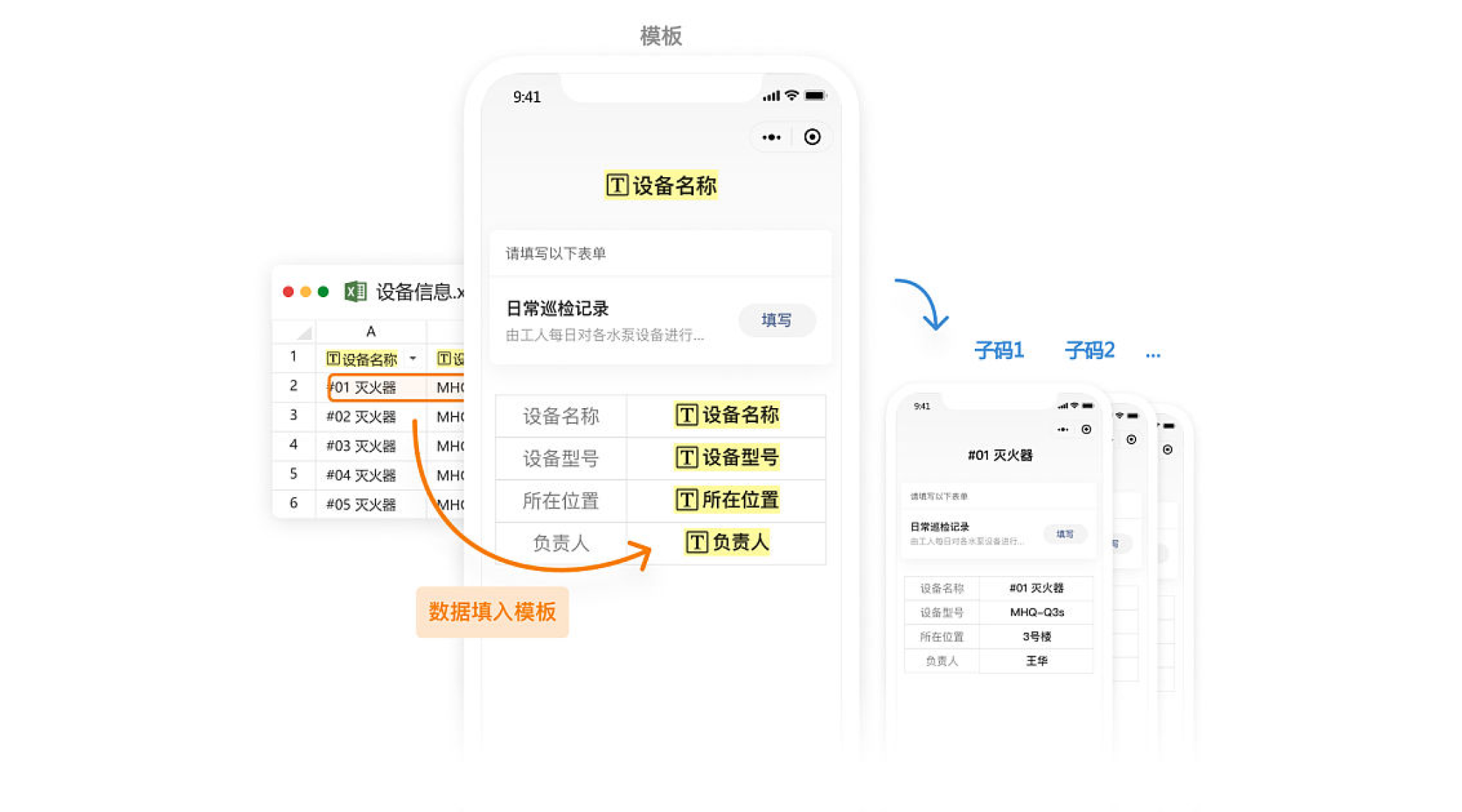
Bulk QR codes generation uses "bulk templates" + "large amounts of data" to generate numerous QR codes at once. Here's a simple analogy: think of a "bulk template" as the layout of a report card, and the data as each student's scores. Schools don't handwrite report cards one by one. The teacher prepares a report card template in advance (name in the top-left, math score on the right, comments below), then inputs each student's scores into Excel. Once the system imports the data, it can batch generate a stack of report cards with the "same format but different content."

CaoLiao currently offers two common application methods. Users can choose based on whether they have an existing system, the purpose of the QR codes, and management needs:
First: Having existing system data and needing to batch generate QR code labels;
Second: No existing system foundation, directly using the CaoLiao platform to build business management processes, achieving one object, one code.
Who is bulk QR codes generation suitable for?
Simply put, if you have a batch of items that "need QR codes attached for management"—whether equipment, employee badges, materials, product exterior labels, trees, or door plates—you can likely use bulk generation.
For example, warehouse managers wanting to quickly retrieve material information by scanning codes during inventory in/out; school libraries assigning unique IDs to each book for easy borrowing and returning; manufacturing enterprises labeling products by batch for production traceability... If these common needs still rely on manually generating QR codes, it's undoubtedly a waste of resources.
1. Having an existing system, batch generating QR code labels
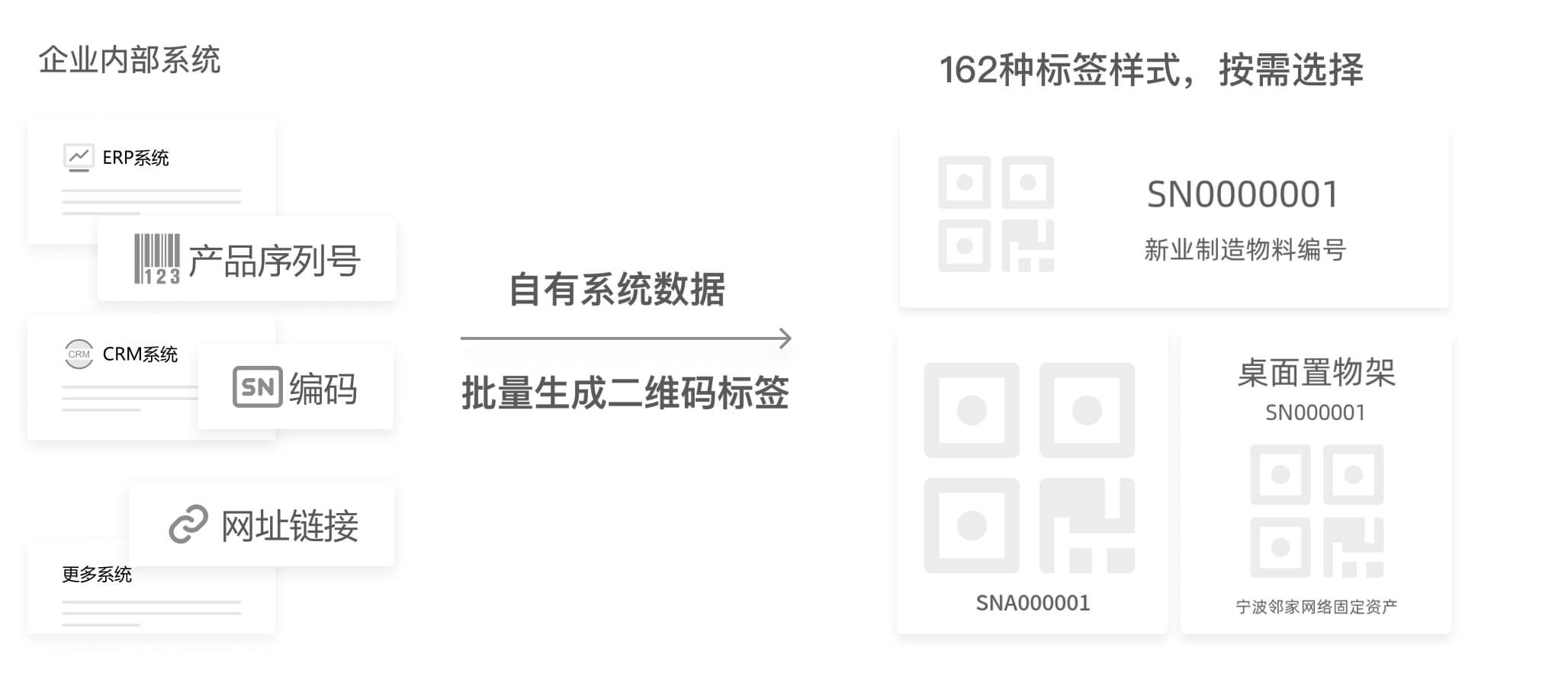
Many enterprises already have their own management systems but lack the capability to generate QR code labels. Through CaoLiao QR Code, data from these systems (such as URLs, serial numbers, codes, etc.) can be imported to batch generate corresponding QR code labels. This enables scanning with specialized devices like barcode scanners, dedicated apps, or universal apps like WeChat.
CaoLiao QR Code also supports API integration with internal enterprise systems, allowing batch generation of QR code labels directly within the internal system via interface calls without repeatedly importing/exporting data.
2. Using CaoLiao QR Code to build a system, achieving one object, one code management
For users without self-built systems, they can also construct their own business systems on the CaoLiao QR Code platform. The platform supports various components like rich text, forms, and status management, allowing users to freely combine them to build template structures suitable for their business. Once the template is set up, simply import the data to automatically generate QR codes with corresponding content. Subsequent batch content modification and management are also supported, making it more convenient and effort-saving.
Many people think QR codes can only transmit a URL or open a file, but QR codes can actually carry very rich types of information. You can generate a pure text QR code, display a graphic introduction page, or even add forms to collect feedback data.
Common application cases:
- One person, one code: Employee badge management, personnel real-name information, safety production learning records, etc.
- One object, one code: Asset management, fire equipment management, equipment inspection, hazardous waste labels, vehicle identification, mold numbering, etc.
- Other applications: Order tracking, process records, property patrols, product label management, etc.
Not just generating QR codes, but also batch producing labels
We've heard feedback from many users that after generating QR codes, they still need to make them into labels. Initially, they manually typeset and produced labels, often making errors like incorrect numbering, missing remarks, or messy layouts, only realizing they needed rework when printing.
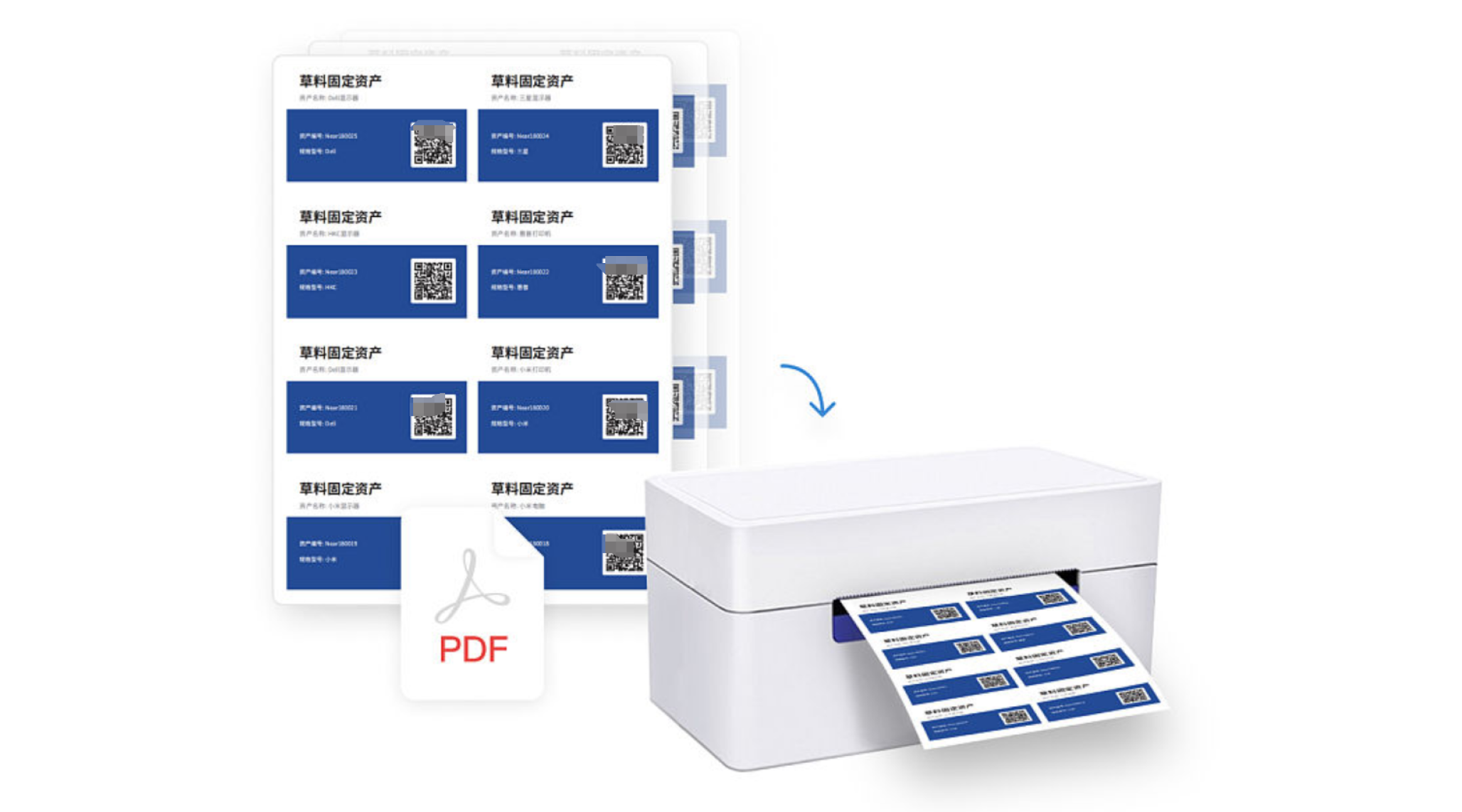
CaoLiao QR Code's label production function is designed precisely to address this pain point. Whether entering data individually, filling out online spreadsheets, or uploading Excel data, you can batch generate QR code labels. Template styles are reusable; simply replace the data to quickly generate QR code labels with a unified style.
The platform also provides multiple download formats compatible with mainstream label printers, enabling one-click batch output and reducing pre-print preparation work.
Frequently Asked Questions
Q: What is the maximum number of QR codes that can be generated in one batch?
CaoLiao QR Code imposes no limit on the total number of QR codes generated. The bulk QR codes generation feature is available for free to all users. To ensure system stability, the upper limit for a single batch generation is 20,000.
Q: Is batch generating QR code labels also free?
Yes. The label function is available for all users to use without additional charges.
Many people use QR codes daily but remain stuck at the most basic "generate one by one" method, unaware that more efficient and user-friendly approaches have long existed. Bulk QR codes generation sounds simple but can significantly enhance work efficiency, standardize data management, and reduce manual errors. If you're handling hundreds or thousands of data entries and have a need to generate QR codes, why not try this tool? A few minutes of learning could save you days of work.