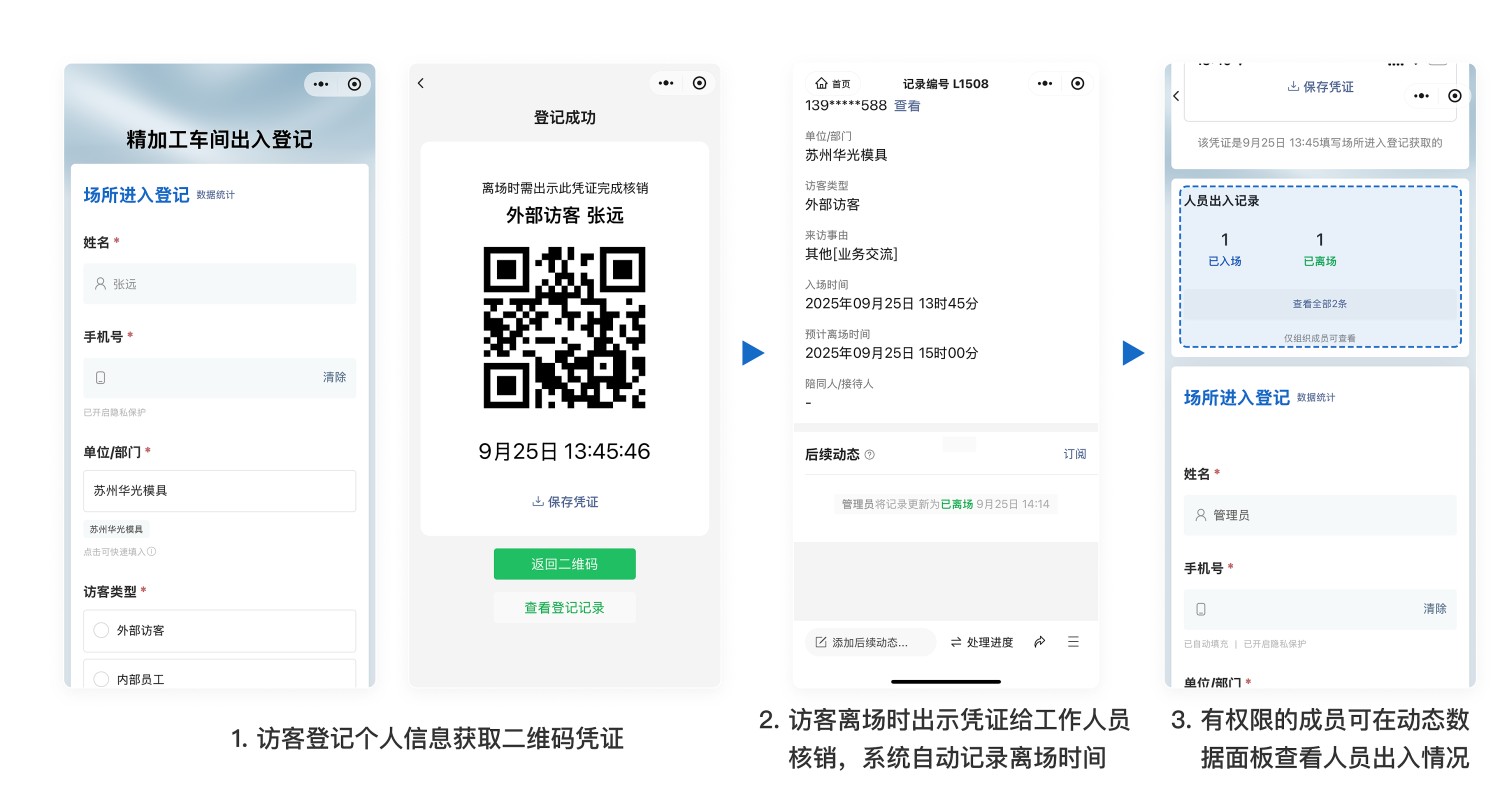
Visitor Entry and Exit Registration
Visitors must register both upon entry and exit for streamlined gate management.
Basic Information
- Monthly Installations: 7,637
- Monthly Visits: 31,170
- Original: https://cli.im/template/detail/47364785
Case Label Images





Instructions
1. Applicable Scenarios
Suitable for:
- Locations requiring strict access control such as corporate campuses, factory workshops, equipment rooms, and warehouses
- Quick visitor registration for personal information to generate access credentials, with real-time recording of entry and exit times
- Backend statistics on visitor numbers and movement patterns
- Exporting complete entry/exit logs (Excel/PDF) for auditing and archiving
Not suitable for:
- Scenarios requiring integration with advanced security features like facial recognition
2. Setup Costs
- Time: Approximately 5 minutes for QR code configuration and generation; 5 minutes for printing and posting
- Manpower: Can be completed by one person, no technical expertise required
- Setup Fees: Basic registration and verification features are free with unlimited users and usage. Advanced features including multi-user collaboration management and advanced data export start from ¥1,280
- Implementation Costs: Approximately ¥15 for A4 printing with acrylic card sleeves; about ¥100 for stands or display frames
3. Usage Process
Step 1: Entry Registration
- Visitors: Scan the QR code at the entrance, complete the information form, and the system generates an electronic access credential
- Staff: Monitor entry registrations in real-time via the backend and guide visitors inside
Step 2: Exit Verification
- Visitors: Present the electronic access credential when leaving
- Staff: Use mobile/computer or scanning devices to scan the electronic access credential, complete exit verification, and the system automatically records the exit time
Step 3: Backend Statistics
Administrators can view at any time:
- Individual visitor entry and exit times
- Current number of people in the area
- Cumulative entry and exit counts for the area
Export Excel/PDF files with one click to meet audit or compliance log requirements