How to Quickly Generate QR Codes: Recommended Free Tools
Original: https://cli.im/article/detail/2314
QR codes have become incredibly widespread and are a common sight in our daily lives. Many people might want to try creating their own QR codes but don't know where to start. Today, I'll guide you step-by-step on how to easily create QR codes using CaoLiao QR Code and provide some practical tips to help you use them more effectively.
1. Basics: Methods for Quickly Generating QR Codes
Whether it's an official merchant link, a promotional video, or a Word document, you can quickly generate a QR code to efficiently convey information.
CaoLiao QR Code is a platform that is simple to operate, free without ads, and supports various QR code types, making it very suitable for beginners. Below, we'll start with the basics of QR code generation:
Step 1: Visit the CaoLiao QR Code Official Website
Open the CaoLiao QR Code official website in your computer browser. The desktop version offers comprehensive features and is simple to operate.
Step 2: Choose the Type of QR Code You Want to Generate
Select the appropriate QR code category based on the content you want to store:
- Text QR Code: Suitable for serial numbers, product information, URLs, and other key details. Can be affixed to products or packaging. Scanning allows for quick information retrieval or entry, avoiding manual input errors and enabling efficient traceability management.
- URL QR Code: Ideal for promoting websites, article links, etc. Users can jump directly to the target after scanning.
- File QR Code: Upload various documents like PDF, Word, Excel, PPT. Scanning allows direct viewing or downloading, suitable for product materials or user manuals.
- Image QR Code: Convert images into QR codes. Scanning allows viewing, downloading, or sharing the image content.
- Audio/Video QR Code: Upload audio or video files. Scanning allows viewing or playback.
Generate QR codes for more content: Also provides functions for generating business card, WeChat, and forms QR codes.
Step 3: Upload Content and Generate the QR Code
After determining the type of QR code to generate, simply upload your content and click "Generate QR Code" to create one.
The platform also supports QR code beautification. You can customize the QR code's color and style according to your needs, and add a logo to enhance brand recognition, making your QR code align better with your brand style. After generation, you can directly download the QR code image in PNG, JPG, or SVG formats, making it easy to print or share.
2. Intermediate: Building Complex Application Scenarios
CaoLiao QR Code not only generates QR codes quickly but can also build more complex application scenarios, using QR codes as management entry points to achieve information-based management. Examples include corporate product introductions, personnel information management, equipment inspections, and conference check-ins. CaoLiao QR Code specifically provides templates and functions tailored for these scenarios, saving you the trouble of development.
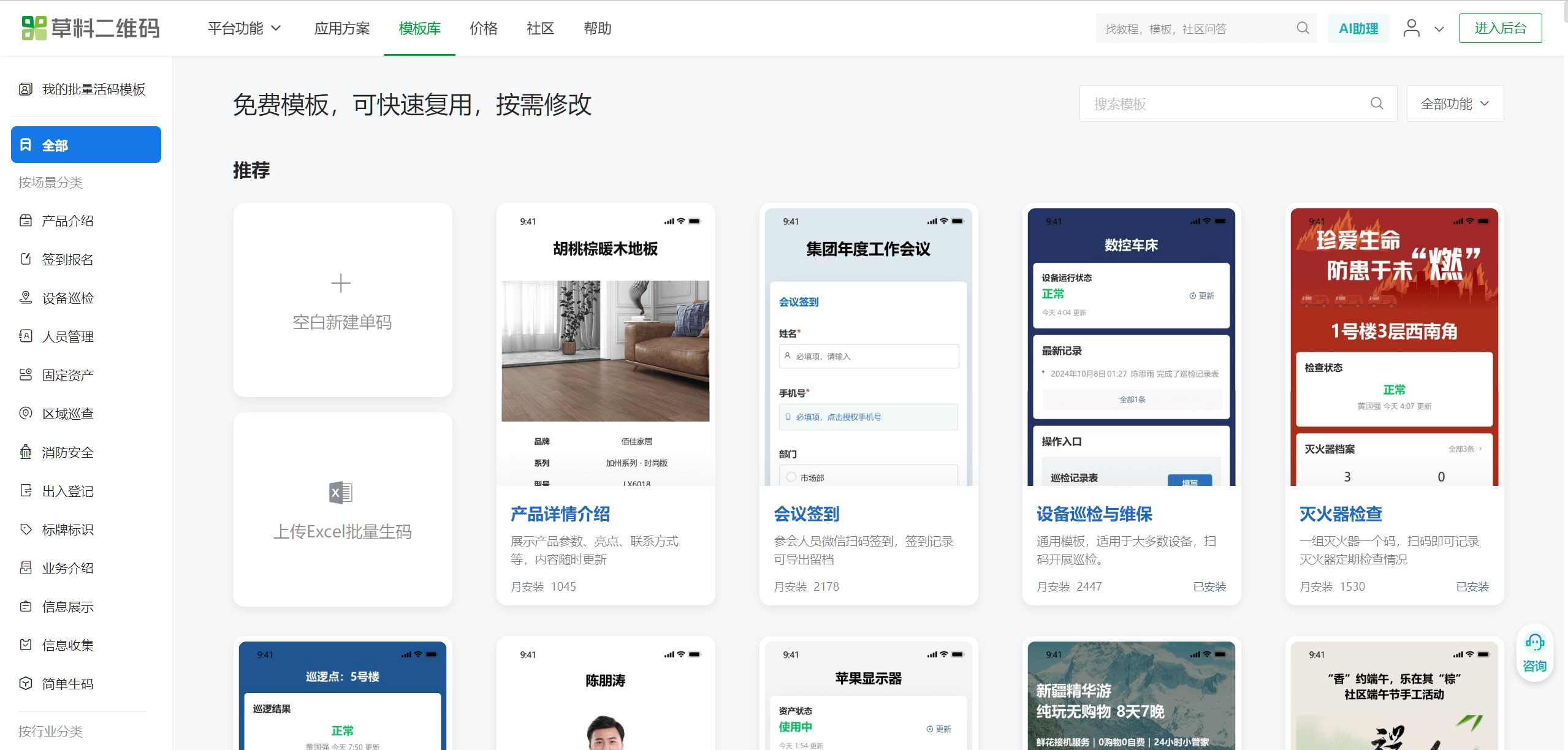
Select a Template
On the CaoLiao homepage, click [Template Library], choose a suitable template, or quickly find the corresponding template by searching for keywords. Click [Use Template to Generate Code] to enter the editing state, where you can start modifying the content and generate the QR code.
Edit Content
You can modify the title, images, and other content in the template according to your needs. After making changes, click [Generate QR Code] to complete the QR code creation. After the QR code is generated, you can also repeatedly modify and edit it; the QR code pattern itself remains unchanged.

Download and Beautify
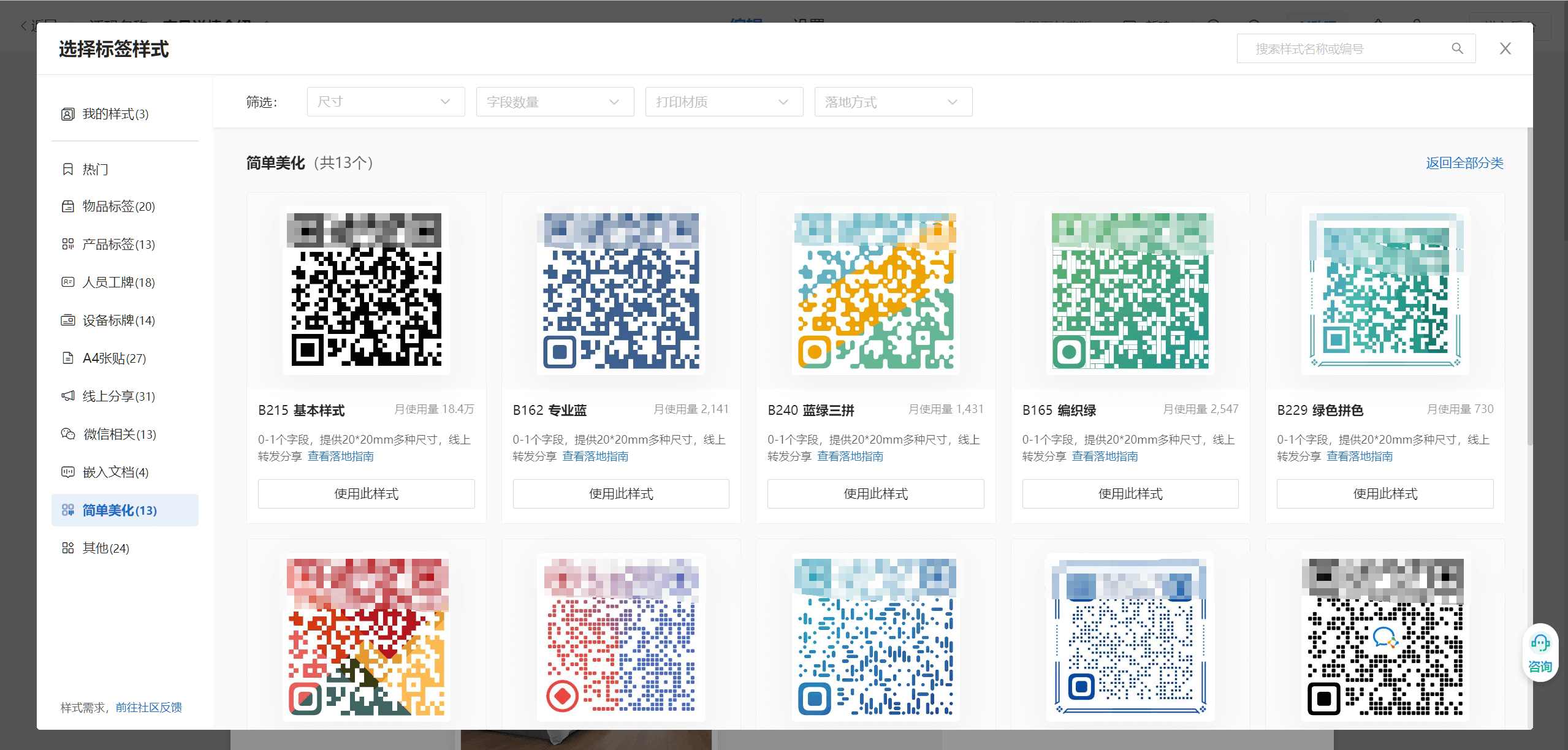
After the QR code is generated, you can directly download the QR code image, label, or A4 sheet. The platform also supports beautification functions; you can beautify the QR code pattern before downloading.
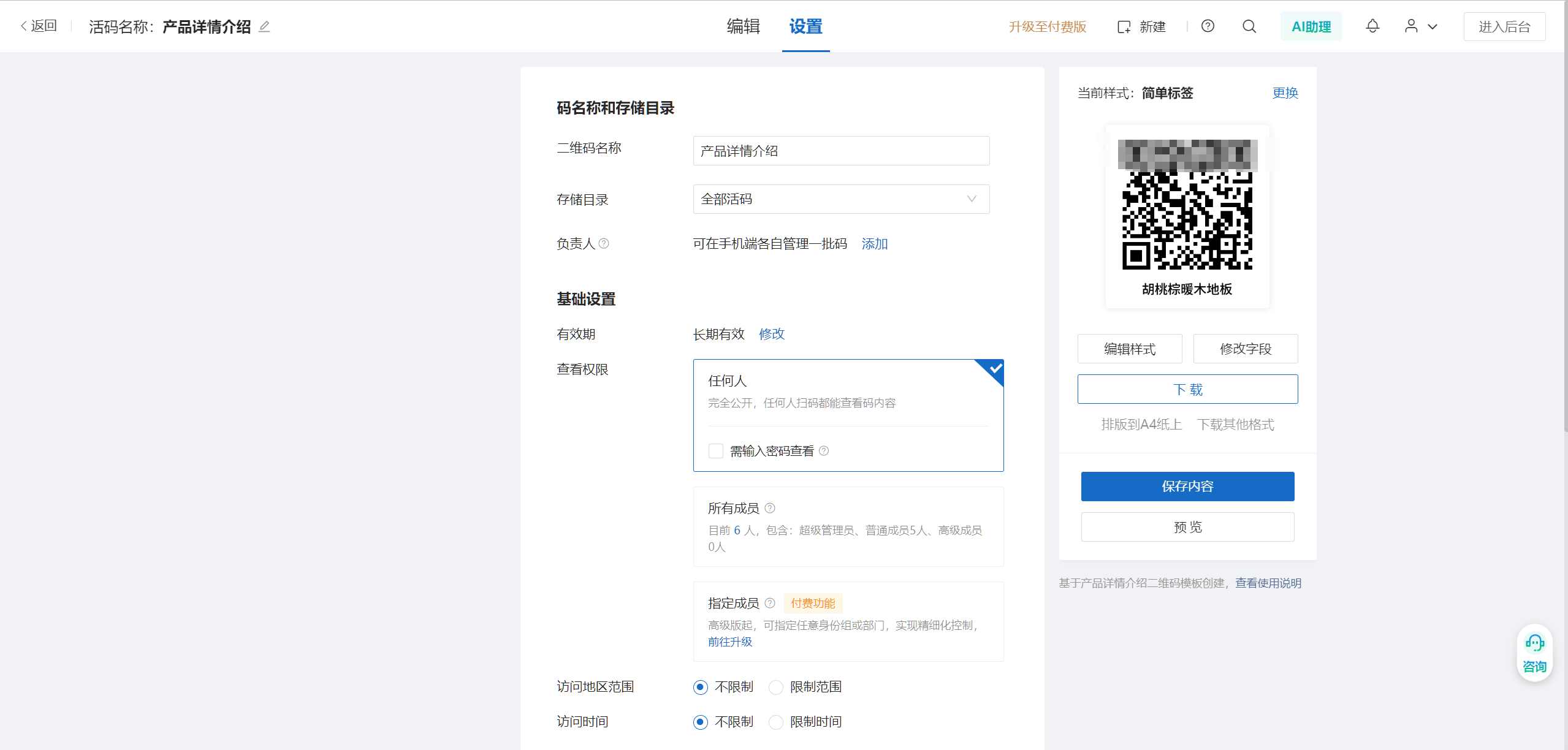
QR Code Settings
You can set the QR code's period of validity (default is permanent), encryption, sharing and collection settings, data statistics viewing (such as scan count statistics), etc.

Post-Creation Management
After creating a QR code, you can manage it in the workbench. In the workbench, you can manage all QR codes under your account, update QR code content (while the QR code pattern remains the same), and also view data, adjust directories, etc. For example, you can update product usage instructions or add more functions to equipment QR codes.
3. Advanced: Utilizing Advanced Features
Using Forms Function: Implementing Information Collection
CaoLiao QR Code provides a forms function for QR codes. By associating a form with a QR code, you can enable information filling via scanning, replacing paper-based records. For example:
- Event Registration: Users scan the code to register and provide their information.
- Meeting or Training Check-in: Easily achieve real-time statistics for check-in data.
- Customer Feedback Surveys: Make data collection simpler and faster.
- Equipment Inspection: Inspection personnel scan the code to fill out inspection and maintenance records.
Form data is automatically summarized. You can view and export it on both computers and mobile phones, greatly improving efficiency.
Personnel Permission Management: Ensuring Information Security
Access permissions can be set for sensitive data and operational entry points within an enterprise. You can group employees by department, identity, etc., for collaborative management, viewing, or operation of QR codes. This ensures information security and prevents unauthorized personnel from viewing.
Data API: Integration into Internal Systems
CaoLiao QR Code offers open capabilities such as bulk QR codes generation, label production, encoding & parsing, and data connectivity. You can integrate CaoLiao QR Code with your company's internal systems as a component of the entire enterprise information system. You can also use CaoLiao QR Code services within third-party applications like WeCom and Tencent Docs.
4. What Free QR Code Generation Tools Are Available?
There are many QR code generation tools on the market, and CaoLiao QR Code is not the only option. Below is a brief introduction to several commonly used generation tools to help you choose based on your needs:
CaoLiao QR Code (Recommendation Score: 5.0)
CaoLiao QR Code is simple to operate, free without ads, supports both static and dynamic QR code creation, with no limits on the number of QR codes generated, number of scanners, scan frequency, or form submission counts. Furthermore, there are no restrictions on the files, images, text, etc., within the QR codes; you can add content without limit. CaoLiao is also a no-code platform, offering many features and a high degree of customization, meeting needs from simple sharing to complex business scenarios.
HLQR Code (Recommendation Score: 4.0)
HLQR Code is a QR code generator that also provides simple QR code generation. While there is no limit on the number of QR codes generated, it imposes restrictions on the upload capacity for images and files. The free version only offers 50MB, and audio/video capacity is only 500MB, which is completely insufficient for enterprise users.
QR Code Chimp (Recommendation Score: 3.0)
This tool has a clean and straightforward interface, suitable for users who want to quickly create simple QR codes. It offers many design styles and is primarily used for overseas promotion and cross-border e-commerce. It limits the number of QR codes generated; the free version only allows generating 3 codes, with each dynamic QR code allowing a maximum of 500 scans.
GoQR.me (Recommendation Score: 4.0)
The interface is extremely minimalistic, and the process is fast, especially suitable for users who need to generate QR codes in bulk. Additionally, it supports generating QR codes for text, SMS, email, and other types. The downside is that the page contains advertisements.
Unitag (Recommendation Score: 3.0)
Unitag has relatively rich features, but the interface is slightly complex, making it suitable for users with some experience using QR codes. It supports various customization methods, such as colors, icons, logos, etc. The dynamic QR code function is powerful, but the free version has limitations; you need to pay to experience the full functionality.
Summary
For most individual and enterprise users, the first choice is CaoLiao QR Code. It's simple, free, and is the QR code generator with the longest establishment time, the largest user base, and the best reputation; 80% of the QR codes on the market are generated by it. For e-commerce users with overseas expansion needs, QR Code Chimp can be chosen. GoQR.me is more suitable for quickly generating simple QR codes or bulk generation. Unitag is suitable for professional users who desire in-depth customization, but the operational difficulty is relatively higher.