Is Manual Recording Reliable for Equipment Inspection? Pros and Cons Analysis of Mainstream Digital Inspection Tools
Original: https://cli.im/article/detail/2412
Equipment inspection is a task frequently mentioned but often poorly executed. Many companies superficially establish standards, schedule frequencies, and even fill out numerous paper forms, yet on-site failures persist, and hidden dangers remain unaddressed. The root of the problem lies not in "whether inspections are conducted" but in "whether inspection data can be used in a closed-loop manner."
With the continuous advancement of digitalization, more and more companies are considering replacing manual recording with tools. However, the market offers a wide variety of solutions, ranging from highly integrated platform systems to lightweight QR code solutions, each with its own focus. This article will analyze the issues with manual inspection methods and provide an in-depth comparison of the characteristics and applicable scenarios of several mainstream digital inspection tools, based on practical frontline needs.
1. Limitations of Manual Recording
Many companies still rely on paper forms or Excel templates for recording inspection information. While this approach appears low-cost, it carries numerous risks in execution:
Difficulty in Verifying Execution Authenticity
Handwritten records often cannot verify whether the executor was present. Instances of copying, filling in on behalf of others, or retroactive entries are common, especially when processes are cumbersome and supervision mechanisms are lacking. Forms may be "filled out," but the site "was never inspected."Disconnected Exception Handling
Even if records are accurate, it is challenging to establish a feedback mechanism. Many companies resort to "reporting exceptions verbally" or sharing photos in group chats, but there is no process to track whether issues were resolved, who was responsible, or how they were handled. Problems may remain unresolved indefinitely.Fragmented Data, Inability to Aggregate
Paper records cannot be automatically summarized, and Excel templates often suffer from inconsistent formats, version chaos, and difficulties in statistical analysis. Using data for predictive analysis or developing maintenance strategies is even more challenging.Inability to Trace Information
When accidents occur and root cause analysis is required, records are often scattered, difficult to locate, and responsibilities unclear, leaving management in a passive position. The essence of these issues is that manual recording can "prove I wrote it" but hardly "prove I actually did it," let alone "drive follow-up actions." This is precisely why digital inspection is gaining widespread attention.
2. Fundamental Value of Digital Inspection
The goal of digital inspection is not merely to "move paper forms to mobile devices" but to make inspection work executable, manageable, and traceable through structured data recording, closed-loop process management, and automatic data aggregation. A mature digital inspection mechanism typically includes the following capabilities:
- Inspection task planning and personnel scheduling
- On-site QR code scanning/location verification
- Form recording and image uploads
- Exception reporting and workflow routing
- Data analysis and trend reporting
- Permission management
Different tools emphasize and implement these capabilities in varying ways, determining their suitability for different scenarios.
3. Types and Applicable Scopes of Mainstream Digital Inspection Tools
Current mainstream digital inspection tools can be broadly categorized into three types: specialized systems, platform-based tools, and lightweight tools. Below, we analyze the characteristics, advantages, and limitations of each category.
1. Specialized System Tools
Examples include systems provided by equipment manufacturers (e.g., Siemens, Schneider, HollySys) or large industrial information platforms (e.g., Huawei FusionPlant, ABB Ability).
Characteristics
These tools are typically deeply integrated with equipment or MES/SCADA systems, supporting point maps, real-time equipment status monitoring, work order dispatch and closed-loop processing, repair orders, and maintenance planning. They are suitable for complex scenarios in process industries and energy enterprises.
Advantages
- Comprehensive functionality, high automation
- Support for IoT integration, enabling real-time equipment status sensing
- High management depth and security, supporting multi-organization collaboration
Limitations
- High implementation cost and long cycles
- Complex configuration, requiring ongoing IT team involvement
- Highly dependent on existing system architecture and equipment communication protocols
- Not suitable for simple inspection scenarios in small and medium-sized enterprises
Suitable Scenarios
Large enterprises and industrial groups with extremely high equipment operational safety requirements and strong IT foundations, such as power plants, chemical plants, and rail transit.
2. Platform-Based Tools
Examples include general-purpose platforms like DingTalk Yida, JianDaoYun, Qingliu, and MingDaoYun.
Characteristics
These platforms use "drag-and-drop building" to create customized inspection processes and record forms. They offer capabilities such as process approval, permission management, data linkage, and report analysis, making them suitable for enterprises with development resources but unwilling to code from scratch.
Advantages
- High flexibility, adaptable to various inspection processes
- Easy integration with existing enterprise systems (e.g., DingTalk, WeCom)
- Extensible to other management scenarios, such as leave requests, inventory management, and repairs
Limitations
- Strong configuration skills required during initial setup
- Lack of equipment-level management functions, requiring manual association
- Mobile experience inferior to specialized apps
- Inspection-specific capabilities (e.g., QR code check-ins, point binding) require additional development or integration
Suitable Scenarios
Medium to large enterprises with moderately complex processes, in-house IT positions, and a desire to unify inspections with other business operations. 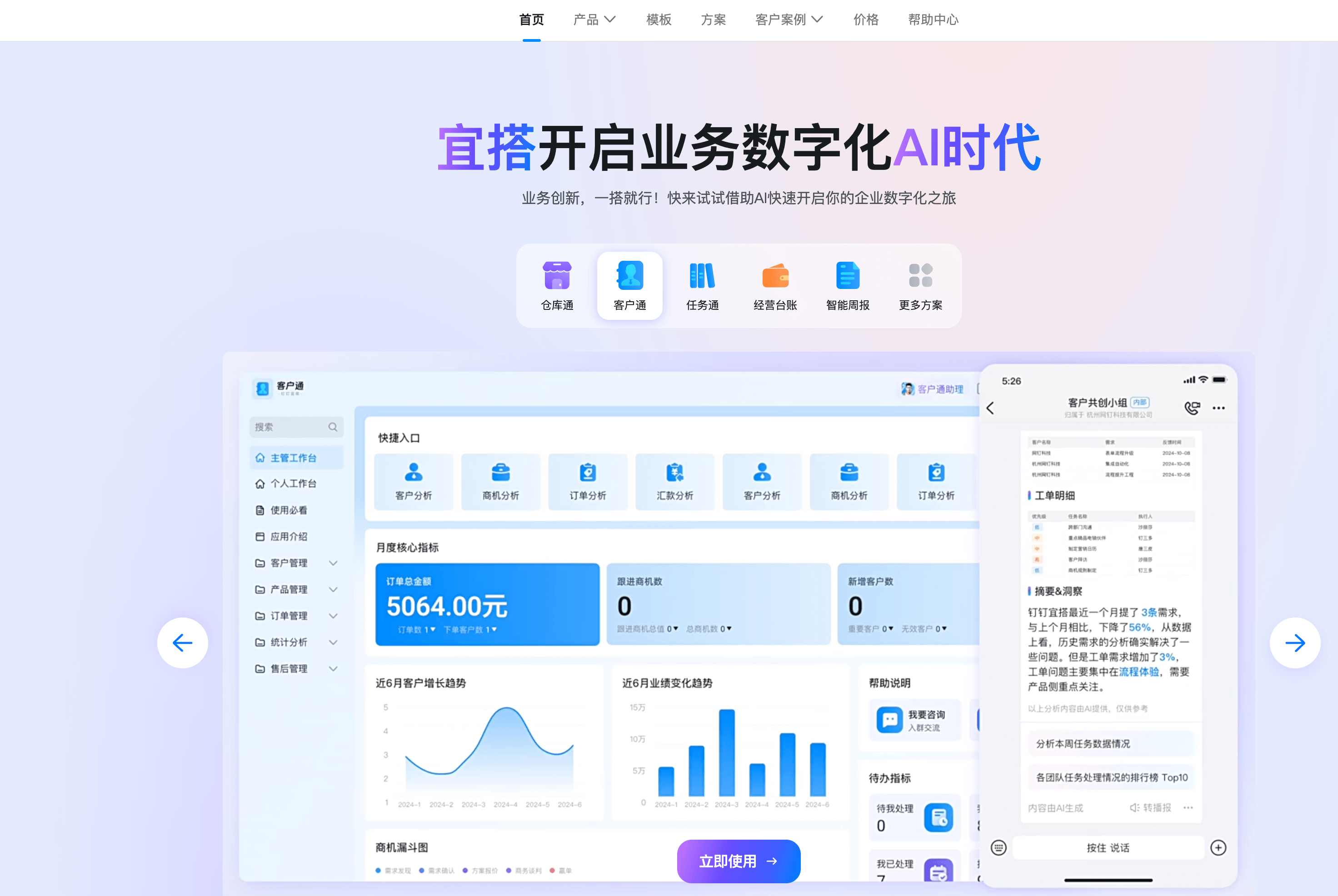
3. Lightweight Tools / QR Code Solutions
Examples include tools like CaoLiao QR Code, which offer scanning + forms + image upload capabilities.
Characteristics
Frontline inspectors scan QR codes on-site to access form pages, fill in inspection content, and upload photos. If exceptions are found, notifications are automatically sent to maintenance personnel. After repairs are completed, maintenance personnel directly add maintenance records to the QR code, closing the loop. All data is updated in real-time in the backend, allowing managers to view and export data as needed. This serves as a lightweight inspection tool with fast deployment and low maintenance costs.
Advantages
- Quick deployment using templates, scanning QR codes, requiring almost no training
- Low cost, suitable for large-scale rollout
- Supports photo watermarks and scanning range restrictions to ensure on-site presence
- Can integrate AI recognition for quick data entry (e.g., reading instrument panels, electric meters)
Limitations
- Lacks system functions like task scheduling, personnel management, and work order closed-loop processing
- Weak data permission management and process control capabilities
- Relies on inspectors' initiative to scan and record, lacking scheduling mechanisms
- More suitable for standardized processes rather than flexible working conditions
Suitable Scenarios
Small and medium-sized enterprises with clear execution processes and dispersed inspection points, such as equipment checks in small manufacturing, property facility inspections, and fire safety checks. 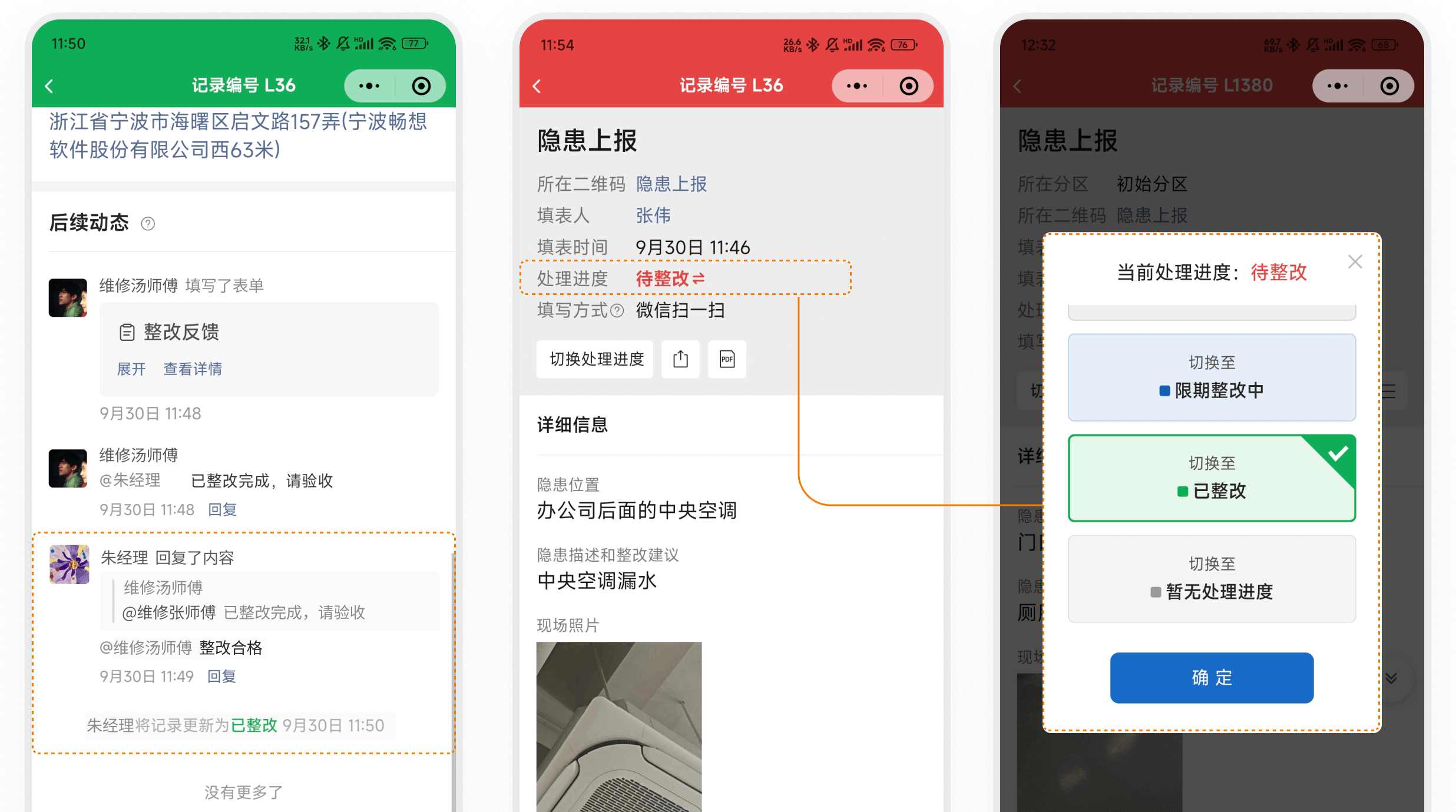
4. Selection Advice: Match Your Management Capabilities and Goals
There is no "better or worse" among different tools, only "degrees of suitability." When selecting a tool, consider the following dimensions:
Is the Inspection Process Standardized?
If the process is unified and points are fixed, lightweight tools can be deployed quickly. If tasks are flexible and exceptions occur frequently, consider systems with scheduling and closed-loop capabilities.What Is the Enterprise's IT Level?
Are there dedicated personnel to maintain the system? Are there existing systems like DingTalk or OA for integration? If not, complex platforms may become a burden.Is There a Need for Data Analysis?
If the goal is merely recording and archiving, QR code tools suffice. If trend prediction and risk assessment based on data are desired, tools with structured data and analysis capabilities are necessary.What Are the Deployment Budget and Maintenance Capabilities?
Some systems charge annual fees and require training for deployment, while others allow self-service setup. Resource availability determines the choice.
Additionally, a practical suggestion: Pilot on a Small Scale. Implement the tool in one department or workshop first to test whether the process works before deciding on full deployment.
5. Conclusion: The Key to Digital Inspection Lies Not in the Tool Itself
Many companies still face equipment failures and incomplete records even after implementing systems. The issue is that digital tools are merely carriers; the key lies in whether the mechanism design is reasonable, whether execution can form a closed loop, and whether data is genuinely utilized.
"Relying on writing things down" is inferior to "relying on system recording," and "relying on photos" is inferior to "relying on data flow." This is the essence of inspection management upgrade. When selecting a tool, return to the fundamental questions: What problem am I solving? To what extent can I manage? What scale can I maintain?
With clear answers, the choice of tool becomes evident.