Vehicle Inspection
Includes self-inspection of vehicle condition, mileage recording, and watermarked photo features, helping various enterprises, logistics fleets, ride-hailing companies, passenger transport companies, used car dealers, etc., quickly complete vehicle condition verification and registration.
Basic Information
- Monthly Installations: 668
- Monthly Visits: 1415
- Source: https://cli.im/template/detail/121463656
Case Tag Image

Instructions
1. Applicable Scenarios and Industries
- Vehicle Management: Suitable for fleet management, logistics and transportation, car rental services, and other scenarios requiring regular vehicle inspections.
- On-site Inspection: Ideal for repair shops, 4S stores, and other scenarios needing to record real-time vehicle status.
2. Core Features
One-Click Vehicle Condition Check
Pre-set 7 basic inspection items (appearance / documents / tires, etc.). Quickly complete the inspection by checking boxes, or modify inspection items as needed.
Reduces errors from paper records and improves inspection efficiency.

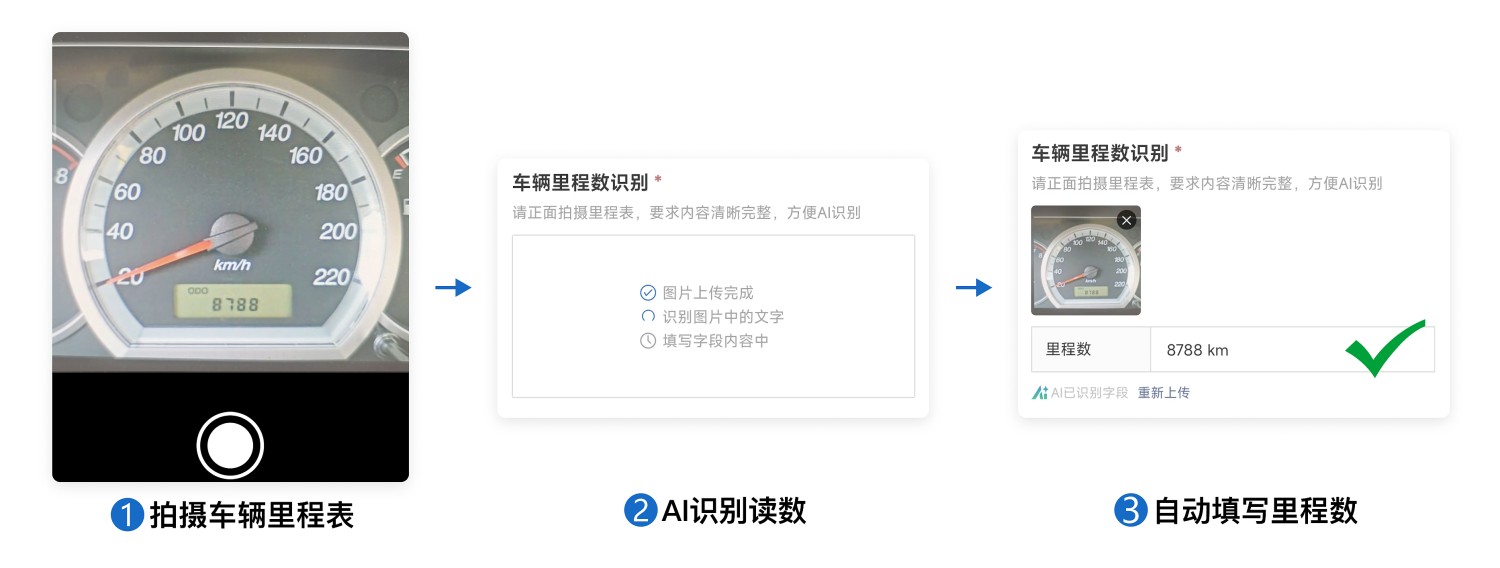
AI Mileage Recognition
Automatically recognizes uploaded odometer photos to avoid manual entry errors.
Data is automatically archived for easy tracking of vehicle usage and wear.
Anti-Fraud Mechanism
Photos automatically include time and location watermarks.
Provides handwritten signature and phone number entry to ensure traceable accountability.
3. Usage Process
Generate QR Code
- Select a template to generate a code, fill in vehicle information (such as license plate number, etc.) to create a dedicated QR code.
On-site Inspection
- Inspector scans the QR code via WeChat → Completes vehicle condition check by selecting items → Takes a photo of the odometer → Determines vehicle status.
Data Archiving
- After submission, an inspection record is automatically generated. Historical data can be viewed via the Mini Program.
Frequently Asked Questions
1. Can the inspection items be modified?
Answer: Yes, inspection items can be freely modified in the template editor.
2. How long are historical records saved?
Answer: Historical records are saved permanently.
3. How are inspections by multiple people distinguished?
Answer: Accountability is ensured by requiring the input of name, phone number, and a handwritten signature. Inspectors can find their own inspection records in the "My Inspection Records" section of the data panel.