Event Invitation
Suitable for various conference and event participation invitation scenarios, such as corporate annual meetings, product launches, industry salons, closed-door exchanges, etc. Can be sent as an electronic invitation, displaying event theme, time, location, and other information. The page style supports custom editing, and a registration link can be attached to guide guests to register their information.
Basic Information
- Monthly Installations: 905
- Monthly Visits: 8180
- Original Text: https://cli.im/template/detail/121463214
Case Label Image

Instructions
I. Core Value
Simple and Quick Registration Process
Users can complete registration simply by scanning a QR code with WeChat, eliminating the need to fill out or submit paper materials, resulting in a better registration experience.
Rich Content Display and Flexible Function Settings
Supports various content formats like images, text, and videos to comprehensively present event information.
Registration limits, review processes, and check-in/verification functions can be set according to event needs, meeting the requirements of different activities.
Efficient Event Management and Data Analysis
Registration data is summarized in real-time to generate statistical reports. Organizers can view and track registration status anytime, reducing manual processing costs and improving overall management efficiency.
II. Usage Process
1. Generate Registration QR Code
Click [Use Now] to create a QR code. Modify the QR code and registration form content according to your event's needs.
Enhance visual appeal and elevate the event's tone using features like video backgrounds. View Application Case
You can also configure the number of people allowed to register, the number of times, and the time period. Set Filling Restrictions
2. Distribute Registration QR Code
Download the QR code label and choose the appropriate distribution method based on the event format and scale.
- Online Channel Distribution: Embed the QR code in official WeChat accounts or share QR code posters via WeChat Moments.
- Offline Channel Distribution: Display posters at the event venue or high-traffic areas, distribute flyers.

3. Manage Registration Data
Event organizers can view registration records and modify registration information in the workbench at any time.
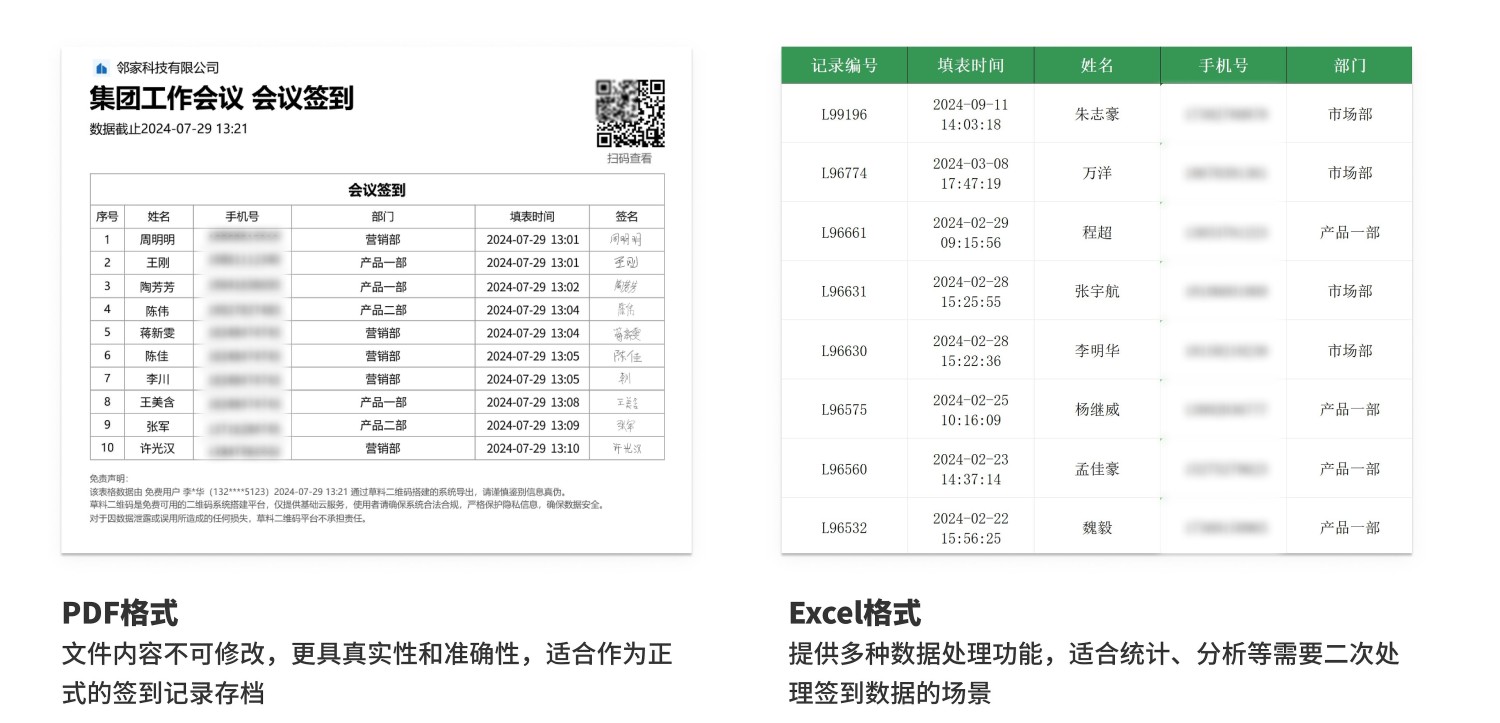
Registration lists can also be exported for archiving or subsequent check-in use. Supports various file formats like Excel and PDF to meet different data processing needs. Data Summary and Statistics Function
III. Frequently Asked Questions
1. Is it free to use? What is the difference between the paid and free versions?
Answer: You can choose the appropriate version based on your budget and needs.
- Free Version: Unlimited number of registrants and submissions, data stored long-term, meets basic registration needs.
- Basic Edition (780 RMB/year): No CaoLiao logo displayed on the QR code, access to audio and video features, option to purchase an exclusive WeChat Mini Program separately. Suitable for events with higher presentation needs and a desire to enhance brand image.
- Advanced Edition (1280 RMB/year): Supports multi-user management of registration data, provides registration information review functionality. Suitable for scenarios requiring collaboration with other teams or organizations.
- Flagship Edition (2680 RMB/year): Supports management of registration data by more users, provides advanced data export and processing functions. Suitable for organizations with long usage cycles, frequent events, and numerous collaborators.
Detailed selection advice: Version Selection Advice
2. How should check-in be handled after registration?
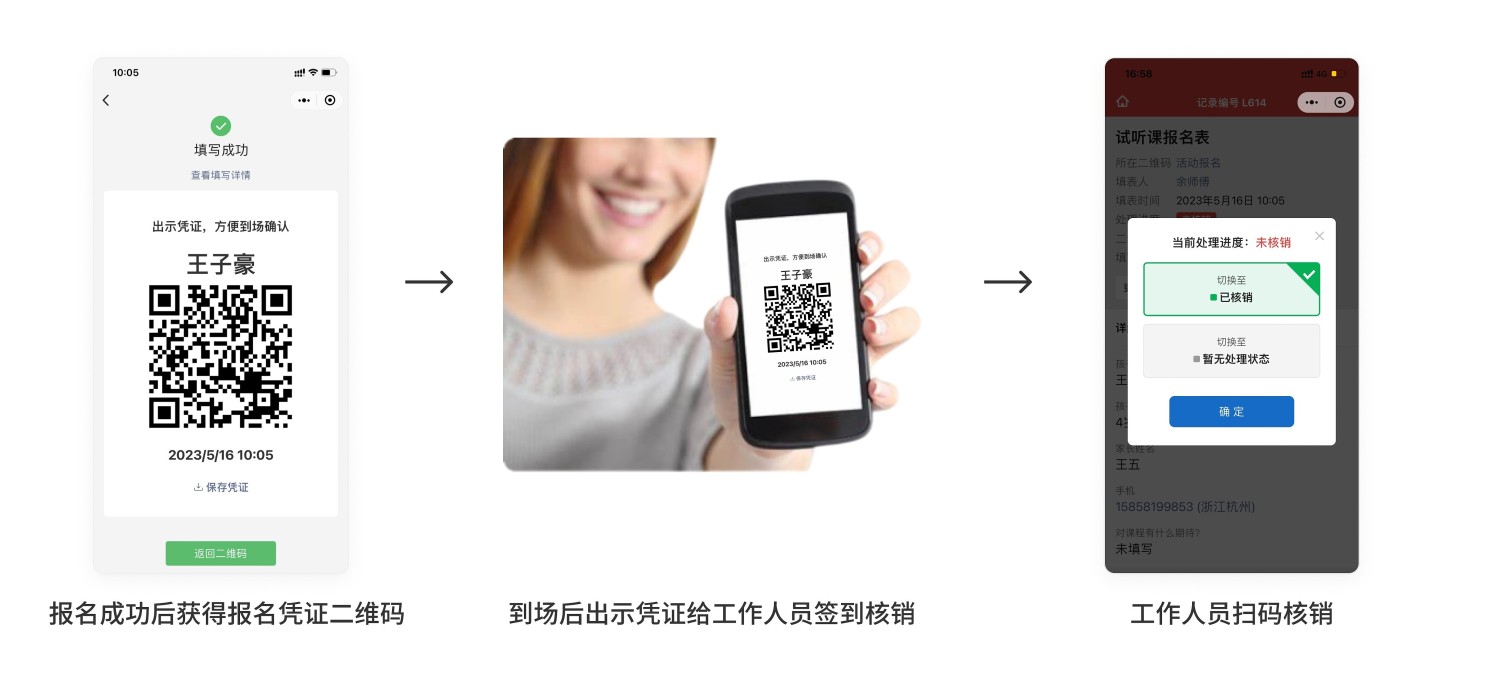
Answer: You can enable the Verification Function, allowing users to receive a QR code voucher after registration. On the event day, users present the QR code voucher for staff to scan to complete check-in. The workbench also allows real-time viewing of the list of attendees and non-attendees. Verification Function Introduction and Setup Tutorial
3. How to operate if registration information needs review or participants need screening?
Answer: You can enable the Review Function to screen and reject applicants who do not meet the conditions. Review Function Introduction and Operation Guide
4. How to handle distributing materials after registration?
Answer: Create a dynamic QR code containing the materials. In [Forms Settings - Submission Success Page Settings], set the page to redirect to this dynamic QR code after information submission. Operation Tutorial
