How to Choose Display Tools for the Home Renovation Industry to Achieve "What You See Is What You Get" for Customers
Original: https://cli.im/article/detail/2399
In the sales process of home renovation products like flooring, tiles, and wall materials, a common issue arises: customers find it difficult to accurately judge the final installed effect based solely on samples or product images. Factors such as color differences, lighting, material texture, and overall coordination with the home environment can easily lead to discrepancies and order cancellations during the delivery phase.
To address the challenge of "how to better help customers anticipate product effects," the industry has seen various digital attempts. These range from QR codes linking to product pages, AR try-on tools, 3D online matching tools, to offline virtual reality showrooms. The display experiences and investment thresholds of these tools vary significantly, often leaving home renovation merchants feeling overwhelmed by information and lacking direction when selecting solutions.
We have researched several mainstream methods currently available in the market and combined insights from frontline practices of multiple dealers to summarize the following reference-worthy display approaches.
1. Product Introduction QR Codes: Low Barrier to Entry, Yet Professional
Among all display tools, deploying QR codes is almost effortless. Simply generate a QR code, attach it to samples, brochures, in-store guides, or shipped samples, and customers can scan it to view product catalogs, real-life case studies, installation videos, or even launch online matching tools.
Compared to traditional product manuals, QR codes offer flexibility in several aspects:
- Richer content formats supporting combinations of images, videos, documents, and more, fully showcasing product usage and effects;
- Compatibility with mainstream apps like WeChat, Douyin, and DingTalk, allowing customers to view content without downloading additional tools, ensuring broader adaptability;
- Product information can be updated at any time without changing the QR code pattern, solving the issue of content changes after bulk material production.
For example, many merchants use CaoLiao QR codes to create "all-in-one" product introduction pages, integrating multiple product series into a single QR code to form a product directory. Customers can quickly browse and select after scanning, and the pages support saving and sharing, making it convenient for customers to store or share with family for reference. This method is gradually becoming the new norm, replacing paper catalogs.
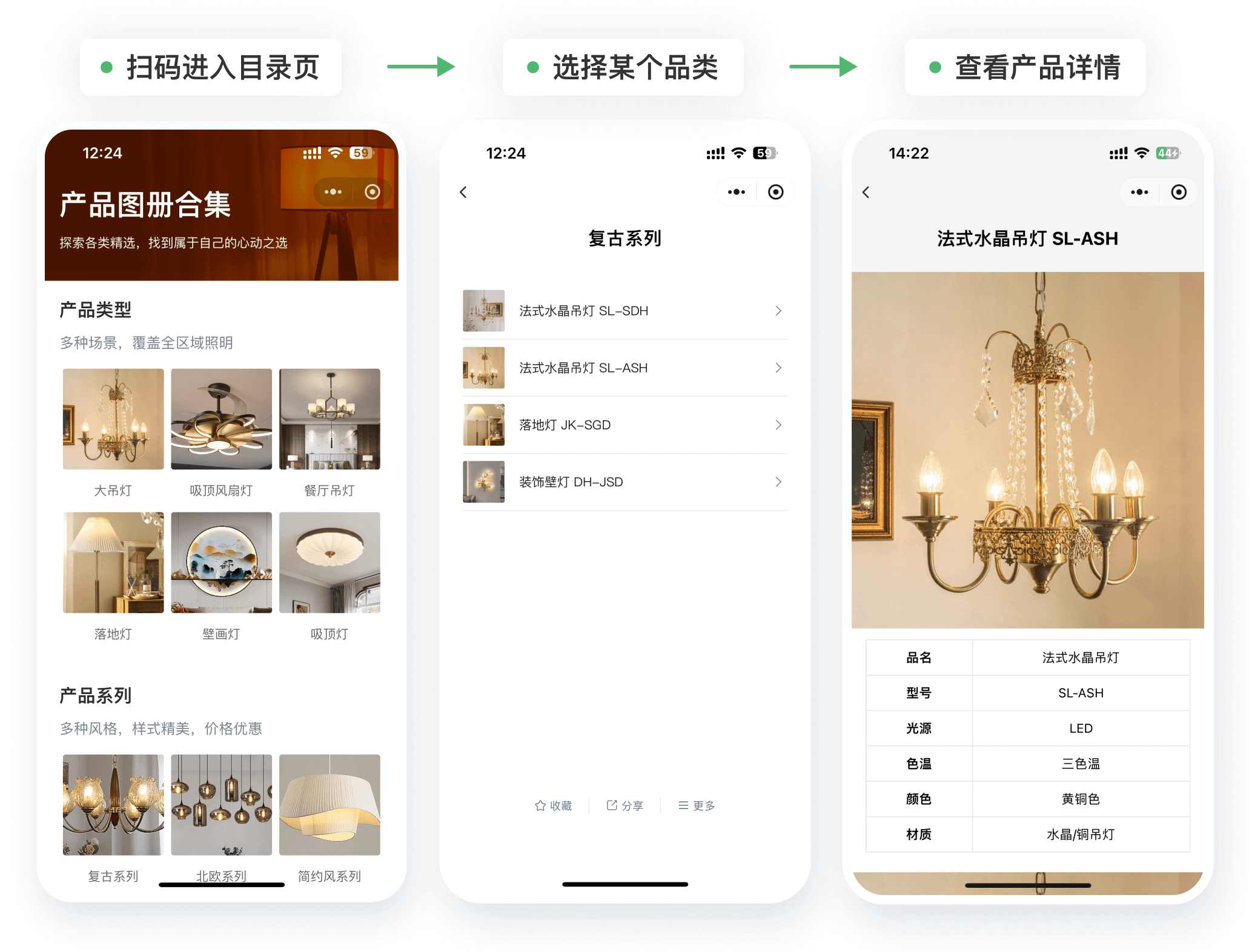
2. AR/VR: More Realistic Virtual Experiences, but with Higher Resource Requirements
Compared to lightweight solutions like QR codes, AR and VR technologies focus on immersive experiences. AR allows customers to "lay" flooring onto their own floors via their phone's camera, experiencing material changes under different lighting conditions in real-time. VR requires headset devices, enabling customers to enter pre-built showrooms, freely switch styles, and explore.
The advantage lies in helping customers overcome imagination limitations, allowing them to see matching effects realistically, which significantly reduces misunderstandings about color differences and cancellation risks. However, the drawbacks are evident: VR equipment involves high acquisition costs and complex maintenance, while AR demands certain smartphone performance and environmental recognition capabilities.
For enterprises with sufficient budgets and stable store traffic, setting up an "AR Experience Corner" in key showrooms can serve as a differentiated service point. However, for small and micro stores, such tools are better suited as supplementary options rather than foundational infrastructure.
3. Sample Delivery: A Compromise Between Reality and Efficiency
Allowing customers to take samples home is currently one of the most frequently used "on-site display methods." It provides authentic tactile feedback and spatial lighting tests while being more convenient and cost-effective than visiting an entire store.
According to data from some platforms, over 70% of customers show a significant increase in purchase intent after receiving samples. However, this comes with operational costs: preparing, shipping, packaging samples, and preventing damage during delivery all require meticulous management.
Currently, many merchants embed QR codes in sample delivery packages, for instance, using CaoLiao QR codes to create product introduction QR codes. After scanning, customers can browse all color and model options in the series, view actual installation cases, and even directly enter the mall to place orders or leave inquiries, greatly enhancing the conversion efficiency of sample delivery.
4. 3D Online Matching Tools: One-Click Try-On, Empowering Customers to Explore Spatial Pairings
Another emerging display method is web-based 3D matching tools. Customers can upload photos of their own floor plans or select standard layouts, then replace flooring colors and wall materials in the browser to preview the overall spatial matching effect in real-time.
These tools significantly enhance customer experience, especially during the early decision-making stages of renovation, helping to shorten communication cycles. Some tools can also simulate lighting and furniture pairings to enhance realism. However, such systems often involve high development and maintenance costs, with substantial barriers to self-development, leading most merchants to collaborate with SaaS service providers. User operation thresholds are not low, making them suitable for guided use in-store or during online live streams.
5. How to Build a Cost-Effective, Realistic Display System?
In summary, each display method has its pros and cons, and the key to selection lies in the store's business structure and budget:
- Entry Stage: Product Introduction QR Codes + Sample Delivery
This is the most widely used and lowest-investment combination in stores today. Taking CaoLiao QR codes as an example, merchants can independently generate introduction pages for different product series, combining videos, graphics, documentation, and customer inquiry entry points within the same QR code. Customers can scan to browse, share, save, and freely switch between series. - Intermediate Stage: Incorporate Online 3D Tools
As business volume gradually expands, introduce 3D matching tools to increase customer engagement and self-assessment capabilities during the browsing phase. - Brand Enhancement Stage: Establish VR/AR Experience Zones
In flagship showrooms or design centers, consider adding AR/VR interactive modules to elevate brand tone and create differentiated display experiences.
When selecting tools, there's no need to pursue "all at once," but it should be possible to "upgrade step by step." Starting from QR code pages, progressing to 3D simulations and sample delivery, and then layering in AR experiences, each step can operate independently while forming a complete system. For today's home renovation merchants, this might be the most cost-effective digital display path.