Spare Parts Receipt Registration
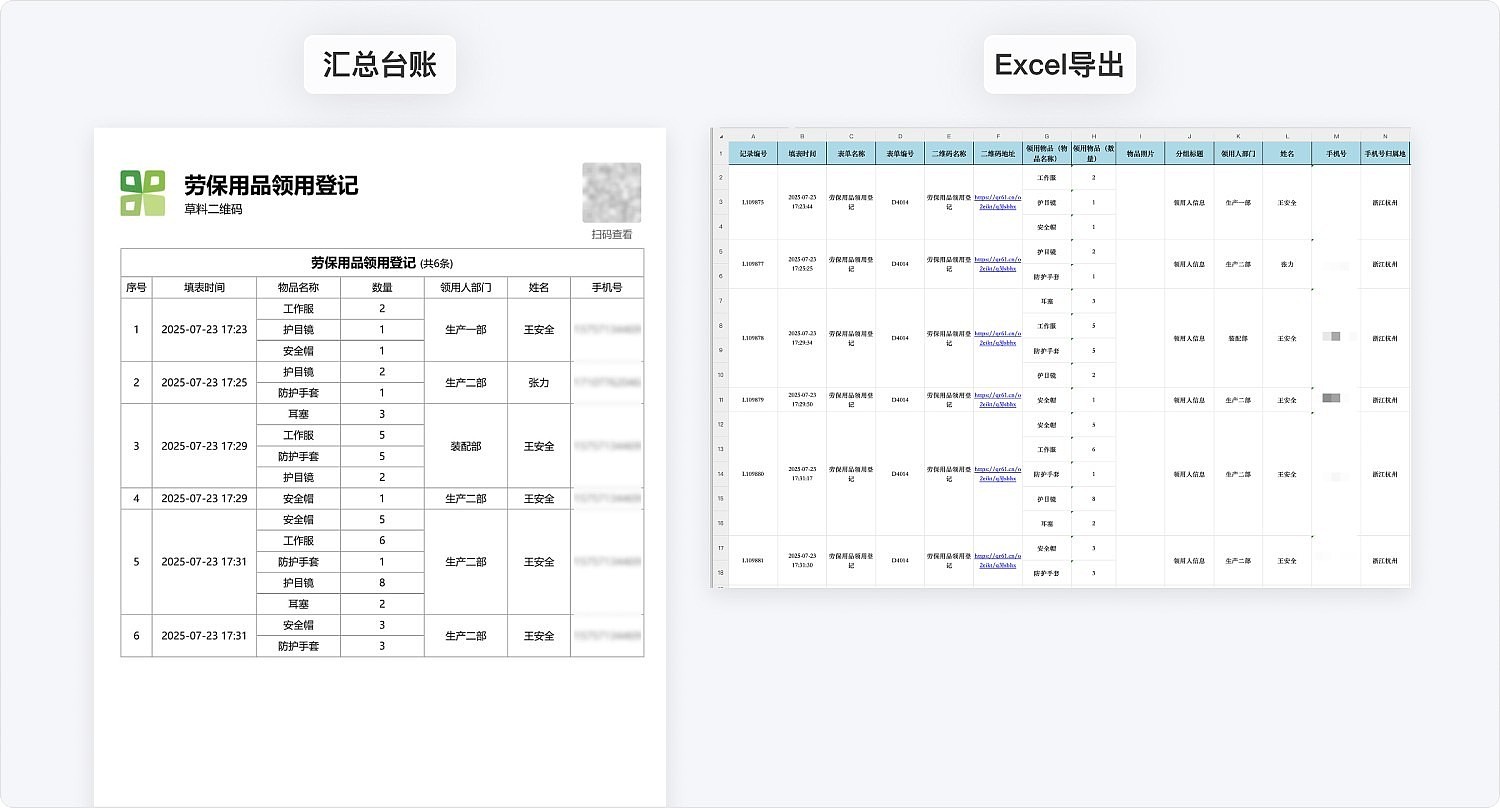
Paperless registration for spare parts receipt, supporting one-time registration of multiple categories and photo archiving. Suitable for industries with spare parts management needs such as manufacturing, energy, and chemical sectors. Registration data can be printed as paper forms for archiving or exported to Excel for statistical analysis.
Basic Information
- Monthly Installations: 220
- Monthly Visits: 71
- Original: https://cli.im/template/detail/121463682
Case Label Image

Instructions
I. Applicable Scenarios & Industries
- Applicable Scenarios: Suitable for industries such as manufacturing, energy & power, and petrochemicals where daily spare parts receipt is required for production operations. Scan QR codes to register spare parts receipts, record quantities received, and export receipt records monthly/quarterly for archiving or statistical purposes.
II. Core Features
1. Standardized Receipt Registration
- Standardized Item Names: Modify the form based on actual spare parts inventory. Recipients only need to fill in quantities during registration, ensuring standardized statistics.
- Photo Documentation: Supports registering multiple items in one receipt entry with photo uploads, ensuring authentic and traceable receipt records.
2. Anti-Counterfeiting Verification
- Automatic timestamp/location watermarking on photos
- Phone number authorization for recipient identity verification
3. Digital Record Management
- Automated Ledger Generation: Replaces traditional paper-based registration by automatically generating summarized receipt ledgers with clear text, exportable to Excel or printable.
- Data Statistics: View historical data via WeChat Mini Program. Combined with Data API, enables visual report generation for more efficient spare parts management.
III. Usage Process
① Recipient scans QR code to access registration page
② Review item names and fill in quantities
③ Take photos of items (automatically watermarked)
④ Enter name and phone number
⑤ Automatic generation of receipt record upon submission, uploaded to cloud storage
FAQ
1. What information is included in the photo watermark?
A: Includes capture time, form submitter, and location data to ensure record authenticity.
2. How long are historical records stored?
A: Receipt history is permanently stored under the account. Advanced edition and below can export records from the last 180 days, while Enterprise edition and above support exporting records from any time period.
3. Can approval workflows be configured?
A: Yes. Basic edition and below only support single-level approval by super administrators. Advanced edition and above support multi-level approval functionality with configurable responsible person review steps.