Introduction to CaoLiao QR Code
1. What is CaoLiao QR Code
CaoLiao QR Code is not only a QR code tool, but also a professional and easy-to-use no-code platform. Anyone can easily combine functional modules and quickly build a business management system with QR codes as the entry point.
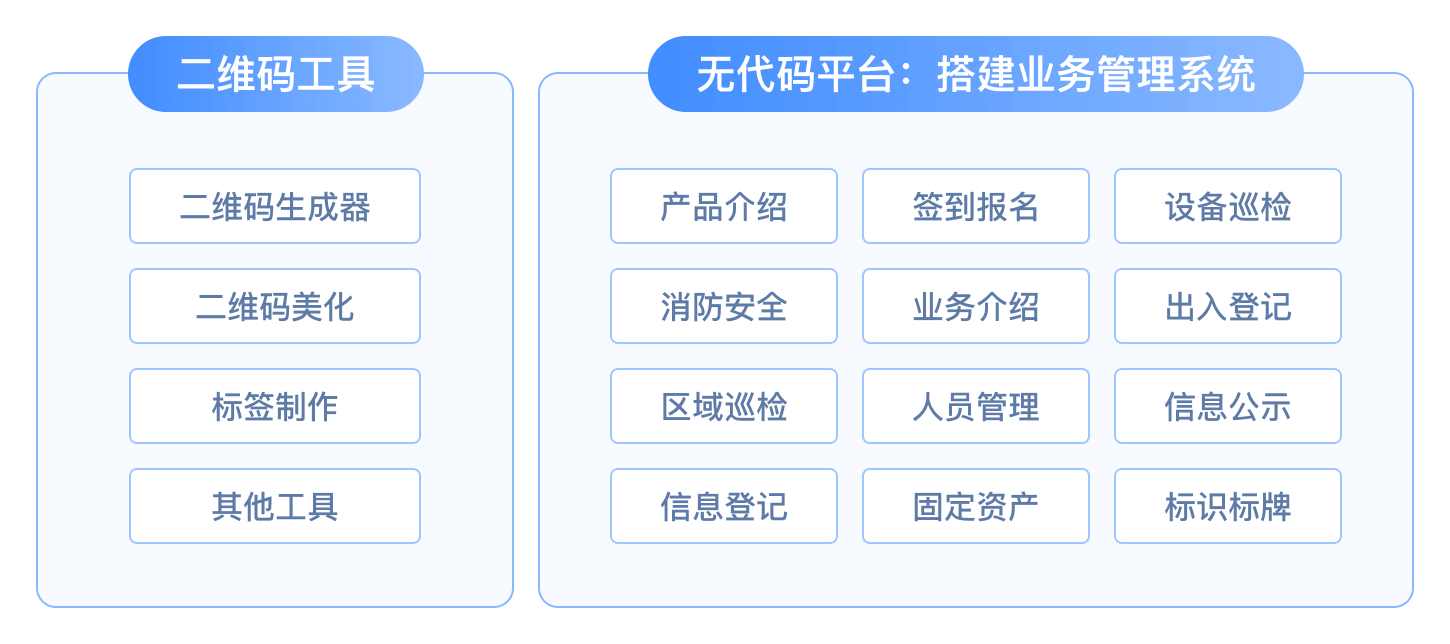
QR Code Tools
CaoLiao provides a series of QR code tools and generation guides to help you quickly create and use QR codes. The following tools are completely free:
Basic QR Code Generator Quickly generate QR codes from content, such as text codes or URL codes.
QR Code Beautification Beautify the QR code image, such as color customization, adding a logo, error correction, etc.
QR Code Label Maker Enter data online to create QR code labels, support bulk layout, download, and print.
Other Practical Tools Decoder, mini program parameter code generator in batch, browser extensions, code generation guides, and more.
No-Code Platform
CaoLiao QR Code is also a no-code platform providing standardized features and service modules. You can freely combine various functions according to your actual needs and quickly build business management systems with QR codes as the core access point. For example: personnel management, equipment inspection, asset management, and other business systems. What is no-code
Modular Functional Components Provides standardized functional and service components such as content display, forms, status, and dynamic data. No coding skills required—just combine blocks like building with bricks to assemble QR code applications that meet your business needs.
Abundant Reusable Templates A collection of free templates based on real user experience, with adjustable content and structure as needed—no need to build from scratch.
One-Scan WeChat Use Seamless collaboration between web and mobile mini-programs. Just scan with WeChat to quickly access and submit content, no app required.
Precise Permission Control Precisely control each user's access, operation, and modification permissions to ensure data security. The system also supports partitioning, allowing QR codes and dynamic data to be managed separately and assigning higher-level members for responsibility, to achieve effective data isolation.
Fast Deployment Mass QR code generation + A4 label layout can generate and lay out a large number of QR codes in a short time, ready to print on regular office A4 printers. For example, 1,000 fixed asset QR codes can be deployed within a day.
API Integration Provides data API, label API, third-party integration, and other open capabilities to incorporate systems built with CaoLiao into enterprise IT systems and synchronize data.
2. Pricing Model
Free Version: Quick Access, Zero Barrier
Suitable for individuals, small teams, or quickly validating needs
- Permanent validity for QR codes
- Unlimited code generation and scan times
- Unlimited image file storage
- Unlimited form data collection and long-term data retention
Paid Version: High Value for Advanced Users
Highly cost-effective plans to help users enhance brand image and team collaboration at every stage
- Remove CaoLiao logo and watermark for better branding
- Support for multi-member collaboration and precise permission control
- AI-powered form filling and image review for enhanced efficiency
- No data export time limit, supports long-term data storage and API integration
- Dedicated mini program for your business and more advanced management features
Payment is annual, with four different plans to choose from. Users can upgrade according to their needs. View Pricing Plans >
3. Application Scenarios
CaoLiao QR Code provides standardized, lightweight solutions centered on QR codes. Simple operation, low cost, and fast deployment make it suitable for various enterprises and organizations for information management of items or personnel.
For highly customized or complex system integration business needs, CaoLiao QR Code's standardized features may have certain limitations. In such cases, companies are advised to choose more specialized or customized solutions based on their requirements.
| Application Scenario | Description |
|---|---|
| Product Information Display | Generate QR codes for products, support scanning by various apps, cover promotion, sales, and after-sales |
| Check-in & Registration | Used for events, conferences, and training to collect and record participant check-ins via QR code |
| Equipment Inspection, Maintenance & Repair | QR code as a "digital ID" for equipment; scan to view info, add inspection, maintenance, repair records |
| Fixed Asset Management | Batch create asset labels; scan to modify asset info, assignment, inventory, repair, etc. |
| Personnel Information Management | One code per person, create digital profiles; scan for attendance, info collection, training sign-in |
| Information Collection | Use QR codes instead of paper forms, suitable for surveys, feedback, ballots, etc. |
| See More Application Cases | Business introduction, entry registration, signage, area inspection, and more |
4. Help Resources
To help you get started quickly, we've compiled beginner guides, free templates, and comprehensive help documents. With these resources, you can quickly master the platform and start building QR code applications.
| Resource | Documentation Link | Description |
|---|---|---|
| Getting Started | System Setup Guide | Learn the core functions and setup process in 5 minutes |
| Template Library | Plenty of free templates for one-click reuse and fast code | |
| Help Docs | In-depth tutorials and Q&A to resolve usage issues | |
| Application Reference | Application Cases | Real user application experiences in various industries |
| Customer Stories | Industry user stories and best practices | |
| Getting Support | CaoLiao Community | Real user discussions, Q&A with peers |
| CaoLiao AI Assistant | Fast Q&A—click the "Consult" button at bottom right | |
| Purchase Consultation | Assisted bidding and government procurement | |
| After-sales Support | Dedicated advisor support for paying users | |
| Ticket Support | Free users can submit tickets for official customer support |